
GUMU™ for Sage CRM – Sage 100 is a real-time, bi-directional integration that keeps customer, sales, and order data moving seamlessly between the two systems. It’s built to eliminate manual re-entry and keep both platforms in sync, giving users real-time access to the Sage 100 information they need while working in Sage CRM.
To make the quoting process more informative and help users make better pricing decisions, the QLE has been enhanced with Last Sold Date visibility and automated sales-history validation. The enhancement checks an item’s Last Sold Date when it is added to a quote and alerts the user when the item has not been sold within the last six months.
Last Sold Date Validation and Pricing Alert
Last Sold Date in the QLE
A new Last Sold column has been added to the lower grid of the QLE. This column displays the Last Sold Date for each item added to the quote, providing users with immediate visibility into the item’s sales history.
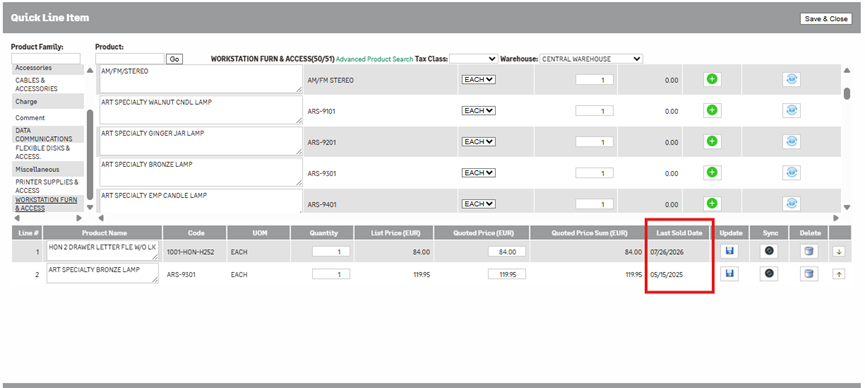
The Last Sold Date information is synchronized from Sage 100 through a weekly batch process. This allows the QLE to maintain updated sales-history information without requiring users to manually look up the item’s last sale in Sage 100.
Automatic Validation When Adding an Item
The Last Sold Date is checked automatically when a product is selected from the upper grid and added to the lower grid of the QLE. The system evaluates the item’s Last Sold Date to determine whether the product has been sold within the last six months.
If the item was sold within the last six months, no warning is displayed and the item is added to the lower grid as usual.
If the item’s Last Sold Date is more than six months old, the QLE displays a pop-up message notifying the user that the item has not been sold within the last six months and prompting them to review the item’s current pricing before proceeding with the quote.
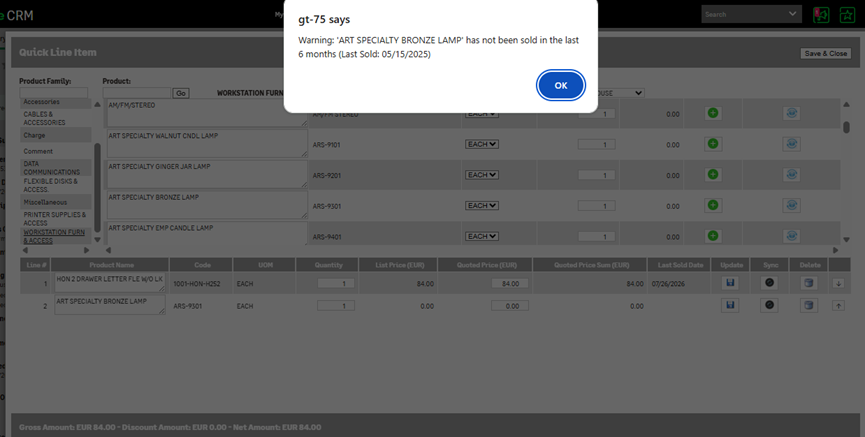
The alert serves as a pricing checkpoint rather than a restriction. After the warning is displayed, the item is still added to the lower grid, allowing the user to continue preparing the quote while being aware that the item’s pricing may require additional review.
Weekly Last Sold Date Synchronization
A batch file synchronizes the Last Sold Date information from Sage 100 on a weekly basis. The synchronized data is then used by the QLE when performing the six-month validation.
Since the synchronization occurs once a week, the Last Sold Date displayed in the QLE may not always reflect the most recent sales activity available in Sage 100. For example, if an item is sold after the latest synchronization, that sale will be reflected in the QLE during the next scheduled synchronization.
This ensures that the QLE has regularly refreshed sales-history information while keeping the quoting workflow simple and automated.
Why It Helps
- Provides Last Sold Date visibility directly within the QLE.
- Automatically checks the item’s sales history when it is added to the quote.
- Identifies items that have not been sold within the last six months.
- Displays a clear pricing alert at the point where the item is being added.
- Encourages users to review current pricing when an item’s sales history is outdated.
- Allows the item to be added to the quote without blocking the quoting process.
- Reduces the risk of proceeding with potentially outdated pricing without review.
- Brings Sage 100 sales-history information directly into the QLE workflow.
Wrapping Up
The Last Sold Date validation and pricing alert enhancement adds greater visibility and awareness to the QLE quoting process. When a product is selected from the upper grid, its Last Sold Date is automatically checked before the item is added to the lower grid.
If the item has not been sold within the last six months, a pop-up alert prompts the user to review the item’s current pricing. The item is then added to the lower grid, where its Last Sold Date remains available for reference.
With Last Sold Date information synchronized from Sage 100 on a weekly basis, users can quickly understand an item’s recent sales activity and identify products that may require additional pricing consideration.
The result is a smarter and more informed quoting workflow that combines sales-history visibility with automated pricing awareness, helping users make better pricing decisions before finalizing a quote.