• Who We Are
    • About Us
    • Factor - D
    • Our Networks
    • Accolades
  • What We Do

    SERVICES

    • Consulting / Implementation
    • Migration
    • Development

    OUR SOLUTIONS

    • GUMU Integration
    • BPortaly
    • Sales Commission
    • Shipping
    • IOT

    COMPREHENSIVE SERVICES FOR

    ERP

    • Acumatica
    • Sage Intacct
    • Sage X3
    • Sage 300
    • Sage 100
    • Sage 500

    CRM

    • Salesforce
    • D365 CRM
    • Sage CRM
    • Creatio

    Other Solutions

    • E-commerce
    • EDI
    • POS
  • Resources
    • Case Study
    • Blogs
    • Videos
    • Ebooks
    • News
  • +1 888 221 6661
Contact us
Career |
  • Africa
  • Middle East

Salesforce.com - Tips, Tricks and Components

Welcome to the treasure trove of Greytrix’s Salesforce knowledge. This page is dedicated to providing you with insightful articles, expert tips, and the latest updates on Salesforce CRM. Whether you want to enhance your Salesforce experience or want to stay updated on industry trends, our blog has you covered. In addition, we also offer cutting-edge solutions for Salesforce and are committed to delivering unparalleled support and innovation for Salesforce users. Explore and enhance your Salesforce experience with Greytrix.

Ultimate Guide to Salesforce Email Tracking – Step-by-Step Setup & Verification

By Greytrix | December 22, 2025
0 Comment

Email engagement is one of the most powerful indicators of buyer interest. Salesforce’s built-in email tracking makes this process effortless by recording when an email is opened, how many times it was viewed, and the first and last open timestamps. With the right configuration, this data helps sales and marketing teams understand prospect behavior, prioritize follow-ups, and measure the impact of their outreach.

In this blog, we’ll walk through how Salesforce detects email opens, how accurate the open count is, the step-by-step setup to enable tracking, and how to verify that it’s working correctly.

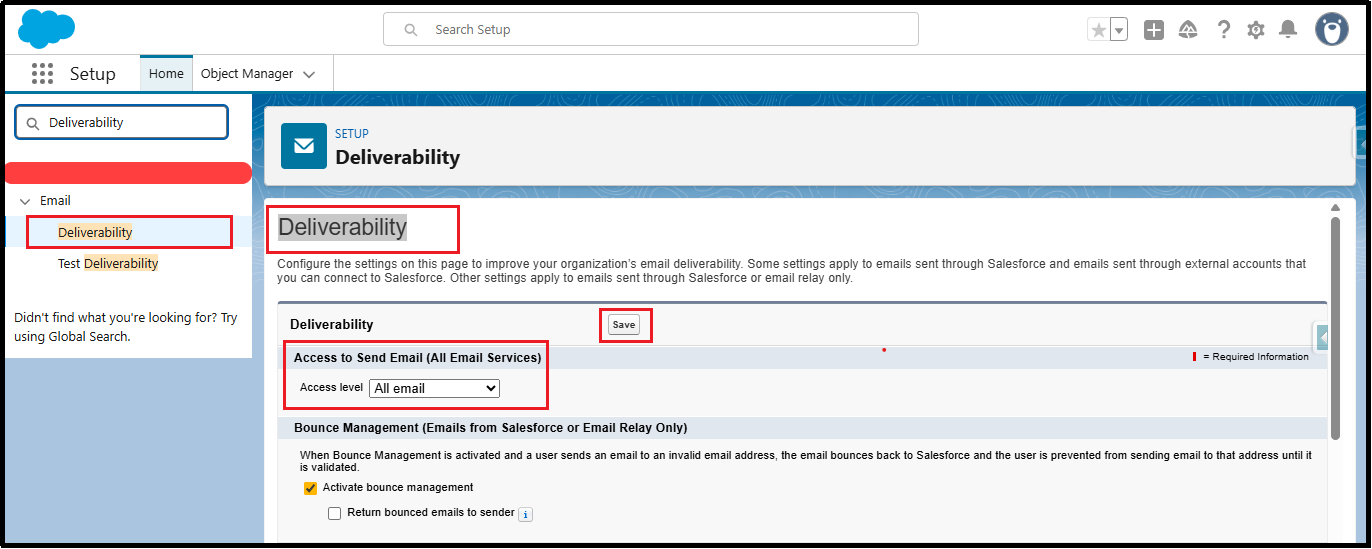
Step 1: Enable Deliverability

  • Navigate to Setup → search Deliverability
  • Set Access Level: All Email
  • Click Save
Enable Deliverability

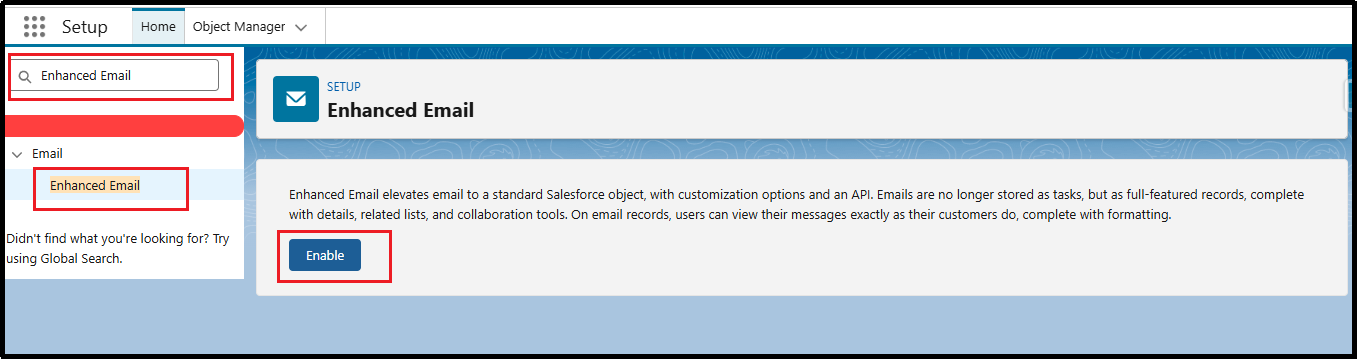
Step 2: Enable Enhanced Email

  • Go to Setup → search Enhanced Email
  • Check Enable Enhanced Email
  • Click Save
Enable Enhanced Email

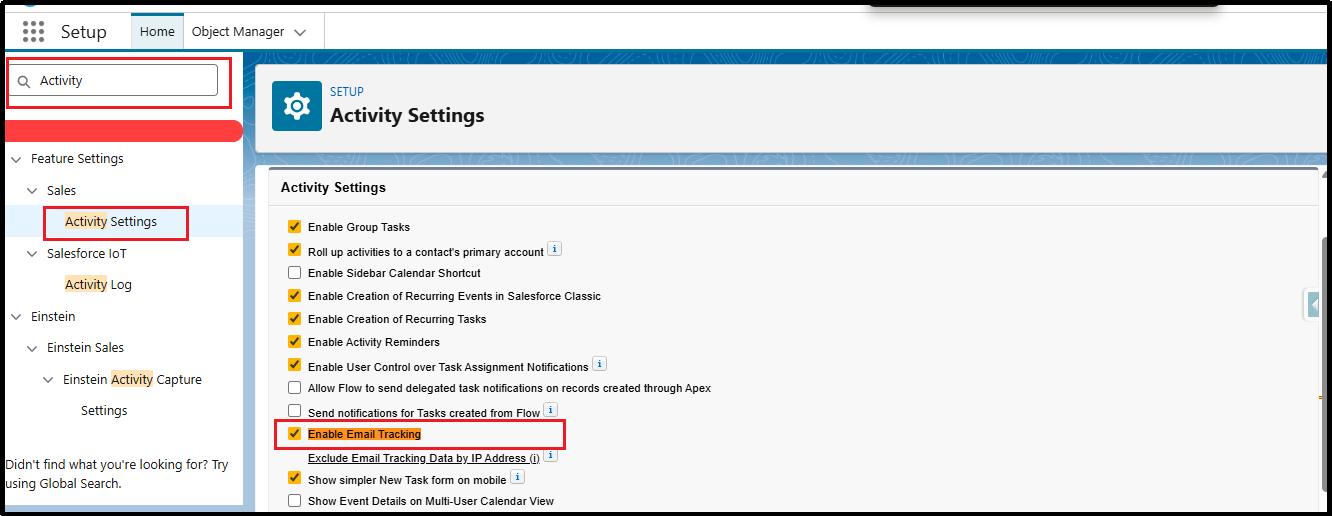
Step 3: Turn On Email Tracking (Lightning Experience)

  • Navigate to Setup → search Activity Settings
  • Enable Email Tracking
  • Click Save
Enable Email Tracking

Step 4: Verify User Permissions

Ensure that users sending emails have access to Email Message records.

  • Go to Profile / Permission Set → Object Settings
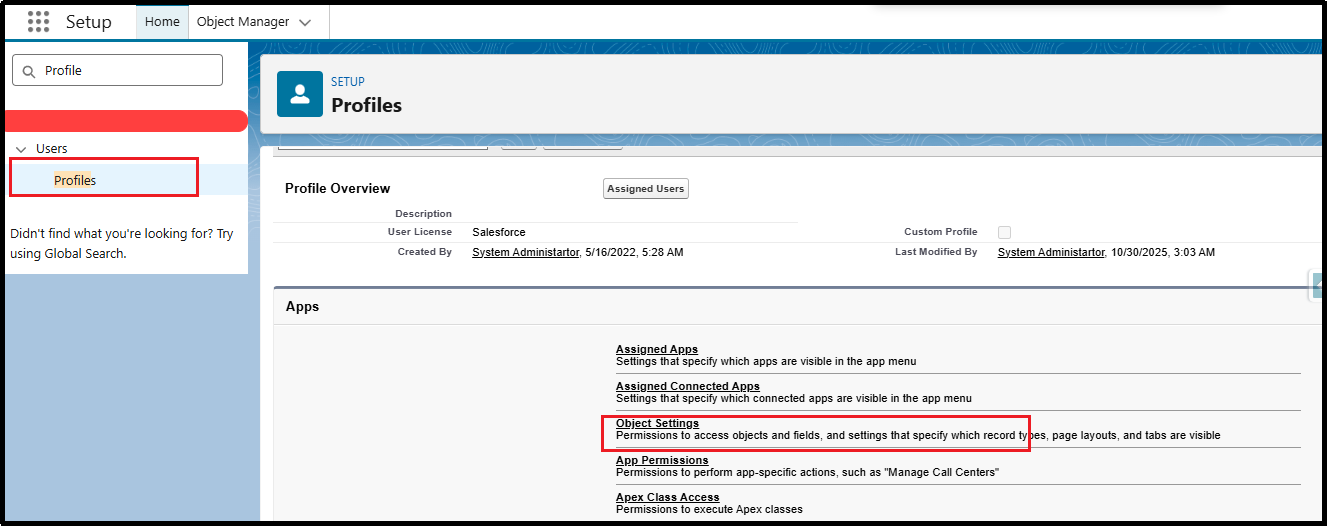
Profile Object Settings
  • Select Email Message
  • Enable Read, Create, Edit
  • Ensure Send Email and Activity permissions are active
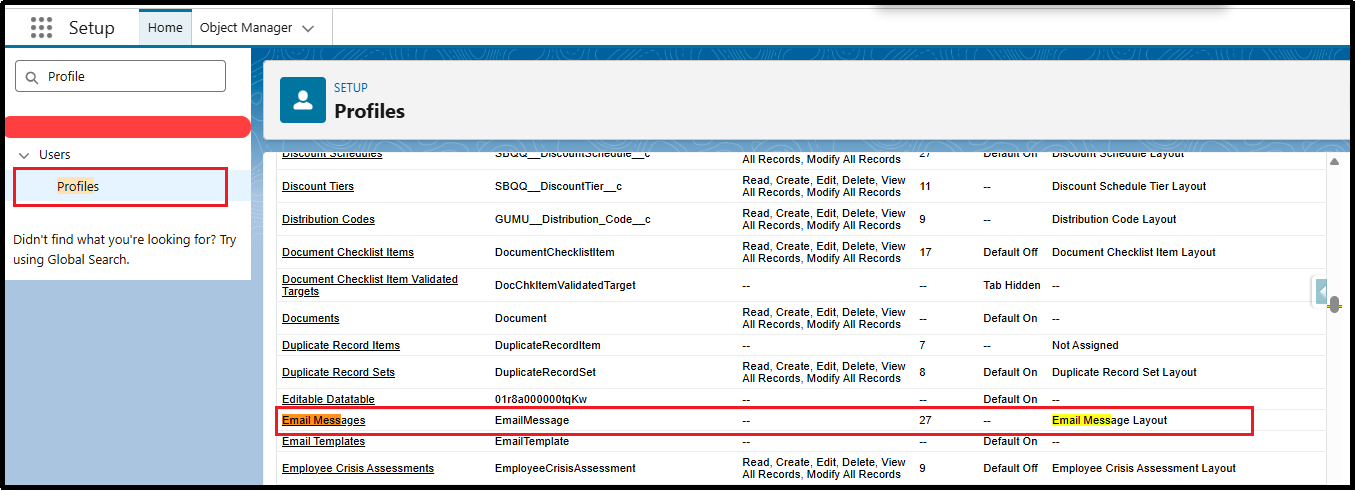
Email Messages
Email Messages

Step 5: Add Email Tracking Fields to Page Layout

To view email open tracking on records:

  • Go to Setup → Object Manager → Email Message
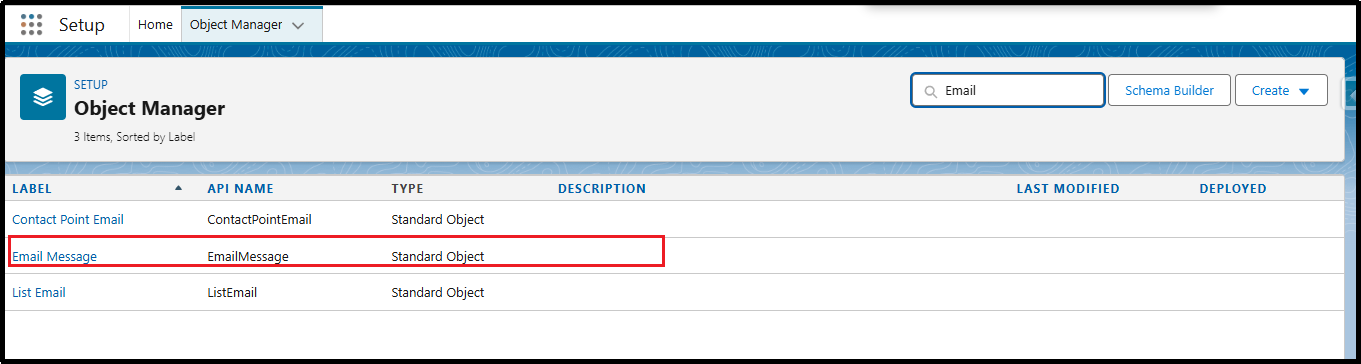
Email Message Object
  • Open Page Layouts
  • Add the following fields:
    • IsOpened
    • TimesOpened
    • FirstOpenedDate
    • LastOpenedDate

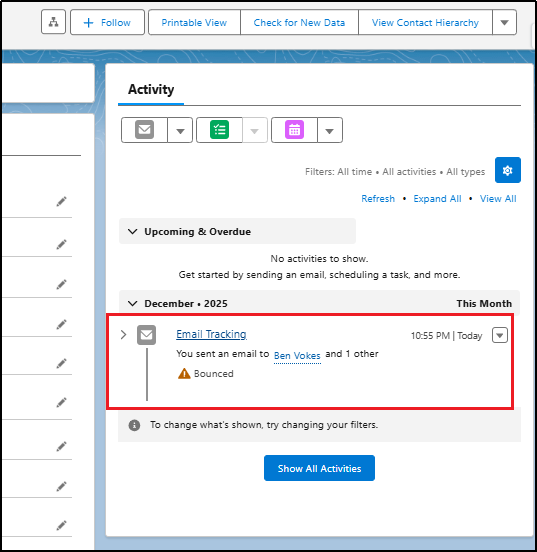
Step 6: Verify Email Tracking is Working

  • Send a tracked email from Salesforce to your own email address
  • Ensure Track Email toggle is ON in the Lightning Email Composer
  • Open the email in your inbox
  • Refresh Salesforce
  • Open the related Email Message record
  • If using Marketing Cloud (Pardot/Marketing Cloud):
    • IsOpened = true
    • TimesOpened ≥ 1
    • FirstOpenedDate / LastOpenedDate populated
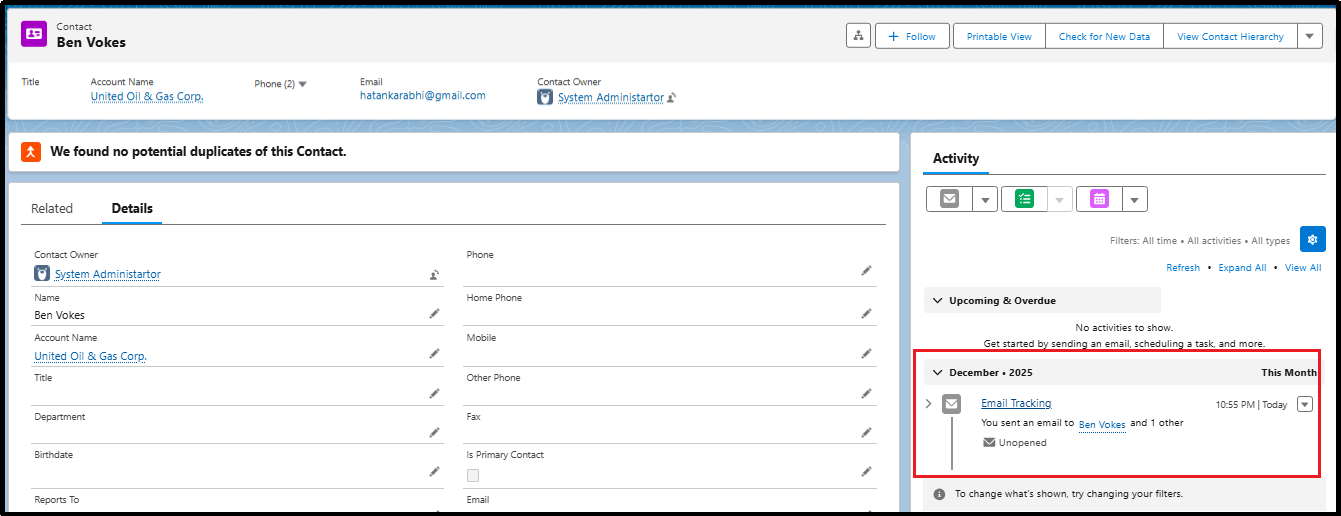
Contact Email Tracking
Bounced Email
Bounced Email

Conclusion

Salesforce Email Tracking provides valuable insights into recipient engagement, helping teams improve follow-ups and optimize communication strategies. By enabling Deliverability, Enhanced Email, Email Tracking, and setting the correct permissions, you ensure accurate open tracking across your org. With these configurations in place, users can confidently analyze email activity and boost productivity.

By following the above blog instructions, you will be able to learn “Ultimate Guide to Salesforce Email Tracking – Step-by-Step Setup & Verification“. If you still have queries or any related problems, don’t hesitate to contact us at salesforce@greytrix.com. More details about our integration product are available on our website and Salesforce AppExchange.

We hope you may find this blog resourceful and helpful. However, if you still have concerns and need more help, please contact us at salesforce@greytrix.com.

About Us

Greytrix – a globally recognized and one of the oldest Sage Development Partner and a Salesforce Product development partner offers a wide variety of integration products and services to the end users as well as to the Partners and Sage PSG across the globe. We offer Consultation, Configuration, Training and support services in out-of-the-box functionality as well as customizations to incorporate custom business rules and functionalities that require apex code incorporation into the Salesforce platform.

Greytrix has some unique solutions for Cloud CRM such as Salesforce Sage integration for Sage X3, Sage 100 and Sage 300 (Sage Accpac). We also offer best-in-class Cloud CRM Salesforce customization and development services along with services such as Salesforce Data Migration, Integrated App development, Custom App development and Technical Support business partners and end users. Salesforce Cloud CRM integration offered by Greytrix works with Lightning web components and supports standard opportunity workflow. Greytrix GUMU™ integration for Sage ERP – Salesforce is a 5-star rated app listed on Salesforce AppExchange.
The GUMU™ Cloud framework by Greytrix forms the backbone of cloud integrations that are managed in real-time for processing and execution of application programs at the click of a button.

For more information on our Salesforce products and services, contact us at salesforce@greytrix.com. We will be glad to assist you.

Related Posts

  • How to reset field values of repeatable sections in Formstack for Salesforce forms
  • How to Fetch current Record Id from Lightning Web Components (LWC)
  • How to create a custom button on Formstack for the Salesforce form
  • How to Restrict the System Administrator to “Edit the Read-Only Field” in Salesforce.

Category: Salesforce Services Tags: Add Summary Formula, Conditional Formatting, Create New Report, Email Message Object Salesforce, Email Open Tracking Salesforce, Find Duplicate Records, Formula Output Type, Group Rows, Identify Duplicate Records, PARENTGROUPVAL, PARENTGROUPVAL Function., Report Type, Resolving Duplicates, Row Count, Salesforce Activity Settings, Salesforce CRM Email Tracking, Salesforce Deliverability, Salesforce Email Analytics, Salesforce Email Setup Guide, Salesforce Email Tracking, Salesforce Enhanced Email, Salesforce Marketing Cloud Tracking, Salesforce Pardot Email Tracking, salesforce reports, Track Email Salesforce
Post navigation
← Parent-to-Child Communication in LWC – A Complete Guide (Part 2)

Greytrix Websites and Blogs

  • Greytrix
  • GUMU™ Cloud
  • Greytrix Africa
  • Sage X3 – Tips, Tricks and Components
  • Sage 100 & 500 ERP Tips and Tricks
  • Sage 300 – Tips, Tricks and Components
  • Sage CRM – Tips, Tricks and Components

GUMU™ Salesforce Sage Integration

https://www.youtube.com/watch?v=X9Dg4uwGT-0

Categories

  • GUMU™ Features
  • GUMU™ Salesforce
  • GUMU™ Tricks & Tips
  • Salesforce Services
  • Uncategorized
sage enterprise management services

Recent Posts

  • Ultimate Guide to Salesforce Email Tracking – Step-by-Step Setup & Verification
  • Parent-to-Child Communication in LWC – A Complete Guide (Part 2)
  • Creating Dynamic User Experiences with Conditional Visibility in Salesforce Screen Flows
  • One-Click Approvals in Salesforce: Automate Approval Processes Using Autolaunched Flows
  • Auto Update the Last Sync Value to Current Date in Entity Mapping/Import tab

Popular blogs

  • Thinking of enhancing your business processes? Get the best ERP – CRM connector on Salesforce AppExchange!
  • GUMU™ for Salesforce – Sage ERP Integration
  • Leverage real-time enterprise data for better insights of your Customers with Salesforce – Sage 300 integration
  • GUMU™ Integration for Salesforce with Sage 300

Archives

Awards

Premier Partner of the Year Premier Partner of the Year
Platinum Partner of the Year Platinum Partner of the Year
The CEO Story The CEO Story
Gold Partner pf the Year Gold Partner pf the Year
Top Excellence Distributor Top Excellence Distributor
  • na.sales@greytrix.com
  • +1 888 221 6661
  • B301, 3rd Floor, Everest Nivara Infotech Park, MIDC, Turbhe,
    Navi Mumbai 400 705. India

Our Global Locations >>

Who We Are

  • About Us
  • Factor - D
  • Our Network
  • Accolades
  • Career
  •  
  •  

Services

  • Consultation & Implementation
  • Migration
  • Development

Solutions

  • GUMUTM Integration
  • BPortaly
  • Sales Commission
  • Shipping
  • IOT
  •  
  •  

ERP

  • Acumatica
  • Sage Intacct
  • Sage X3
  • Sage 300
  • Sage 100
  • Sage 500

CRM

  • Salesforce
  • D365 CRM
  • Sage CRM
  • Creatio
  •  
  •  
  •  

Other Solutions

  • E-commerce
  • EDI
  • POS

Resources

  • Case Study
  • Blogs
  • Videos
  • E-books
  • News
  •  
  •  

Connect

  • Contact Us
  • Privacy Policy
  • Terms Of Use
  •  

© 2025. Greytrix, All Rights Reserved