
Salesforce is excellent at managing customer data, transactions, and interactions. But what happens when your org needs to handle millions or even billions of records, such as ERP transactions, historical logs, IoT events, or audit trails? Standard objects and storage limits are not built for this scale, and performance can quickly degrade.
This is where Big Objects come into play. Big Objects are a specialized type of Salesforce object designed to store huge volumes of data efficiently, with minimal impact on org performance. They are optimized for archival, reporting, and high-volume integrations, allowing businesses to retain critical data while keeping standard objects lean and fast.
Advantages of Salesforce Big Objects
Big Objects provide several benefits that make them ideal for enterprise-scale data management:
- Scalability: Can store billions of records, far beyond standard object limits
- Performance: Optimized for high-volume insertions and read operations using indexed fields
- Long-term Storage: Ideal for historical data, logs, and compliance records without slowing down standard objects
- Integration-Ready: Perfect for syncing data from external systems like ERP or IoT platforms
- Analytics-Friendly: Can be used with Tableau CRM / Einstein Analytics for reporting and trend analysis
- Storage Efficiency: Does not consume standard Salesforce storage the same way as regular objects
Key Use Cases of Big Objects in Business Processes
Big Objects play a crucial role in handling large-scale enterprise data scenarios:
- ERP Transaction Logging: Keep all transactional data for analysis, audit, or reconciliation.
- Event Monitoring: Track user actions, login history, or API calls at scale.
- Audit & Compliance: Maintain immutable records for regulatory requirements (SOX, GDPR, HIPAA).
- IoT Data Storage: Collect massive streams of sensor or device data for operational monitoring.
- Historical Analytics: Store older records from standard objects in Big Objects for trend analysis while keeping the org fast.
- Integration Layer: Serve as a staging area for external system data before syncing with standard objects.
How to Create a Big Object in Salesforce
Follow these steps to create a Big Object:
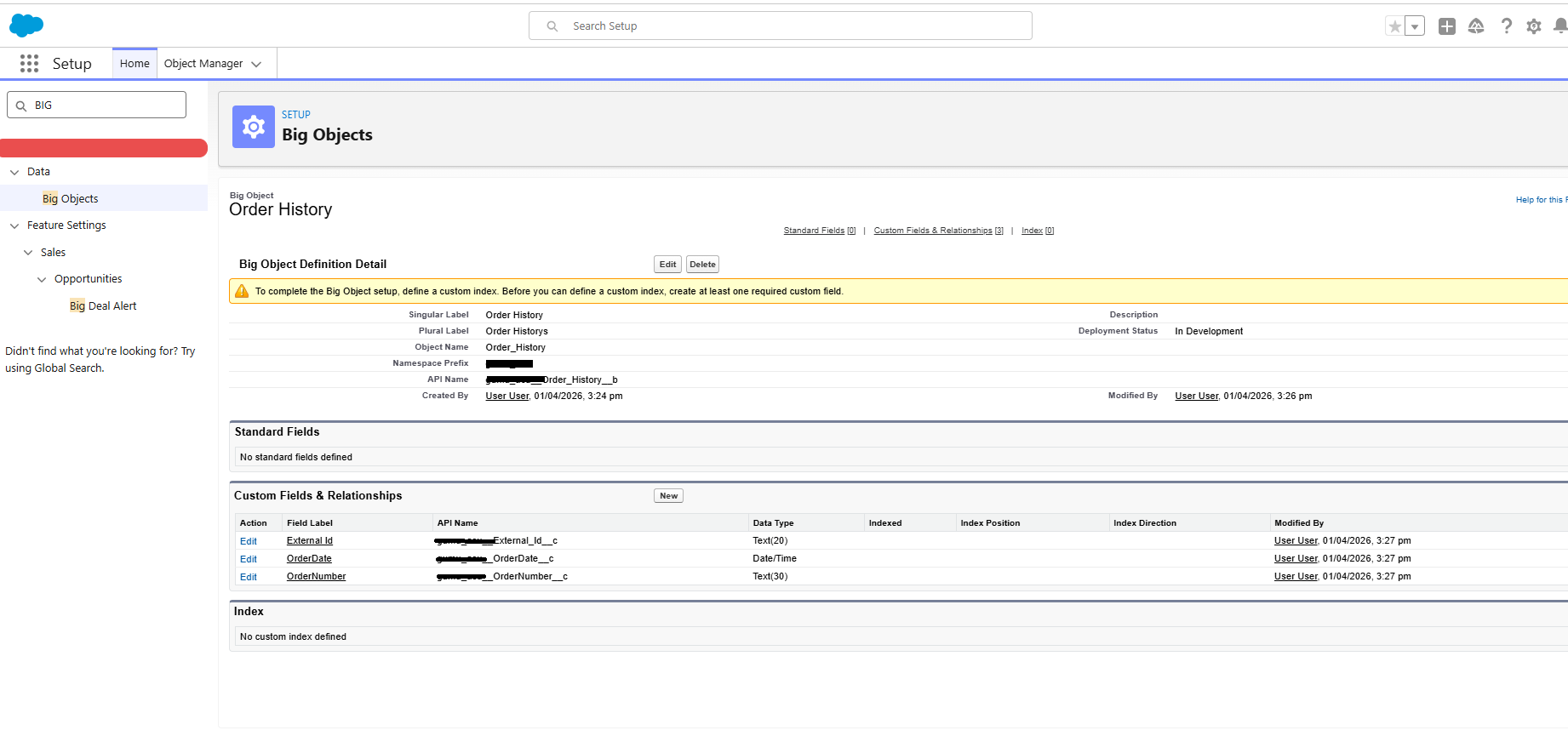
- Navigate to Setup → Object Manager → Create → Big Object
- Define the fields
Field Configuration
- External ID: Required and indexed (acts as the primary key)
- Other Fields: Text, Number, Date, etc., based on business requirements
| Field Name | Data Type | Notes |
|---|---|---|
| External_Id__c | Text | Required, indexed, unique |
| OrderNumber__c | Text | ERP reference number |
| OrderDate__c | Date | Transaction date |
How to Insert Data into Big Objects
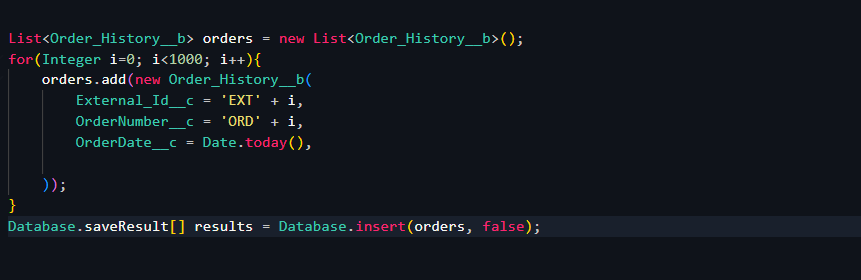
Big Objects support asynchronous inserts and bulk operations, making them suitable for handling large datasets efficiently.
Apex Example: Insert Data into Big Object
How to Query Big Objects
When querying Big Objects, there are important considerations:
- Queries must use indexed fields such as External ID or Date
- Full table scans are not allowed

Query Best Practices
- Filter using indexed fields
- Use date ranges for analytics queries
- Optimize queries for performance
Conclusion
Big Objects are a powerful tool for Salesforce admins and developers to manage high-volume, historical, and integration data efficiently. By combining Big Objects with asynchronous processing, analytics tools, and external integrations, businesses can retain critical information, perform advanced reporting, and maintain optimal system performance.
Whether you’re building ERP integrations, logging IoT events, or managing audit trails, Big Objects provide the scalability, performance, and storage capabilities required for enterprise-grade Salesforce implementations.
By following the above blog instructions, you will be able to learn “Managing Salesforce Big Objects for Business Insights and High-Volume Data Processing“. If you still have queries or any related problems, don’t hesitate to contact us at salesforce@greytrix.com. More details about our integration product are available on our website and Salesforce AppExchange.
We hope you may find this blog resourceful and helpful. However, if you still have concerns and need more help, please contact us at salesforce@greytrix.com.
About Us
Greytrix – a globally recognized and one of the oldest Sage Development Partner and a Salesforce Product development partner offers a wide variety of integration products and services to the end users as well as to the Partners and Sage PSG across the globe. We offer Consultation, Configuration, Training and support services in out-of-the-box functionality as well as customizations to incorporate custom business rules and functionalities that require apex code incorporation into the Salesforce platform.
Greytrix has some unique solutions for Cloud CRM such as Salesforce Sage integration for Sage X3, Sage 100 and Sage 300 (Sage Accpac). We also offer best-in-class Cloud CRM Salesforce customization and development services along with services such as Salesforce Data Migration, Integrated App development, Custom App development and Technical Support business partners and end users. Salesforce Cloud CRM integration offered by Greytrix works with Lightning web components and supports standard opportunity workflow. Greytrix GUMU™ integration for Sage ERP – Salesforce is a 5-star rated app listed on Salesforce AppExchange.
The GUMU™ Cloud framework by Greytrix forms the backbone of cloud integrations that are managed in real-time for processing and execution of application programs at the click of a button.
For more information on our Salesforce products and services, contact us at salesforce@greytrix.com. We will be glad to assist you.
Related Posts