
The GUMU™ for Sage CRM – Sage 100 Integration is a real-time, bi-directional link that seamlessly connects Sage CRM and Sage 100 where users can view and analyze customers, vendors and sales information data from either of the systems Sage CRM to Sage 100 and vice versa.
With GUMU, organizations can eliminate manual data entry, improve data accuracy, and gain better visibility into customer and order information—all within a unified ecosystem.
In one of our recent Sage CRM and Sage 100 integration projects, the client required better control over customer credit handling during transaction processing.
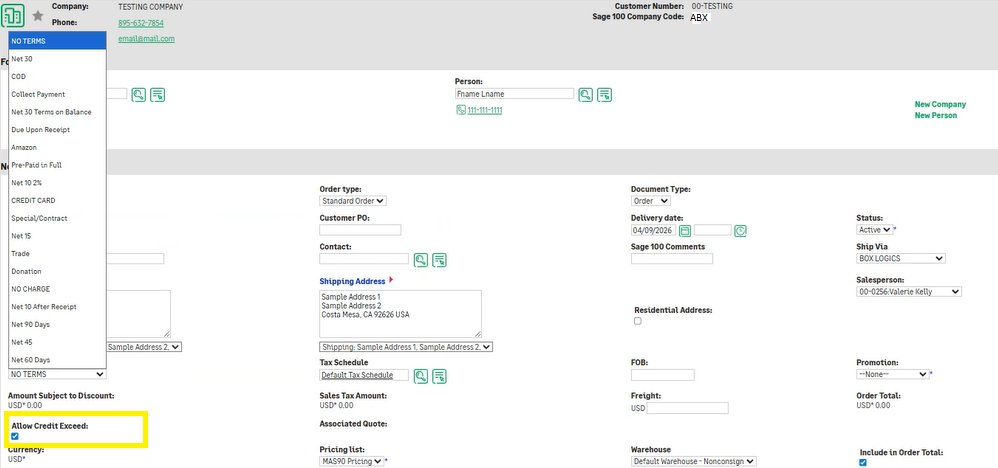
They wanted the “Allow Credit Exceed” checkbox behavior to be automatically controlled based on the selected Term Code, instead of relying on manual user selection.
To address this, we implemented a customization that dynamically updates the “Allow Credit Exceed” setting based on Term Code logic from Sage 100.
Business Requirement
The requirement was to:
– Automate Allow Credit Exceed checkbox behavior
– Control it based on Term Code
– Ensure consistency and reduce manual errors
– Align CRM behavior with Sage 100 business rules
What’s New: Key Enhancement Introduced
1. Term Code-Based Control of Allow Credit Checkbox
A validation has been implemented to control the Allow Credit checkbox based on the selected Term Code.
- When a specific Term Code is selected
→ The Allow Credit checkbox is automatically checked - For all other Term Codes
→ The Allow Credit checkbox remains unchecked
This ensures that credit is allowed only for predefined payment terms.
2. Automatic Checkbox Update in CRM
Whenever a Term Code is selected or changed:
– The Allow Credit Exceed checkbox is automatically updated
– Users do not need to manually modify it
This ensures real-time enforcement of business rules.
3. Impact on Order Processing
This enhancement directly improves transaction control:
– Orders are processed based on valid credit rules
– Restricted customers cannot bypass credit validation
– Reduces risk of incorrect order approvals
4. Consistent Behavior Across System
The logic ensures:
– Same credit behavior across all users
– Alignment between Sage CRM and Sage 100
– No dependency on user decision-making
How This Enhancement Helps Businesses
– Improved Credit Control
– Reduced Errors
– Faster Processing
– Consistent Transactions
The Allow Credit Exceed Checkbox based on Term Code enhancement brings automation and control into credit management within Sage CRM. By linking credit behavior directly to Term Code logic, businesses can ensure accurate, consistent, and reliable transaction processing while minimizing manual errors.