
The GUMU™ for Sage CRM – Sage 100 Integration is a real-time, bi-directional link that seamlessly connects Sage CRM and Sage 100 where users can view and analyze customers, vendors and sales information data from either of the systems Sage CRM to Sage 100 and vice versa.
With GUMU, organizations can eliminate manual data entry, improve data accuracy, and gain better visibility into customer and order information—all within a unified ecosystem.
What’s New: Order Tracking Tab in My CRM Context
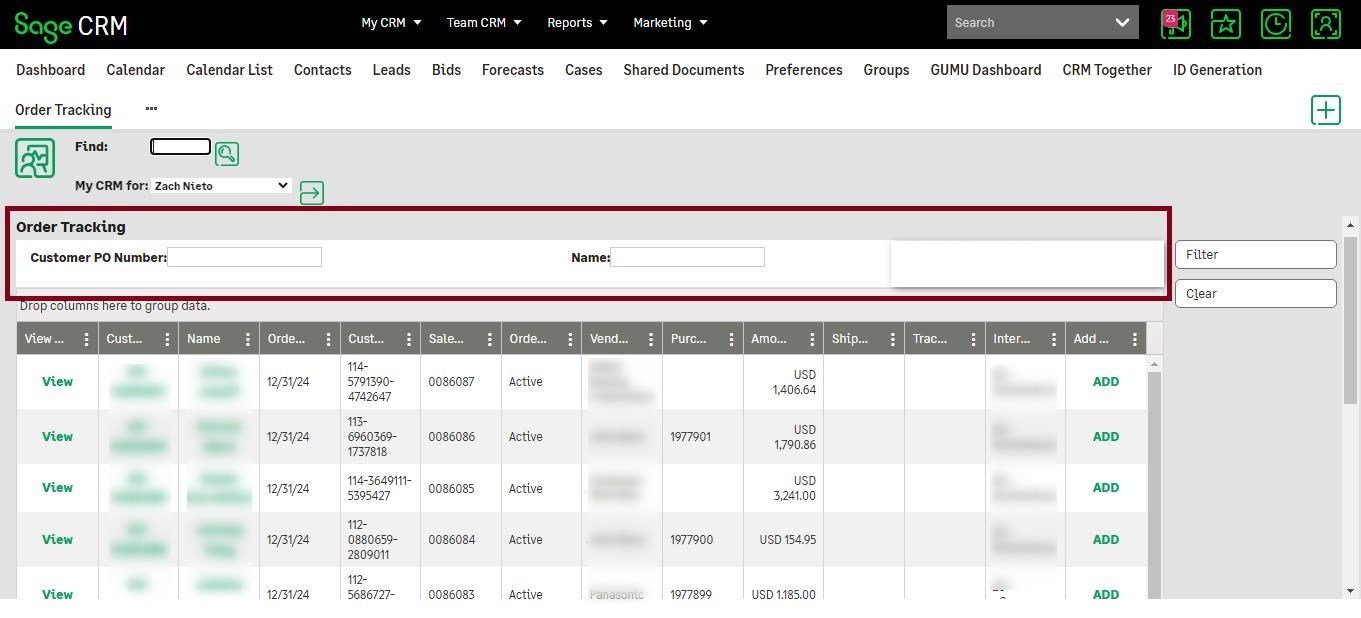
To enhance operational efficiency, a powerful Order Tracking customization has been introduced within the My CRM(Logged in) context. This feature provides users with real-time access to order details and tracking information, improving transparency and decision-making.
Key Features of the Order Tracking Tab
- Real-Time Order Visibility
Users can access a live list of orders directly within CRM, ensuring up-to-date insights. - Comprehensive Data Grid
The grid includes key Sage 100 data fields such as:- Customer Number & Name
- Customer PO Number
- Sales Order Number
- Order Status & Date
- Amount
- Ship Via
- Tracking Info
- Vendor Name
- Purchase Order Number
- Quick Navigation
- ‘’View’’ hyperlink in the grid redirects users to the respective Sales Order Detail page
- Additionally, we have provided hyperlinks to Customer Number and Name for quick access to the Company Summary screen.
- Customer Number can be redirected from the Sales Order detail page
- Smart Data Grouping
Orders records in grid are grouped by Vendor and Vendor PO, making it easier to track related transactions across multiple sales and purchase orders. - Efficient Data Handling
- Data is restricted to 1 year for better performance and relevance
- Vendor number is used as a unique identifier, enabling accurate mapping across multiple orders
Advanced Filter Panel
To help users quickly locate specific orders, a Filter Panel has been included.
Available Filters:
- Customer PO (Search Box)
- Customer Name (Search Box)
- A “Clear” button to reset all filters and return to the full dataset
Add Tracking Screen: Simplified Data Entry
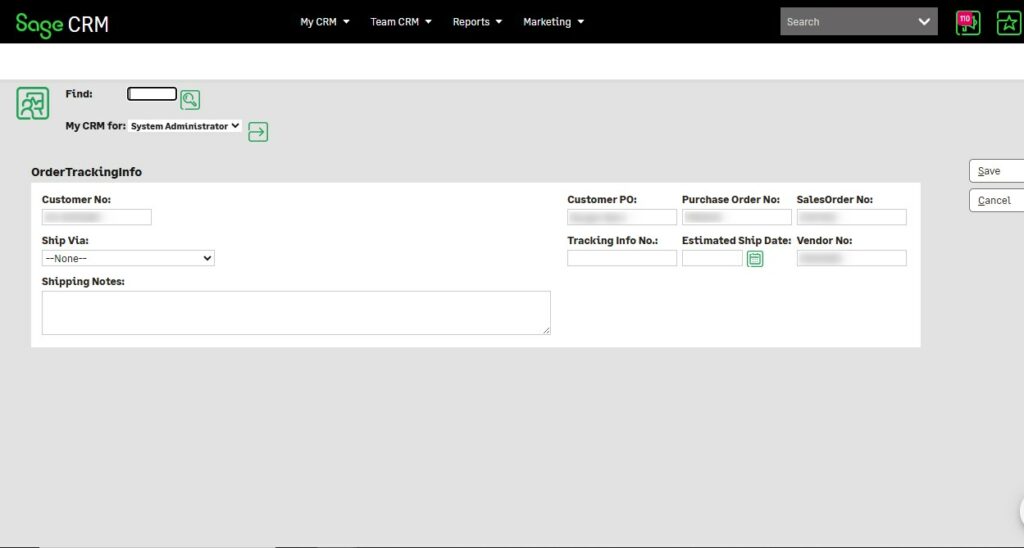
An Add Tracking column is added to Order tracking grid, where clicking the “Add” link opens an interface to easily enter shipping and tracking details
Input Fields Available:
- Ship Via
- Shipping Notes
- Tracking Info Number
- Estimated Ship Date
Users can:
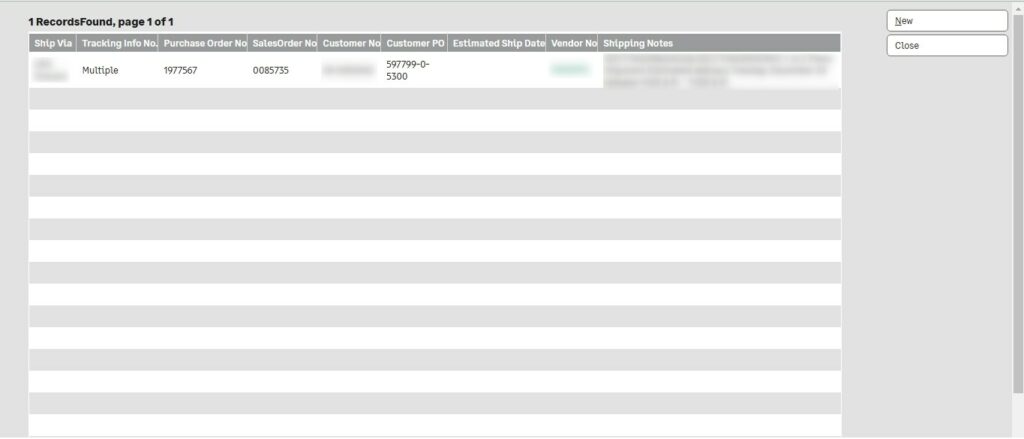
- Add new tracking details
- Edit existing records
- Update the informed tracking details
This ensures that logistics and customer service teams always have the latest shipment updates.
Key Business Uses
This customization addresses several real-world business challenges:
1. Improved Customer Service- Customer support teams can instantly access order and tracking details, enabling faster response times and better service.
2. Streamlined Logistics Coordination – Operations teams can track shipments across vendors and purchase orders in one place, reducing delays and miscommunication.
3. Better Sales Insights – Sales teams gain visibility into order statuses and fulfillment progress, helping them proactively manage client expectations.
4. Multi-Vendor Order Management – Businesses dealing with multiple vendors can easily group and track orders, ensuring accurate coordination across the supply chain.
Conclusion
The Order Tracking customization is a significant step toward improving operational visibility and efficiency. By combining real-time data access, intuitive navigation, and powerful filtering capabilities, this enhancement empowers teams across sales, support, and operations.
If you’re already using GUMU Integration, this customization is a valuable upgrade to streamline your order management process. Even if you are not, it’s a great example of how integrated systems can transform your business operations.