
Anyone who has worked across a Sage CRM and ERP integration knows the risk: a customer gets placed On Hold in the ERP system, but the sales or support rep working the account in CRM has no easy way of knowing. They raise a quote, push an opportunity forward, or process an order — only to find out later that the customer’s account was frozen the whole time.
On a recent Sage CRM and Sage 300 integration project, we set out to close that gap for good. The result was a simple but effective customization: a Customer On Hold banner that appears automatically across every Company-related screen in CRM whenever a customer is marked On Hold in ERP.
The Business Problem
Users move around a Company record constantly — checking the summary, reviewing opportunities, building quotes, tracking orders. If an On Hold warning only shows up on one screen, it’s easy to miss. The client’s ask was straightforward:
- Show a clear, unmistakable On Hold banner in Sage CRM.
- Trigger it automatically the moment ERP marks a customer On Hold.
- Make sure it follows the user across every Company-related screen, not just one.
- Give users a constant, visual reminder for as long as the hold is active.
- Cut down the risk of anyone unknowingly transacting with an On Hold customer.
What We Built
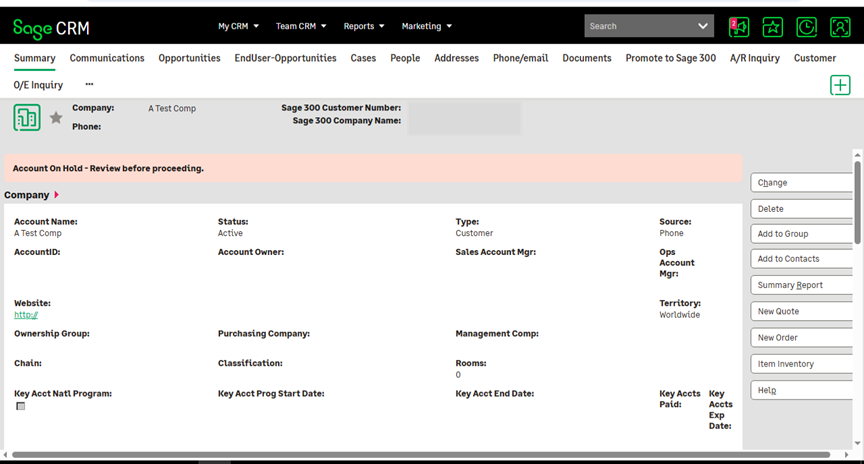
1. Automatic Banner Display
The moment a customer’s status changes to On Hold in ERP, the linked Company record in Sage CRM picks it up and displays the banner — no manual checks, no separate lookup screen. Users see it the instant they open the record.
2. Banner Visibility Across the Whole Company Record
Rather than bolting the warning onto a single tab, we made sure it travels with the user:
- Company Summary
- Opportunities
- Quotes
- Orders
- Any other screen tied to that Company record
Wherever the user navigates within that account, the reminder is right there with them.
3. Real-Time Status Sync
The banner isn’t a static flag — it reflects the customer’s current ERP status. If the hold is lifted, the banner disappears the next time the record is loaded. If a customer moves back onto hold, it reappears just as quickly. Users are always working off live, accurate information rather than a stale snapshot.
4. Better Awareness at the Point of Action
The real payoff shows up during day-to-day sales activity. When a user is halfway through building a quote or updating an opportunity, the banner is sitting right there as a visual checkpoint — a chance to pause before committing to an action that might need to wait until the hold is cleared.
Why It Matters
For a business running Sage CRM alongside an ERP system, small visibility gaps like this tend to cause outsized problems — orders that need to be unwound, quotes issued to accounts that shouldn’t be transacting, awkward conversations with finance. This enhancement addresses that directly by:
- Making ERP hold status visible inside CRM, where the sales team actually works.
- Keeping the warning consistent across every screen tied to the Company.
- Reducing reliance on someone remembering to check ERP separately.
- Lowering the risk of activity being initiated on accounts that are on hold.
- Creating a uniform experience regardless of which part of the Company record a user is in.
Wrapping Up
The Customer On Hold Banner is a good example of how a fairly small piece of Sage CRM–ERP integration work can meaningfully reduce operational risk. By surfacing the On Hold status automatically, in real time, across the Company Summary, Opportunities, Quotes, and every other related screen, teams get a constant, reliable reminder — helping them make informed decisions and steer clear of business activity that shouldn’t be happening while a customer’s account is on hold.
About Us
Greytrix – a globally recognized and one of the oldest Sage Development Partners is a one-stop solution provider for Sage ERP and Sage CRM organizational needs. Being acknowledged and rewarded for multi-man years of experience and expertise, we bring complete end-to-end assistance for your technical consultations, product customizations, data migration, system integrations, third-party add-on development, and implementation competence.
Greytrix has some unique integration solutions developed for Sage CRM with Sage ERPs namely Sage X3, Sage Intacct, Sage 100, Sage 500, and Sage 300. We also offer best-in-class Sage ERP and Sage CRM customization and development services to Business Partners, End Users, and Sage PSG worldwide. Greytrix helps in the migration of Sage CRM from Salesforce | ACT! | SalesLogix | Goldmine | Sugar CRM | Maximizer. Our Sage CRM Product Suite includes add-ons like Greytrix Business Manager, Sage CRM Project Manager, Sage CRM Resource Planner, Sage CRM Contract Manager, Sage CRM Event Manager, Sage CRM Budget Planner, Gmail Integration, Sage CRM Mobile Service Signature, Sage CRM CTI Framework.
Greytrix is a recognized Sage Champion Partner for GUMU™ Sage X3 – Sage CRM integration listed on Sage Marketplace and Sage CRM – Sage Intacct integration listed on Sage Intacct Marketplace. The GUMU™ Cloud framework by Greytrix forms the backbone of cloud integrations that are managed in real-time for the processing and execution of application programs at the click of a button.
For more information on our integration solutions, please contact us at sage@greytrix.com. We will be glad to assist you.