
Introduction
In the previous blog, we explored how SQL, synchronizaton tables, joins, calculated fields, and other SQL capabilities can be used to build advanced Dynamic Grids.
But preparing the data is only one part of the process. When a Dynamic Grid uses a SQL synchronizatontable, the data in that table must also be kept up to date with the latest information from Sage 100.
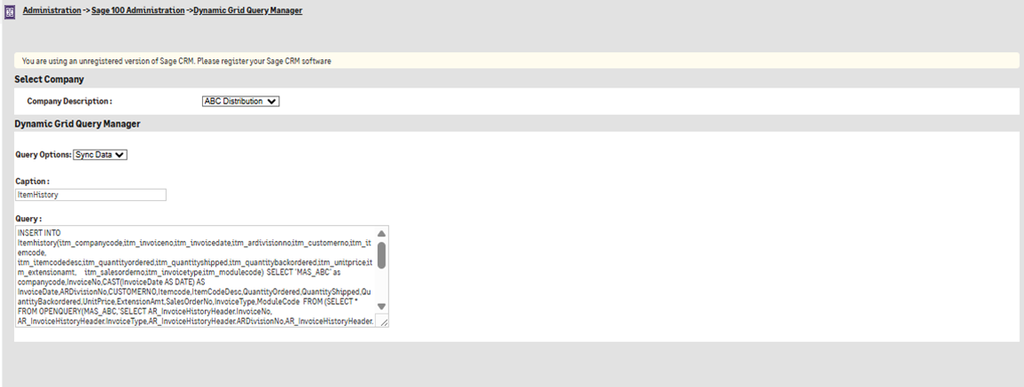
This is where the Sync Data option in Dynamic Grid Query Manager becomes important.
What Is Sync Data?
The Sync Data option is used to synchronize information from Sage 100 into a SQL synchronizatontable.
While a Show Grid query is responsible for displaying information to users, a Sync Data query is responsible for preparing or updating the underlying data.
| Query Option | Purpose |
| Show Grid | Retrieves and displays data in the Dynamic Grid |
| Sync Data | Synchronizes and prepares data in the SQL synchronizatontable |
This separation allows the data-processing logic and the user-facing grid query to remain independent.
Show Grid vs. Sync Data
Show Grid
A Show Grid query determines what the CRM user sees. It can:
- Select required fields
- Apply filters
- Format values
- Display calculated fields
- Provide hyperlinks
- Control the information shown in the grid
Sync Data
A Sync Data query determines how the synchronizaton data is maintained. It can:
- Remove existing synchronized data
- Retrieve information from Sage 100
- Combine data from multiple tables
- Calculate values
- Insert prepared data into the synchronizaton table
The two queries work together:
Sync Data → Staging Table → Show Grid → CRM User
Why Is Sync Data Important?
If a grid has to perform complex processing every time a user opens it, this can increase database and ERP system load. Instead, the complex processing can be performed during synchronization. The prepared information is then available in the synchronizaton table for the Show Grid query.
This approach can provide:
- Better separation of responsibilities
- Simpler grid queries
- Reduced repeated processing
- Better control over data preparation
- Easier maintenance of complex grids
Types of Sync Data Queries
A Query-wise Dynamic Grid can use different Sync Data queries depending on the required synchronization process.
1. Truncate/Delete Query
Existing synchronized data can be removed before loading fresh information. This ensures that outdated records do not remain in the synchronizaton table. The operation can be performed for all data or for a particular company, depending on the design.
2. Import/Load Query
After the existing data has been cleared or prepared, a second query can retrieve information from Sage 100, process it, and insert the resulting data into the synchronizaton table.
How Sync Data Works
Sage 100 → Retrieve ERP Data → Delete Existing Data → Insert Updated Data → SQL synchronizaton Table → Show Grid Query → Sage CRM
Keeping CRM Data Updated
One of the main purposes of Sync Data is to ensure that information displayed in CRM remains useful and relevant. The synchronization strategy depends on the business requirement.
The synchronization process should consider:
- How frequently Sage 100 data changes
- How frequently users need updated information
- Amount of data being synchronized
- Complexity of the synchronization query
- Available system resources
Scheduling Sync Queries
For data that needs to remain updated automatically, synchronization can be incorporated into a scheduled process. The scheduling frequency should be selected according to the business requirement.
- Frequent updates – suitable when users need relatively current ERP information.
- Periodic updates – suitable when minor synchronization delays are acceptable.
- Scheduled daily updates – suitable for information that does not change frequently.
The important consideration is to balance data freshness with system performance.
Best Practices for Sync Data
Separate Sync : Keep data preparation in Sync Data queries.
Avoid Unnecessary Data: Synchronize only the information required by the Dynamic Grid.
Use Appropriate Filters: Filtering data during synchronization can reduce the amount of information stored and processed.
Consider Synchronization Frequency: Do not synchronize more frequently than the business requirement demands.
Handle Existing Data Carefully: Delete or truncate operations should be designed carefully to avoid leaving incomplete staging data if the import process fails.
Monitor Large Synchronizations: Large datasets may require additional attention to query execution time and SQL Server performance.
Conclusion
The Sync Data functionality is an important part of Query-wise Dynamic Grid configuration when ERP information is maintained in SQL synchronizaton tables.
While Show Grid focuses on displaying information to CRM users, Sync Data focuses on keeping the underlying dataset updated. By using separate queries for data preparation and presentation, organizations can build more structured and maintainable Dynamic Grid solutions.
The key concept is: Sync Data prepares the information; Show Grid presents it.
In the next blog, we will explore Table-wise Dynamic Grid Configuration through a practical example, covering how Sage 100 tables and columns can be selected and configured to create a Dynamic Grid.