
In business applications, not every user should have the same level of access. While many users may need to view records and information, only authorized users should be able to modify them.
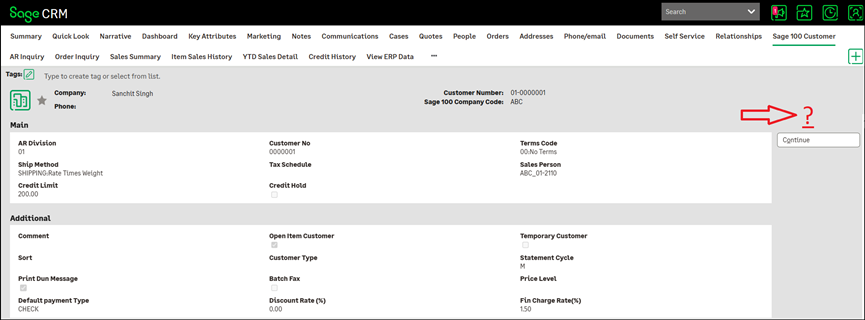
One of our client wanted control over record modifications, so a customization has been introduced to control the visibility of the Change button based on the user’s Admin rights and Primary Team.
This customization ensures that the Change functionality is available only to users who are authorized to perform record updates, while other users can continue to access the relevant information without modification privileges.
How Does It Work?
When a user accesses a Sage 100 Customer Tab in a Customer Context, the system checks two key criteria:
- Whether the user has the required Admin rights
- Whether the user’s Primary Team matches the configured authorized team
The Change button is displayed if either condition is satisfied.
Access Logic
- Admin rights OR Primary Team = Authorized Team → Change button is Visible
- Otherwise → Change button is Hidden
Admin-Based Access
Users with the required Admin rights are automatically allowed to access the Change functionality.
This ensures that administrators can continue to perform necessary record updates and system-management activities regardless of their Primary Team.
Primary Team-Based Access
In addition to Admin access, the Change button can be made available to users based on their Primary Team.
The authorized team can be configured according to the organization’s business requirements. This means the functionality does not need to be permanently restricted to a specific team.
This allows organizations to provide Change access to users whose responsibilities require them to modify records, without providing the same access to all users.
The Change Button Access Control customization provides a simple and flexible way to manage record modification permissions.
By evaluating the user’s Admin rights and Primary Team, the system ensures that the Change button is displayed only to users who meet the required access criteria.
This approach helps organizations maintain better control over their data, reduce unauthorized modifications, and ensure that system functionality is aligned with users’ roles and responsibilities.
About Us
Greytrix – a globally recognized and one of the oldest Sage Development Partners is a one-stop solution provider for Sage ERP and Sage CRM organizational needs. Being acknowledged and rewarded for multi-man years of experience and expertise, we bring complete end-to-end assistance for your technical consultations, product customizations, data migration, system integrations, third-party add-on development, and implementation competence.
Greytrix has some unique integration solutions developed for Sage CRM with Sage ERPs namely Sage X3, Sage Intacct, Sage 100, Sage 500, and Sage 300. We also offer best-in-class Sage ERP and Sage CRM customization and development services to Business Partners, End Users, and Sage PSG worldwide. Greytrix helps in the migration of Sage CRM from Salesforce | ACT! | SalesLogix | Goldmine | Sugar CRM | Maximizer. Our Sage CRM Product Suite includes add-ons like Greytrix Business Manager, Sage CRM Project Manager, Sage CRM Resource Planner, Sage CRM Contract Manager, Sage CRM Event Manager, Sage CRM Budget Planner, Gmail Integration, Sage CRM Mobile Service Signature, Sage CRM CTI Framework.
Greytrix is a recognized Sage Champion Partner for GUMU™ Sage X3 – Sage CRM integration listed on Sage Marketplace and Sage CRM – Sage Intacct integration listed on Sage Intacct Marketplace. The GUMU™ Cloud framework by Greytrix forms the backbone of cloud integrations that are managed in real-time for the processing and execution of application programs at the click of a button.
For more information on our integration solutions, please contact us at sage@greytrix.com. We will be glad to assist you.