
When preparing quotations, businesses may need to obtain pricing from multiple vendors for the same product or quote line item. Managing these requests manually can lead to duplicate records, repetitive data entry, and difficulties tracking vendor responses.
To simplify this process, a customized Vendor RFQ (Request for Quotation) entity has been introduced in GUMU™ for Sage CRM–Sage 100. It allows users to create vendor quotation records directly from the Quote Line Entry (QLE) screen, compare vendor responses, select the preferred vendor, and carry the selected vendor information into the sales order process.
Creating Vendor RFQs from QLE
The QLE screen includes an RFQ checkbox in both the upper and lower grids. When selected, the system automatically creates a Vendor RFQ record containing the Product Code, Product Description, and Quote Reference Number.
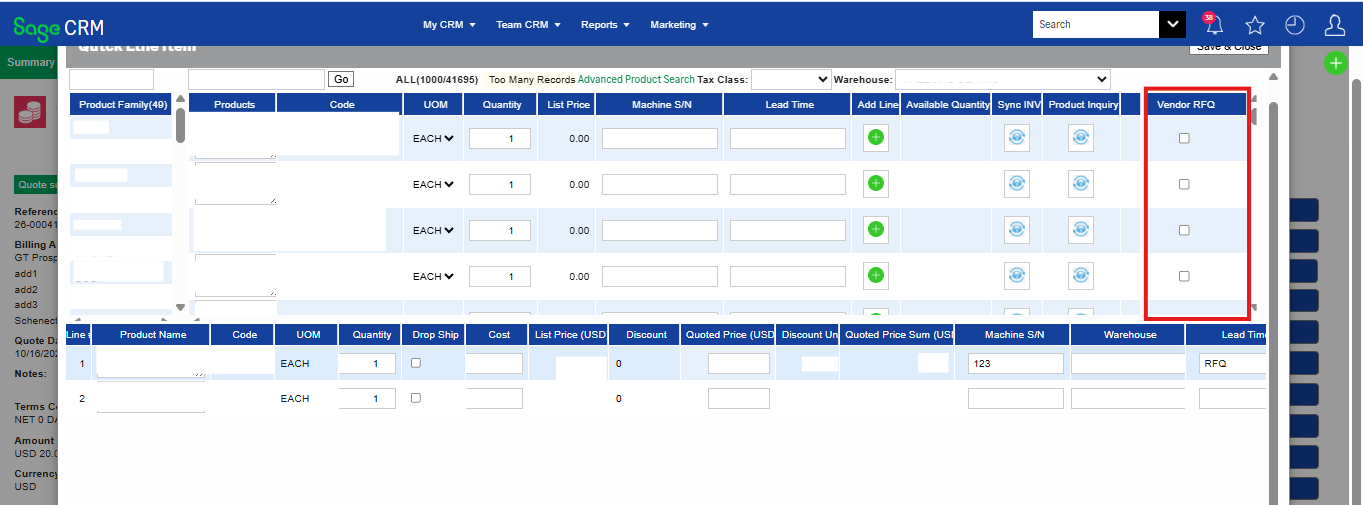
The RFQ checkbox is selected by default for miscellaneous items. If a user unchecks the checkbox for a quote line item and clicks Update, all associated Vendor RFQ records, including cloned records, are deleted.
Vendor RFQ records can be managed through a dedicated list and entry/edit screen, with a Vendor RFQ tab available within the Opportunity context. The standard New button is hidden so that initial records are created through the QLE process and remain associated with the appropriate quote line item.
Requesting Quotations from Multiple Vendors
The Vendor RFQ entity includes a Clone action that allows users to create additional quotation records for the same quote line item.
When a record is cloned, the Item Code, Item Description, and Quote Reference Number are carried forward. Other fields are cleared or reset so the new record can be completed for another vendor. Selecting a vendor is mandatory for a cloned record, and cloning is restricted if the parent Vendor RFQ does not have a vendor selected.
To maintain data accuracy, duplicate validation prevents records with the same combination of Vendor, Item Code, Quote Reference, and Quote Line Item ID. This validation applies when creating, editing, or cloning Vendor RFQ records.
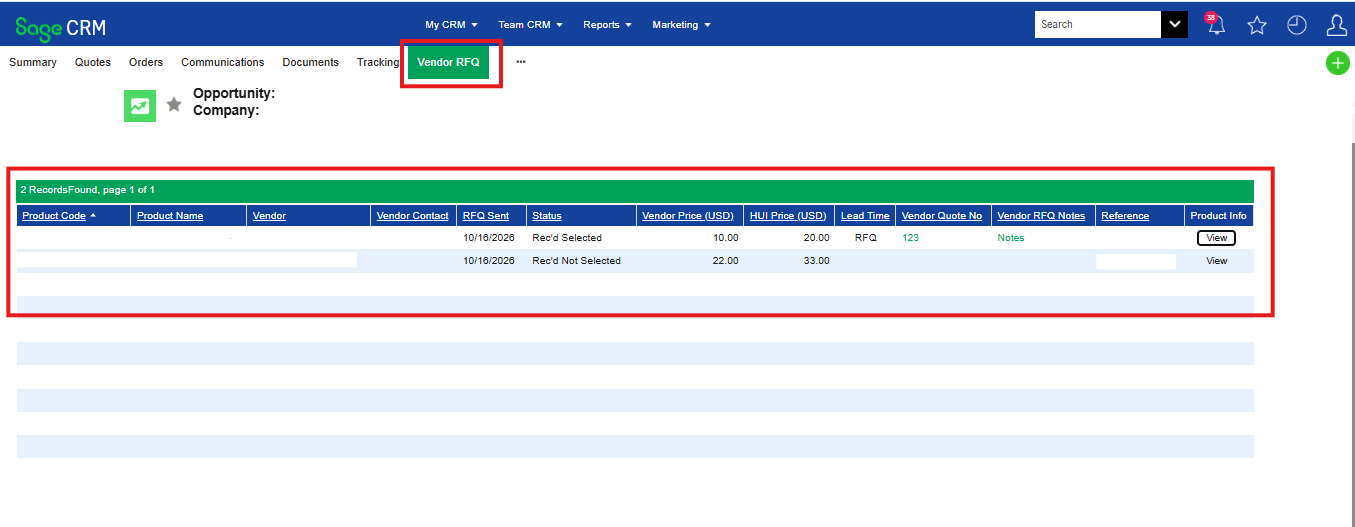
Managing Vendor RFQ Status and Selecting a Vendor
The Vendor RFQ Status defaults to Sent when a record is created. Users can change the status only after selecting a vendor.
When a Vendor RFQ status is changed to Rec’d Selected, the corresponding Quote Item is automatically updated with the selected vendor’s details:
- Vendor
- Cost
- Quoted Price
- Lead Time
All other Vendor RFQ records associated with the same quote line item are automatically marked as Rec’d Not Selected. This ensures that the preferred vendor is clearly identified for each quote line item.
Product Inquiry from the Vendor RFQ List
The Vendor RFQ list includes a Product Inquiry feature similar to the functionality available in QLE. Users can review relevant product and inventory information while evaluating vendor quotations, including:
- Item Code, Item Description, and Product Line
- Warehouse and inventory quantities, including Quantity on Hand, Quantity Available, and quantities on purchase, sales, back, and work orders
- Average Cost and Last Cost
- Last Received Date and Last Sold Date
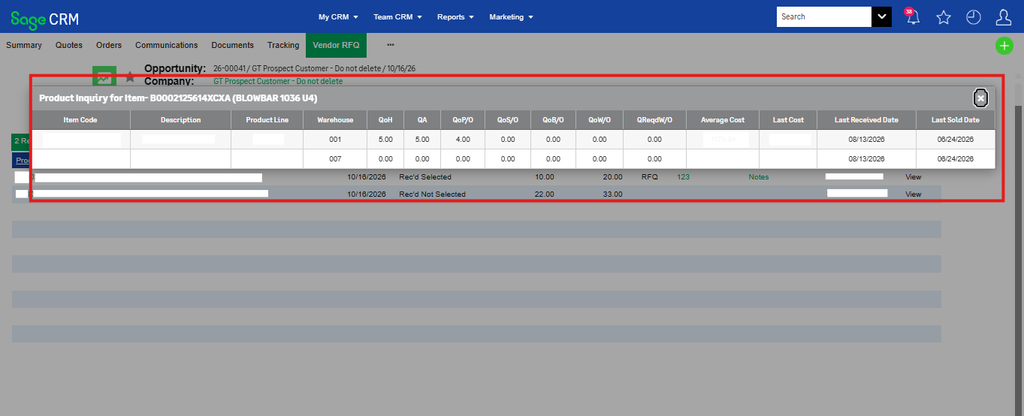
The quantity inquiry is restricted to the item associated with the Vendor RFQ, helping users review relevant product information during vendor selection.
Passing Selected Vendor Information to Sales Orders
Once a Vendor RFQ is marked as Rec’d Selected, the selected vendor details are updated on the corresponding Quote Item. During order conversion, the configured vendor information is passed to the Sage CRM Order and then promoted to the corresponding Sage 100 Order Line Items.
The information transferred includes Vendor Number, Cost, Quoted Price, and Lead Time, according to the configured field mappings. This reduces repetitive data entry and helps maintain consistency from vendor selection through order processing.
By bringing Vendor RFQ creation, multi-vendor quotation management, duplicate validation, product inquiry, vendor selection, and order integration into a connected workflow, this customization streamlines vendor quotation management in GUMU for Sage CRM–Sage 100.
About Us
Greytrix – a globally recognized and one of the oldest Sage Development Partners is a one-stop solution provider for Sage ERP and Sage CRM organizational needs. Being acknowledged and rewarded for multi-man years of experience and expertise, we bring complete end-to-end assistance for your technical consultations, product customizations, data migration, system integrations, third-party add-on development, and implementation competence.
Greytrix has some unique integration solutions developed for Sage CRM with Sage ERPs namely Sage X3, Sage Intacct, Sage 100, Sage 500, and Sage 300. We also offer best-in-class Sage ERP and Sage CRM customization and development services to Business Partners, End Users, and Sage PSG worldwide. Greytrix helps in the migration of Sage CRM from Salesforce | ACT! | SalesLogix | Goldmine | Sugar CRM | Maximizer. Our Sage CRM Product Suite includes add-ons like Greytrix Business Manager, Sage CRM Project Manager, Sage CRM Resource Planner, Sage CRM Contract Manager, Sage CRM Event Manager, Sage CRM Budget Planner, Gmail Integration, Sage CRM Mobile Service Signature, Sage CRM CTI Framework.
Greytrix is a recognized Sage Champion Partner for GUMU™ Sage X3 – Sage CRM integration listed on Sage Marketplace and Sage CRM – Sage Intacct integration listed on Sage Intacct Marketplace. The GUMU™ Cloud framework by Greytrix forms the backbone of cloud integrations that are managed in real-time for the processing and execution of application programs at the click of a button.
For more information on our integration solutions, please contact us at sage@greytrix.com. We will be glad to assist you.