
The newest version of Sage Intacct adds line-level approvals to the Purchasing module, which is a big improvement.
In the past, approvals were done at the transaction (header) level, which made things take longer, especially when more than one department or stakeholder was involved. With this new feature, approvals can now happen on each line, which speeds up the process and makes it more useful for everyone.
In most companies, one purchase order can include things that are for different departments, projects, or locations. Line-level approvals make sure that each person only sees what they need to see, instead of sending the whole transaction to multiple approvers.
Not only does this help with bottlenecks, but it also makes things more accountable and accurate.
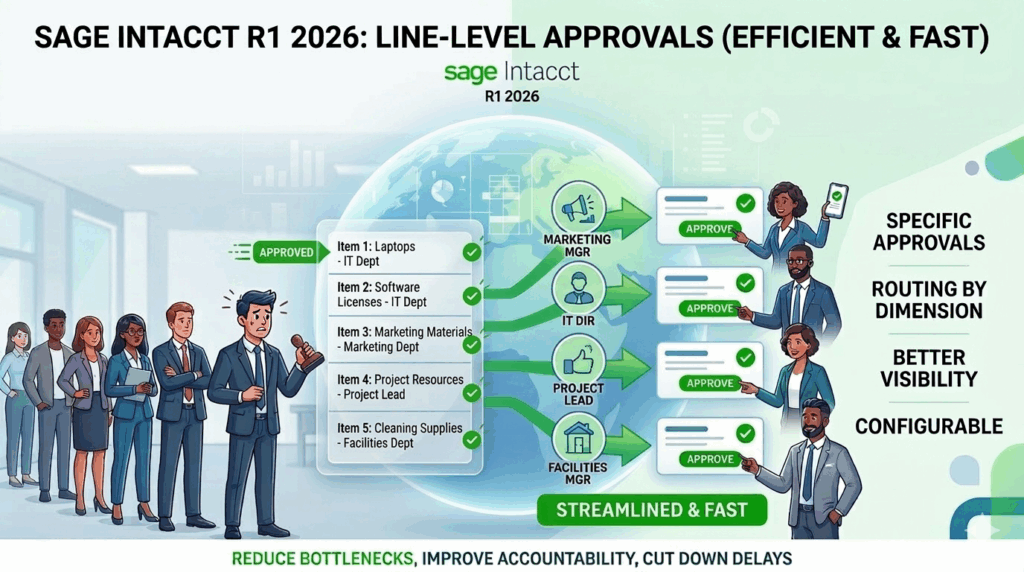
Key Highlights:
Approvals that are specific: Approvers can approve or deny specific line items or the whole transaction if they need to.
Routing by dimension: Approval requests can be automatically sent to the right person based on Department, Project, or Location, making sure that the right person looks at the right line.
Better visibility: You can easily see which lines have been approved, are still pending, or have been turned down in a single transaction.
Configurable: You can mix and match line-level and header-level approvals to fit the way your business works.
You can also set up notifications and delegate approvals to keep things moving even when someone isn’t available.
Approval rules are processed in the order they are set up.
It’s important to remember that line-level and value-based approvals can’t be used together as one rule. They are used one after the other, though.
For example, let’s say your policy for approving things includes:
Approval at the line level sent to department heads
A value-based approval for purchases over $100
If you make a purchase order for $150:
1. First, each line is sent to the manager of the department it belongs to.
2. After all of the line approvals are done
3. After that, the transaction is sent for value-based approval.
This step-by-step guide makes sure that everything is clear and under control at every stage.
Overview of setup
To turn on this feature:
To enable purchasing approvals, go to Purchasing > Setup > Configuration > Enable Purchasing approvals > Create or edit an approval policy.
Choose a type of rule:
- Line level by department
- Line level by place
- Line level by project
- Keep your settings safe.
Make sure that the right dimensions (Department, Location, Project) are turned on and given to managers.
Line-level approvals make purchasing workflows more useful and efficient. Organizations can speed up the process, improve ownership, and cut down on delays by allowing approvals at a detailed level.
About Us
Greytrix has a wide product range for Sage Intacct- a Cloud ERP. This includes migrations from QuickBooks | Sage 50 | Sage 100 | Sage 300 to Sage Intacct. Our unique GUMU™ integrations include Sage Intacct for Sage CRM | Salesforce | FTP/SFTP | Rev.io | Checkbook | Dynamics 365 CRM | Magento | Rent Manager | Treez | Avalara Avatax | Blackline SFTP. We also offer best-in-class Sage Intacct Development Services, Consulting services, integrated apps like POS | WMS | Payroll | Shipping System | Business Intelligence | eCommerce for Sage Intacct to Sage business partners, resellers, and Sage PSG worldwide. Greytrix constantly develops apps, products, and add-ons to enhance user experience. Sage Intacct add-ons include AR Lockbox File Processing.
Greytrix GUMU™ integration for Sage CRM – Sage Intacct, Sales Commission App for Sage Intacct, and Checkbook.io ACH/Digital Check Payments for Sage powered by GUMU™ are listed on Sage Intacct Marketplace.
The GUMU™ Cloud framework by Greytrix forms the backbone of cloud integrations that are managed in real-time for the processing and execution of application programs at the click of a button.
For more information on Sage Business Cloud Services, please contact us at sagecloud@greytrix.com. We will like to hear from you.