
The Purchase Order (PO) Report in Sage Intacct is essential to managing procurement procedures in Singapore Localization while guaranteeing compliance with GST regulations and company documentation standards. A purchase order is a legal document that is sent to suppliers to approve the acquisition of products or services under predetermined terms and conditions.
Businesses may maintain transparency, audit readiness, and consistency in vendor transactions with the help of the Singapore Localization PO Report, which offers a clear, structured, and GST-ready printable formats.
This report is a crucial aspect of the Singapore Localization Suite, especially for businesses that deal with GST reporting, multi-currency transactions, and taxable vendors.
New Stuff : Currency Codes Configuration for E-Invoicing in Singapore Localization Suite
In this blog, we are going to discuss about the Purchase Order(PO) Report in Singapore Localization with sage Intacct.
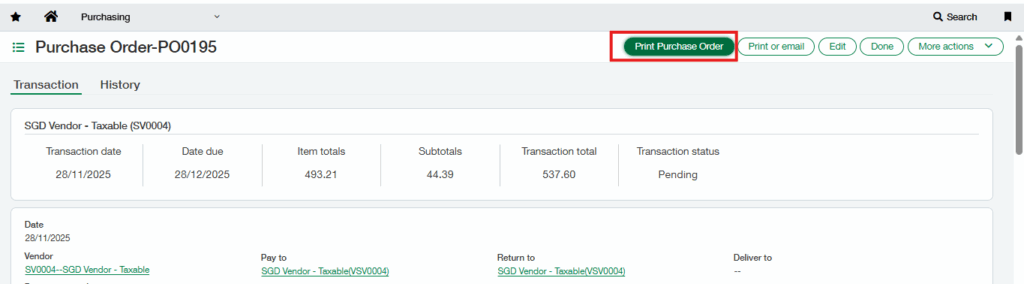


In the PO module, you can generate the Purchase Order(PO) Report in just a few steps. Select the transaction and click the “Print Purchase Order” button (Refer Fig.1). A dropdown will appear with a list of available report (Refer Fig. 2).From the list, choose “Portrait – Purchase Order”. Click the “Print Report”
button (Refer Fig. 3). The system will then generate the Purchase Order(PO) Report in the selected format (Refer Fig 4).
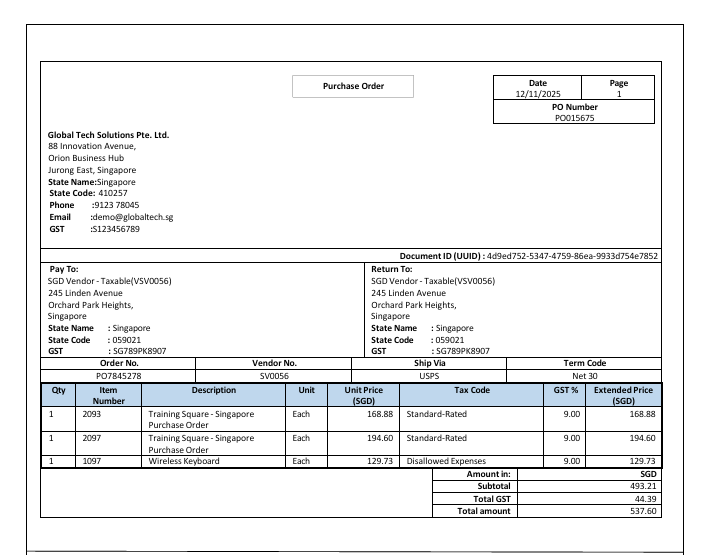
The Purchase Order(PO) Report in Singapore Localization captures essential fields from the Purchasing module’s Purchase Order screen and can be tailored to meet specific business requirements. It covers the following details:
- Purpose of the Document :
The Purchase Order Report is an official procurement document that serves as a legal and financial reference, facilitates GST-compliant vendor transactions, and verifies purchase intent with vendors. It also clearly outlines pricing, quantities, tax application, and delivery terms. This report makes sure that Sage Intacct’s Singapore Localization framework reliably and consistently records all purchase-related data.
- Company Details :
Capturers essential company details such as Company name ,address ,GST, Phone and Email.
- Purchase Order Details:
Fields include Purchase Order No. ,Purchase Order Date, Payment Term, Shipping Method, Vender Reference and Page No.
- Billing Details :
“Bill To” includes recipient’s address , GST Details , Stare name and Code .
- Shipping Details :
“Ship To” includes recipient’s address , GST Details , Stare name and Code.
- Transaction Details :
Transaction table provides an itemized breakdown, including:
- Item Number and Description
- Quantity and Unit
- Unit and Quantity
- Unit Price and Extended Price
- Tax Code
- GST Information
- Total
- Additional Information :
The report also includes:
- The Document ID (UUID) is automatically generated when the e-Invoicefor the Purchase Order(PO) is uploaded and generated through the e-invoicing portal.
- Total Tax Amount , Subtotal
- Total Amount
About Us :-
Greytrix – a globally recognized and one of the oldest Sage Development Partner is a one-stop solution provider for Sage ERP and Sage CRM organizational needs. Being acknowledged and rewarded for multi-man years of experience and expertise, we bring complete end-to-end assistance for your technical consultations, product customizations, data migration, system integrations, third party add-on development and implementation competence.
Greytrix has a wide product range for Sage Intacct- a Cloud ERP. This includes migrations from QuickBooks | Sage 50 | Sage 100 | Sage 300 to Sage Intacct. Our unique GUMU™ integrations include Sage Intacct for Sage CRM| Salesforce| FTP/SFTP | Rev.io | Checkbook| Dynamics 365 CRM | Magento | Rent Manager | Treez| Avalara Avatax | Blackline SFTP. We also offer best-in-class Sage Intacct Development Services, Consulting services, integrated apps like POS | WMS | Payroll |Shipping System | Business Intelligence | eCommerce for Sage Intacct to Sage business partners, resellers, and Sage PSG worldwide. Greytrix constantly develops apps, products, and add-ons to enhance user experience. Sage Intacct add-ons include AR Lockbox File Processing.
For more information on Sage Business Cloud Services, please contact us at sagecloud@greytrix.com. We will like to hear from you.