
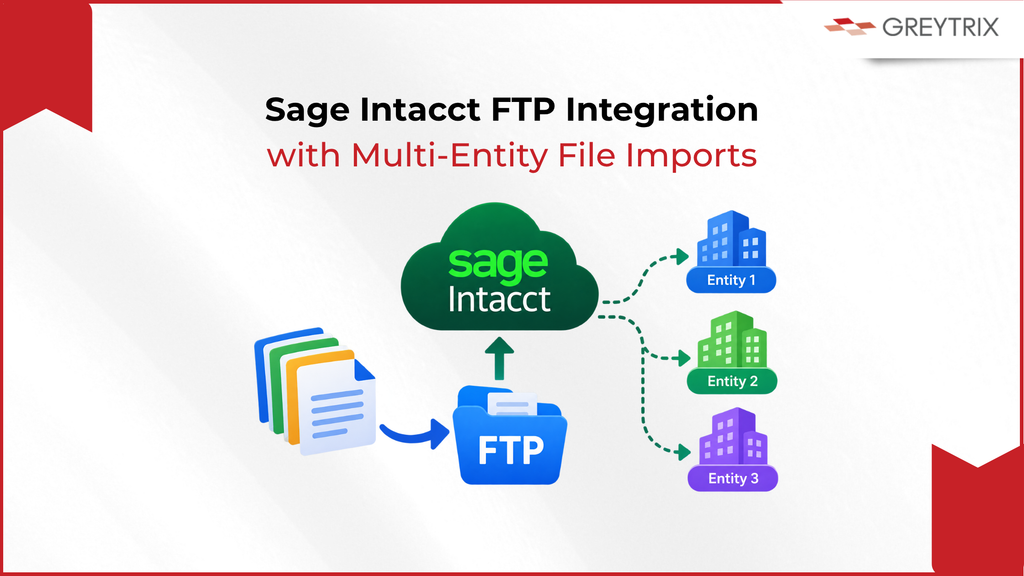
Every month, someone on the finance team exports a file from a system that will never connect to Sage Intacct directly.
They clean up the columns, check the totals, and key the result in or upload it by hand. It works until that person is on leave, and it stays fragile: one misaligned column can post wrong figures into the ledger, and nobody finds out until the numbers don’t tie at month-end.
That’s why modern businesses are replacing the manual hand-off with a Sage Intacct FTP integration like GUMU™’s FTP/SFTP connector.
GUMU™ for Sage Intacct FTP connector picks files up from FTP/SFTP, cloud storage or a bank server, maps them to the right Sage Intacct records and loads them on a schedule, with no API needed on the other side. Here’s where the manual process breaks, how the connector works, and what changes for finance once nobody is re-keying.
How Sage Intacct FTP Integration Works
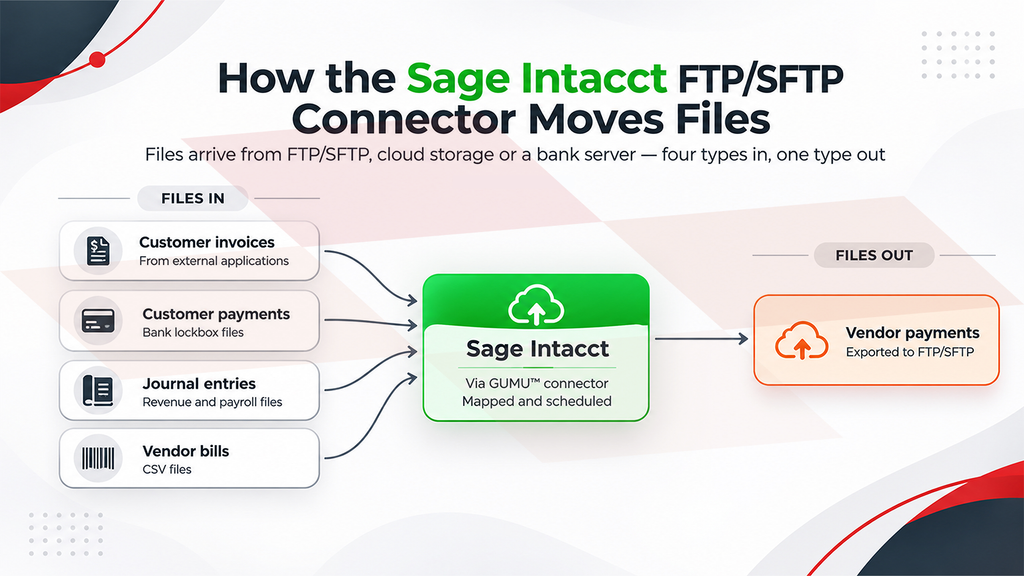
The GUMU™ connector treats the file as the interface. It reads CSV, Excel, text, JSON or XML files from an FTP or SFTP location, from OneDrive, Google Drive or Box, or from a bank server, and imports them into Sage Intacct as records: customers, invoices, payments, bills and more.
Setup starts with the connection: the FTP/SFTP host URL, the root directory where files are placed, the connection type (FTP or SFTP), the server’s configured port (commonly 22 for SFTP and 21 for FTP).
Imports can then be scheduled around how often new files arrive, so loading becomes a standing process rather than a task someone remembers. A last-sync date lets you re-run an integration from a chosen point when you need to.
Because it works from files, the system on the other side doesn’t need to offer an API at all. That is what makes this practical for the long tail of systems that sit around an ERP.
And it runs the other way too. Vendor payments are exported from Sage Intacct and placed on FTP/SFTP for the other system to pick up, which is how bills in a source system get closed.
Which Files Can You Import Into Sage Intacct
Most finance teams have the same handful of recurring files. Each one maps to a specific Sage Intacct record:
| File | What it becomes in Sage Intacct |
| Customer invoices from external applications | Customer invoices |
| Bank lockbox files | Customer payments |
| Revenue and payroll files | General ledger journal entries |
| Vendor bills (CSV) | AP bills |
| Customer and vendor lists | Customer and vendor master records |
| Vendor payments (outbound) | Exported from Sage Intacct to FTP/SFTP |
Each is a standing import: define the mapping once, schedule it, and the files load as they arrive.
Multi-Entity File Imports in Sage Intacct
If you run more than one entity in Sage Intacct, the file you receive rarely respects that boundary. A single accounts payable file from a supplier or billing platform can carry invoices for several of your companies at once. Without help, someone splits it by entity, uploads each piece separately, and hopes every invoice lands in the right company. Each of those steps is a chance to post something to the wrong entity, which later shows up as an intercompany difference or a consolidation adjustment.
The connector’s multi-company support removes the split. One import file can hold records for multiple Sage Intacct companies, and the connector decides the target company for each record. How a record points to its company is a mapping decision worth settling up front.
The business outcome is a cleaner multi-entity close. Once the mapping is settled, every entity’s invoices load in the same run, so close week isn’t spent tracing intercompany differences and consolidation adjustments back to a single misposted line. (For the accounting side of multi-entity setups, see our piece on multi-entity and multi-currency management in Sage Intacct.)
Benefits of Sage Intacct FTP Integration
Files are rarely in sync. A partner’s columns won’t match your Sage Intacct fields, one row may need to become several records, and codes or amounts may need reshaping on the way in.
The connector’s mapping handles this with string, numeric and custom expressions. It can import one CSV into many related objects, bring in several CSV files directly, and start from predefined data entities. Setup needs no programming: mapping and scheduling are configured, not coded. That also moves the transformation logic out of someone’s VLOOKUPs and macros and into configuration, where it can be reviewed and the next person isn’t reverse-engineering a spreadsheet.
For general ledger files, GUMU™ reads and validates the file, maps it to your chart of accounts and validates entries before import, so problems surface before entries are imported rather than at close.
None of that removes the design work. Someone still has to decide how a supplier’s file should translate into your chart of accounts, dimensions and entities, and those are the decisions worth settling before the first import runs, not after the first month-end.
Changes in the Ledger after Sage Intacct FTP Integration
Take the person out of the middle and the change shows up in the ledger, not just in the workload.
Postings follow the files. Imports are scheduled around how often files arrive, so vendor bills reach the AP subledger, lockbox payments reach AR as customer payments, and revenue and payroll files post as GL journal entries as the files land, not whenever someone gets to them. That should keep accruals, aging and cash position working from current subledger activity rather than whatever was last uploaded.
Reconciliation gets narrower. With no re-keying, there’s no duplicate entry between the source system and Sage Intacct, so the reconciling items a controller chases at close should be genuine discrepancies in the data, not keying errors introduced between export and entry. Tying a file’s control totals to posted subledger activity should become a quick check instead of a forensic exercise.
The process stops depending on one calendar. A scheduled import runs whether or not the person who used to do it is in the office.
Start With the File Someone Re-Keys Every Week
If your team has a recurring file that someone exports, reshapes and loads by hand, that’s the process to look at first. Three questions are usually enough to tell whether a file-based integration fits: what produces the file, how often does it arrive, and which Sage Intacct records does it need to become?
We’re happy to walk through your specific file, source and entity set. Talk to the Greytrix team, or read more about the Sage Intacct FTP/SFTP integration. The connector is also listed on the Sage Intacct Marketplace, and the same file-based approach powers our Sage Intacct to Blackline integration.
Related Reading
- Understanding GUMU™ Workflow for FTP/SFTP and Sage Intacct Integration
- Integration of General Ledger Transactions from FTP/SFTP to Sage Intacct through GUMU™
FAQ
1. What is the Sage Intacct FTP connector?
GUMU™ for Sage Intacct – FTP/SFTP Integration is a Greytrix connector that imports CSV, Excel, text, JSON and XML files from FTP/SFTP, OneDrive, Google Drive, Box Drive or a bank server into Sage Intacct as records such as customers, invoices, payments and bills.
2. Can Sage Intacct integrate with a system that has no API?
Yes, through files. The connector is designed to support external systems without APIs: if the other system can produce a file, the connector can map and load it.
3. How do I set up an FTP/SFTP connection for Sage Intacct?
The integration is configured with the FTP/SFTP host URL, the root directory for files, the connection type (FTP or SFTP), the port (for example 22 for SFTP and 21 for FTP) and the server username and password. Imports can then be scheduled around how often files arrive.
4. Does Sage Intacct SFTP integration require coding?
No programming skills are needed to map and schedule imports. How each file’s fields map to your Sage Intacct records is still a design decision worth planning with your implementation team.
5. Can one file load data into more than one Sage Intacct company?
Yes. The connector supports multi-company environments: records for several Sage Intacct companies can sit in a single import file, and the connector decides each record’s target company.
6. Does data only flow into Sage Intacct?
No. Alongside imports, vendor payments can be exported from Sage Intacct and placed on FTP/SFTP, which allows bills in the source system to be closed.
About Us
Greytrix has a wide product range for Sage Intacct- a Cloud ERP. This includes migrations from QuickBooks | Sage 50 | Sage 100 | Sage 300 to Sage Intacct. Our unique GUMU™ integrations include Sage Intacct for Sage CRM | Salesforce | FTP/SFTP | Rev.io | Checkbook | Dynamics 365 CRM | Magento | Rent Manager | Treez | Avalara Avatax | Blackline SFTP. We also offer best-in-class Sage Intacct Development Services, Consulting services, integrated apps like POS | WMS | Payroll | Shipping System | Business Intelligence | eCommerce for Sage Intacct to Sage business partners, resellers, and Sage PSG worldwide. Greytrix constantly develops apps, products, and add-ons to enhance user experience. Sage Intacct add-ons include AR Lockbox File Processing.
Greytrix GUMU™ integration for Sage CRM – Sage Intacct, Sales Commission App for Sage Intacct, and Checkbook.io ACH/Digital Check Payments for Sage powered by GUMU™ are listed on Sage Intacct Marketplace.
The GUMU™ Cloud framework by Greytrix forms the backbone of cloud integrations that are managed in real-time for the processing and execution of application programs at the click of a button.
For more information on Sage Business Cloud Services, please contact us at sagecloud@greytrix.com. We will like to hear from you.