
Sales tax management has entered a different phase in 2026. The challenge for finance teams is no longer simply keeping a table of tax rates or calculating the right amount at month-end. Tax rules are expanding into more digital products, services, advertising models, and transaction types, while businesses themselves continue to sell through more channels and across more jurisdictions. Avalara’s 2026 tax update, for example, points to expanding taxation of AI, digital goods and services, digital advertising, social media, and other emerging business models, with additional changes already scheduled for 2026.
At the same time, Sage has also introduced its AI Gateway to allow external AI solutions to connect with Sage Intacct through controlled APIs and the Model Context Protocol (MCP).
That creates a bigger question for businesses – “Is tax calculation still something the finance team manages separately, or should it happen as part of the financial transaction itself?”
With an Avalara Sage Intacct integration, the objective is different. Sage Intacct remains the financial system where the transaction originates, while Avalara handles the specialized tax calculation and the result is brought back into the ERP workflow.
So this article looks at more than simply how to integrate Avalara with Sage Intacct. It examines the current tax and technology environment, what happens when Avalara operates without a connected ERP workflow, how a Sage Intacct ERP tax integration changes that process.
What is the Avalara Sage Intacct integration?
The Avalara Sage Intacct integration connects Sage Intacct transactions with Avalara for sales tax calculation. When an invoice or credit memo is created, the required customer, address, item, and transaction data is sent to Avalara, the applicable tax is calculated, and the tax result is returned to Sage Intacct.
This allows businesses to incorporate tax calculation into their accounting workflow instead of manually calculating and entering tax separately.
Where Does Your Business Already Stand?
Five signals tend to show up before a business realizes it’s already exposed. Check honestly.
| Signal | What it means if true |
| You sell through more than one channel — POS, e-commerce, and direct invoicing. | Each channel may be taxing the same customer differently unless something is actively reconciling it. |
| You’ve crossed roughly $100K in sales in a state where you have no physical office. | The collection obligation already exists in that state, regardless of whether your system knows it. |
| You operate more than one legal entity under the same parent business. | Entity-specific tax treatment is likely being tracked manually, or not at all. |
| Tax rates get updated by someone checking periodically, not automatically. | The rate applied at the point of sale is only as current as the last manual check. |
| No state audit has ever confirmed your historical tax collection was fully accurate. | Absence of a finding isn’t the same as absence of exposure — it may just mean no one’s looked yet. |
Two or fewer checked: worth watching, not yet urgent. Three or more: this isn’t a future risk sitting on a roadmap — it’s exposure that already exists in your transaction history, waiting to be found by whoever looks first.
Why Integrate Avalara With Sage Intacct?
A growing business may already have a process for calculating sales tax. The problem is that the process can become increasingly difficult to maintain when transaction volume and business complexity increase.
For example, a finance team may need to deal with:
- Sales across multiple states and jurisdictions
- Different tax treatment for different products or services
- Multiple legal entities within Sage Intacct
- Customers with different billing and shipping locations
- Tax calculations on invoices and credit memos
- Tax-rule and rate changes
- New digital products, services, or sales channels
Sage Intacct itself supports sales and use tax automation and highlights its integration with Avalara as a way to calculate tax while keeping the accounting process connected to the ERP.
The important distinction is between having tax software and integrating tax software.
If Avalara is operating separately from Sage Intacct, the business may still have a gap between the transaction and the tax calculation. Someone—or another process—has to make sure the right transaction data reaches Avalara, the correct tax result comes back, and the accounting record reflects that result.
That gap becomes more significant as transaction volume increases.
With an Avalara integration with Sage Intacct, tax calculation can become part of the transaction workflow. Instead of treating tax as a separate finance activity, the relevant transaction information can move from Sage Intacct to Avalara for tax determination and the resulting tax information can return to Sage Intacct.
How the Sage Intacct Avalara Integration Actually Works
This is the specific mechanism worth understanding, because “integration” gets used loosely enough that it’s worth being precise about what actually happens.
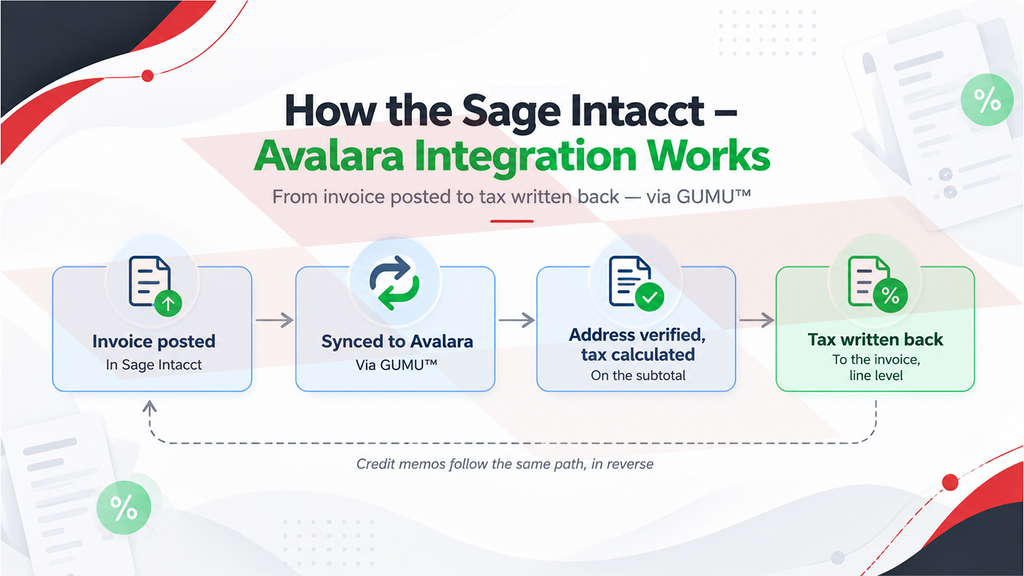
When an invoice is created in Sage Intacct, the required transaction information is passed to Avalara. Avalara uses that information to determine the applicable tax and returns the calculated amount to Sage Intacct.
The result is recorded against the relevant transaction, keeping the accounting process within Sage Intacct.
A similar workflow can be applied to credit memos, so tax handling does not stop at the original invoice.
A typical transaction flow
1. Create the transaction in Sage Intacct
The sales invoice is created as part of the normal accounting workflow.
2. Send transaction information to Avalara
Customer, address, item, and transaction information required for tax calculation is passed to Avalara.
3. Calculate tax
Avalara determines the applicable tax based on the transaction information.
4. Return the tax result
The calculated tax information is sent back to Sage Intacct.
5. Complete the accounting transaction
The transaction in Sage Intacct reflects the applicable tax without requiring the finance team to separately calculate and enter it.
This is the practical value of Sage Intacct tax calculation automation: tax determination becomes connected to the transaction instead of being handled as a separate manual process.
What Should You Consider Before Implementing the Integration?
The integration itself is only one part of the project. Configuration and testing determine whether it works properly within the business’s existing processes.
1. Customer and address information
Tax calculation depends on accurate transaction information. Customer and address data therefore needs to be reviewed as part of the integration.
2. Item and tax treatment
Products and services may not all receive the same tax treatment. Item configuration and mapping should be reviewed before transactions are processed through the integration.
3. Multi-entity requirements
Businesses operating multiple entities in Sage Intacct may need different configurations depending on how those entities conduct and record transactions.
4. Accounting configuration
The tax amount returned from Avalara needs to fit into the company’s Sage Intacct accounting structure. This makes GL and transaction mapping an important part of implementation.
5. Credit memos and adjustments
Tax automation shouldn’t be limited to new invoices. Credit memos and adjustments also need to be tested so that the accounting workflow remains consistent.
Greytrix can help businesses assess their existing Sage Intacct environment, configure the Avalara Sage Intacct integration, establish the required mappings, test transaction workflows, and implement the integration according to their accounting processes. Businesses looking for broader ERP guidance can also explore Greytrix’s Sage Intacct consulting and services.
What Is Changing in Sales Tax as 2026 Moves Toward 2027?
In its 2026 tax update, Chicago introduced a tax on social media advertising in January 2026, while Utah expanded sales tax to digital products and prewritten software in July 2026. Utah is also scheduled to begin taxing digital advertising services in January 2027.
Economic nexus rules are changing too. As of August 1, 2026, 17 states had eliminated the 200-transaction threshold from their economic nexus rules. That does not eliminate sales tax complexity; businesses still have to evaluate different revenue thresholds, taxable sales definitions, sourcing rules, and state-specific requirements.
There are transaction-level changes as well. Pennsylvania, for example, is moving to destination sourcing for certain local sales taxes in Philadelphia and Allegheny County beginning October 1, 2026.
If Avalara is used separately from Sage Intacct, the business may still have accurate tax technology, but the finance workflow can contain gaps between the transaction being created, the information being evaluated for tax purposes, and the final accounting record.
An integrated Sage Intacct ERP tax integration brings those stages closer together. The other major change is happening inside the finance function itself.
The August 2026 Sage Intacct update went further with AI-powered financial controls, including anomaly detection designed to identify unusual invoice activity earlier in the payment process.
Avalara is moving in a similar direction from the tax side. Its 2026 product and industry updates increasingly position tax and compliance around automation, AI agents, real-time calculation, and continuous compliance rather than isolated periodic processes. Avalara says its platform processes more than 54 billion transactions annually and supports millions of businesses worldwide.
It does suggest that finance technology is moving toward connected workflows in which systems exchange transaction data and perform specialized tasks without requiring employees to repeatedly move information between applications. That is where Sage Intacct tax calculation automation becomes relevant.
Is Your Sage Intacct–Avalara Workflow Ready for 2027?
If Avalara is already part of your tax process, the next question is whether it is fully connected to the way your finance team actually creates and records transactions.
If your team is still moving tax information between systems, manually checking calculations, reconciling tax amounts, or managing different workflows across entities, there may be an opportunity to improve the process.
Greytrix can help you evaluate where the current workflow stands and what it would take to connect Avalara with Sage Intacct through GUMU™.
From integration assessment and configuration to transaction mapping, testing, and implementation, Greytrix can help build a tax workflow around the way your business operates—not force your finance team into a generic process.
Talk to Greytrix about your Sage Intacct–Avalara integration. Identify the gaps in your current tax workflow, understand what can be automated, and plan an implementation that keeps tax calculation connected to your financial transactions as your business moves into 2027.
FAQs:
1. What is the Sage Intacct Avalara integration?
It’s a native connection — built by Greytrix as part of the GUMU™ integration suite — that syncs sales invoices and credit memos from Sage Intacct to Avalara for real-time tax calculation, then writes the calculated tax back into Sage Intacct at the line level.
2. How does Avalara integration with Sage Intacct handle multi-entity businesses?
Each legal entity in Sage Intacct is treated as its own company for tax purposes, so entity-specific tax rules apply automatically rather than requiring manual tracking across entities.
3. Is Avalara Sage Intacct integration real-time?
Yes — tax is calculated at the point the sales invoice or credit memo posts in Sage Intacct, not on a batch or periodic schedule, which is what allows errors to be caught before the transaction reaches the customer rather than during an audit months later.
About Us
Greytrix has a wide product range for Sage Intacct- a Cloud ERP. This includes migrations from QuickBooks | Sage 50 | Sage 100 | Sage 300 to Sage Intacct. Our unique GUMU™ integrations include Sage Intacct for Sage CRM | Salesforce | FTP/SFTP | Rev.io | Checkbook | Dynamics 365 CRM | Magento | Rent Manager | Treez | Avalara Avatax | Blackline SFTP. We also offer best-in-class Sage Intacct Development Services, Consulting services, integrated apps like POS | WMS | Payroll | Shipping System | Business Intelligence | eCommerce for Sage Intacct to Sage business partners, resellers, and Sage PSG worldwide. Greytrix constantly develops apps, products, and add-ons to enhance user experience. Sage Intacct add-ons include AR Lockbox File Processing.
Greytrix GUMU™ integration for Sage CRM – Sage Intacct, Sales Commission App for Sage Intacct, and Checkbook.io ACH/Digital Check Payments for Sage powered by GUMU™ are listed on Sage Intacct Marketplace.
The GUMU™ Cloud framework by Greytrix forms the backbone of cloud integrations that are managed in real-time for the processing and execution of application programs at the click of a button.
For more information on Sage Business Cloud Services, please contact us at sagecloud@greytrix.com. We will like to hear from you.