
In the previous parts of this blog series, we explored the fundamental communication mechanisms available in Lightning Web Components (LWC):
Part 1 – focused on Child-to-Parent communication using custom events.
Part 2 – covered Parent-to-Child communication using public (@api) properties and methods.
In this third part, we build on those foundational concepts and address a common real-world LWC scenario – sibling-to-sibling communication using a shared parent component.
What is Sibling Communication in LWC?
Sibling components in Lightning Web Components are components that:
- Exist under the same parent component
- Do not have a direct relationship with each other
In LWC, sibling components cannot communicate directly. Any data exchange between them must always be routed through their common parent component.
Communication Flow
The communication follows a predictable and structured pattern:
- Sibling Component A sends data to the Parent Component
- The Parent Component processes and stores the data
- The Parent Component passes the data to Sibling Component B
This approach ensures:
- Loose coupling between components
- Clear and predictable data flow
- Better maintainability and scalability
Business Use Case
To better understand sibling-to-sibling communication in LWC, let’s look at a simple and practical example.
Scenario
The application consists of:
- An Input Component where a user enters text
- A Display Component that shows the entered text
- A Container Component that acts as the parent
Requirement
Whenever the user types something in the Input Component, the same value should immediately appear in the Display Component.
Step 1: Child-to-Parent Communication (Input Component)
The Input Component captures user input and notifies the parent using a custom event.
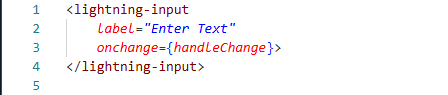
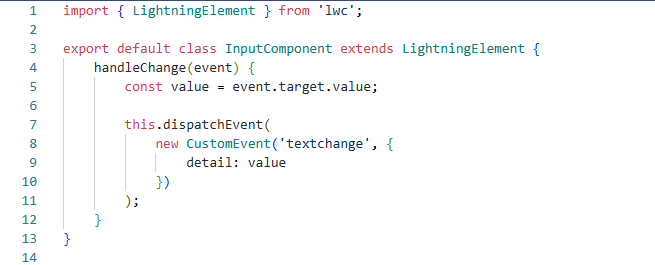
At this point:
- The child component only handles user interaction
- No logic related to other components is added
Step 2: Parent Component Handles the Event
The parent component listens to the custom event and stores the value received from the Input Component.
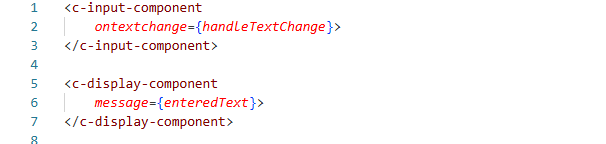
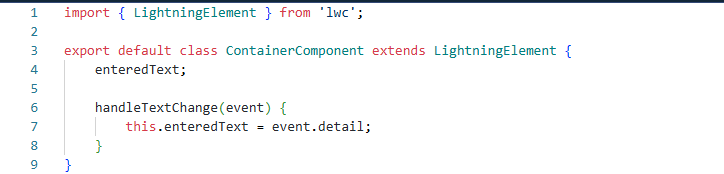
The parent component now:
- Acts as a mediator between sibling components
- Maintains shared state
- Controls the data flow
Step 3: Parent-to-Child Communication (Display Component)
The Display Component receives the value from the parent using a public property.

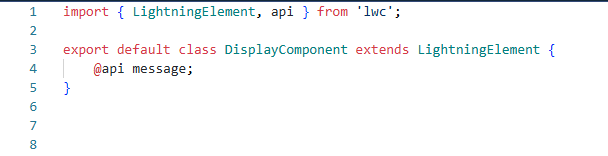
Whenever the value changes in the parent component, the Display Component automatically updates to reflect the new data.
How the Communication Works
The complete communication cycle works as follows:
- User enters text in Input Component
- Input Component sends data to the parent using a custom event
- Parent Component receives and stores the value
- Parent passes the value to Display Component
- Display Component reflects the updated data
Conclusion
Sibling-to-sibling communication is a natural extension of the core Lightning Web Components communication patterns. By routing communication through a common parent component, developers can design clean, scalable, and maintainable UI architectures in Salesforce.
This approach keeps sibling components independent while allowing them to work together seamlessly.
By following the above blog instructions, you will be able to learn “Sibling-to-Sibling Communication in LWC Using a Common Parent – A Complete Guide (Part 3)“. If you still have queries or any related problems, don’t hesitate to contact us at salesforce@greytrix.com. More details about our integration product are available on our website and Salesforce AppExchange.
We hope you may find this blog resourceful and helpful. However, if you still have concerns and need more help, please contact us at salesforce@greytrix.com.
About Us
Greytrix – a globally recognized and one of the oldest Sage Development Partner and a Salesforce Product development partner offers a wide variety of integration products and services to the end users as well as to the Partners and Sage PSG across the globe. We offer Consultation, Configuration, Training and support services in out-of-the-box functionality as well as customizations to incorporate custom business rules and functionalities that require apex code incorporation into the Salesforce platform.
Greytrix has some unique solutions for Cloud CRM such as Salesforce Sage integration for Sage X3, Sage 100 and Sage 300 (Sage Accpac). We also offer best-in-class Cloud CRM Salesforce customization and development services along with services such as Salesforce Data Migration, Integrated App development, Custom App development and Technical Support business partners and end users. Salesforce Cloud CRM integration offered by Greytrix works with Lightning web components and supports standard opportunity workflow. Greytrix GUMU™ integration for Sage ERP – Salesforce is a 5-star rated app listed on Salesforce AppExchange.
The GUMU™ Cloud framework by Greytrix forms the backbone of cloud integrations that are managed in real-time for processing and execution of application programs at the click of a button.
For more information on our Salesforce products and services, contact us at salesforce@greytrix.com. We will be glad to assist you.
Related Posts
- Child-to-Parent Communication in LWC – A Complete Guide (Part 1)
- Parent-to-Child Communication in LWC – A Complete Guide (Part 2)
- Displaying Types of Toast Message in Lightning Web component.
- Navigation Service in LWC
- Key Event/Listener in LWC
- How to Notify User about Unsaved Changes on the UI using Lightning Component