
In standard Sage 300, there is no screen dedicated to generating Picklists. While Sage 300 only provides Order Entry and Shipment functionalities. While many organizations require a focused process to identify which items need to be picked from which orders and in what sequence before shipments are processed.
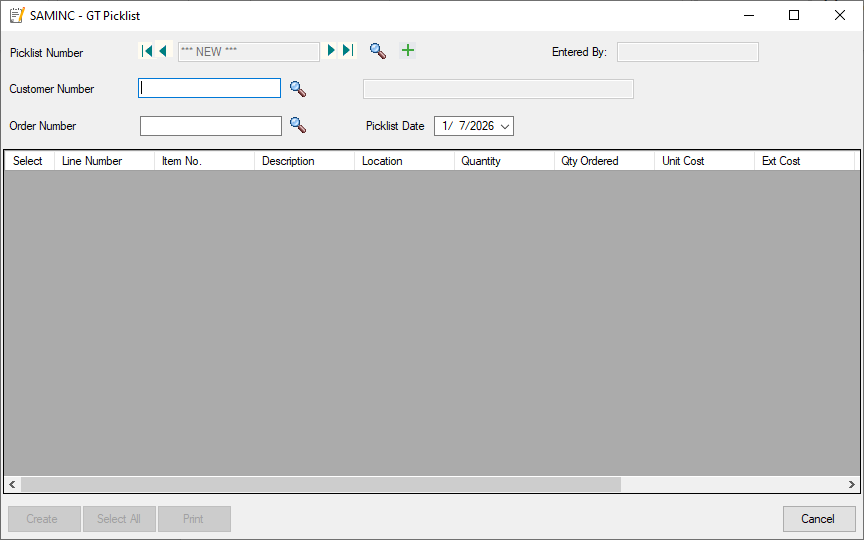
To address this we developed a custom picklist screen that integrates seamlessly with the Sage 300 workflow. In this blog we will go through the purpose, logic and features of the custom picklist screen and its functionality.
Why a custom picklist?
Most of the warehouses follows a structured workflow:
1. Sales Order created
2. Picklist prepared
3. Items picked from the warehouse
4. Shipment created
5. Invoice posted
However in Sage 300 it allows you to jump directly from Order Entry to Shipment with no picklist feature.
This can lead to challenges such as:
1. Warehouse staff not knowing which items needed to be picked without printing the entire sales order.
2. Difficulty in preventing picking for already-shipped orders.
Since our custom picklist screen solves these gaps by introducing a dedicated step between order entry and shipment.
What Our Custom Picklist Screen Does:
1. Shows Orders That Are Not Shipped Yet
The custom screen has displays only those orders that meet the below following criteria’s :
- Order exists in Order Entry.
- Order is not yet converted to a Shipment.
- Orders which are still open or in an active status.
- This prevents confusion and ensures that users need to generate the picklists only for valid orders and pending orders.
2. Allows Generating a picklist with One Click
- Once the user selects the order in our custom picklist screen.
- It reads the order header and detail lines.
- Creates a new picklist and stores the record in the custom view table.
- It stores the order details such as order number, item number, quantities, warehouse locations and other order information.
Each generated Picklist is assigned a unique Picklist Number similar to how Sage 300 assigns numbers for OE Transactions.
3. Enables Printing the Picklist Immediately
- After creating the Picklist, the system allows the user to Preview the Picklist report and print it.
- Also it can Export it as PDF, Excel, or other formats (based on Crystal Reports or custom reporting engine).
This Picklist document becomes the official document used by warehouse staff to perform physical picking of the item.
Workflow After Generating the Picklist
1. Once the picklist is printed and items are picked.
2. The warehouse picks items according to the picklist.
3. This creates a controlled and reliable process.
Benefits of Our Custom Picklist Solution
1. Adds a missing feature to Sage 300
2. Prevents duplicate picking for shipped orders
3. Improves warehouse efficiency
4. Ensures clean separation between picking and shipping
5. Supports audit and tracking of warehouse activities
6. Fully customizable to meet company-specific requirements
About Us
Greytrix – a globally recognized and one of the oldest Sage Development Partners is a one-stop solution provider for Sage ERP and Sage CRM organizational needs. Being acknowledged and rewarded for multi-man years of experience, we bring complete end-to-end assistance for your technical consultations, product customizations, data migration, system integrations, third-party add-on development, and implementation competence.
Greytrix offers unique GUMU™ integrated solutions of Sage 300 with Sage CRM, Salesforce(listed on Salesforce Appexchange), Dynamics 365 CRM, and Magento eCommerce, along with Sage 300 Migration from Sage 50 US, Sage 50 CA, Sage PRO, QuickBooks, Sage Business Vision and Sage Business Works. We also offer best-in-class Sage 300 customization and development services and integration services for applications such as POS | WMS | Payroll | Shipping System | Business Intelligence | eCommerce for Sage 300 ERP and for Sage 300c development services we offer, upgrades of older codes and screens to new web screens, latest integrations using Data and web services to Sage business partners, end users and Sage PSG worldwide.
Greytrix offers 20+ add-ons for Sage 300 to enhance productivity such as GreyMatrix, Document Attachment, Document Numbering, Auto-Bank Reconciliation, Purchase Approval System, Three-way PO matching, Bill of Lading, and VAT for the Middle East. The GUMU™ integration for Dynamics 365 CRM – Sage ERP is listed on Microsoft Appsource with an easy implementation package.
The GUMU™ Cloud framework by Greytrix forms the backbone of cloud integrations that are managed in real-time for processing and execution of application programs at the click of a button.
For more details on Sage 300 and Sage 300c Services, please contact us at accpac@greytrix.com, We will like to hear from you.