
The GUMU™ for Sage CRM – Sage 100 Integration is a real-time, bi-directional link that seamlessly connects Sage CRM and Sage 100 where users can view and analyze customers, vendors and sales information data from either of the systems Sage CRM to Sage 100 and vice versa.
In today’s fast-paced business environment, keeping your CRM and ERP systems perfectly aligned is critical for operational efficiency and accurate reporting. With the GUMU™ for Sage CRM – Sage 100 Integration, organizations can seamlessly synchronize data between systems while eliminating manual effort and ensure data consistency to meet their business needs.
In this blog, we will walk you through a valuable client-requested customization designed to automatically update Opportunity status fields in Sage CRM when the corresponding order is completed in Sage 100. By leveraging Windows Scheduler and GUMU integration capabilities, businesses can streamline their sales lifecycle and improve visibility across systems.
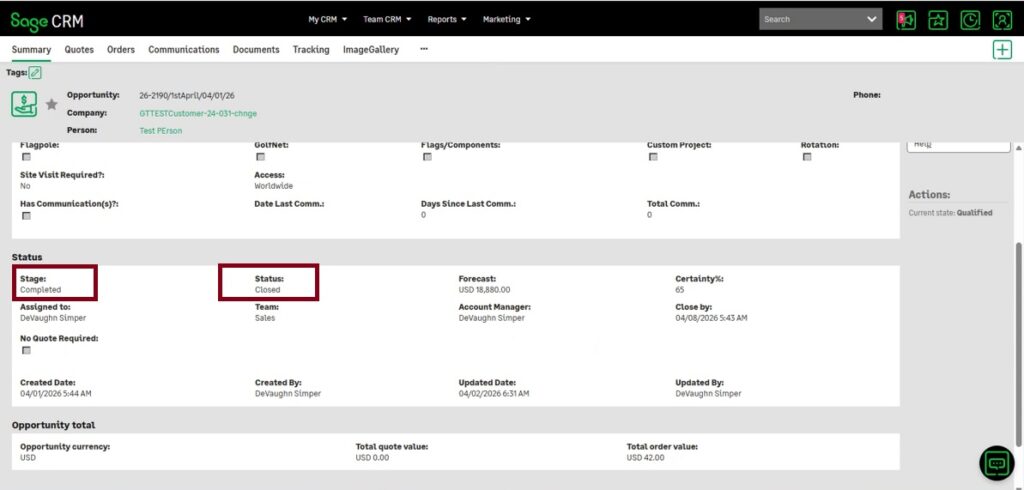
In order to address this requirement we came up with the solution that whenever a promoted Sage 100 order linked to a CRM Opportunity is shipped and marked as Completed in Sage 100, the following fields in Sage CRM are automatically updated:
- Opportunity Stage (
oppo_stage) → Completed - Opportunity Status (
oppo_status) → Closed
This automation is possibly implemented via Windows Scheduler, on a specific daily interval of synchronization without user intervention.
How It Works
- Opportunity Promotion
A sales opportunity(Sales Quote->Sales order) in Sage CRM is promoted to a Sage 100 order via GUMU integration. - Order Processing in Sage 100
The order progresses through fulfillment and is eventually marked as Completed in Sage 100. - Scheduled Synchronization
Windows Scheduler is configured to run at scheduled nightly intervals outside the client’s business hours, where it reads processed/completed orders from Sage 100. - Automatic CRM Update
GUMU detects the completed order status and updates the linked opportunity in Sage CRM:
a. Marks the opportunity as Completed
b. Sets its status to Closed
Key Use Cases
1. Sales Lifecycle Automation: Sales teams no longer need to manually revisit and close opportunities once orders are fulfilled. The system handles it automatically.
2. Accurate Pipeline Management: Open opportunities reflect only active deals, ensuring your pipeline data is always current and reliable.
3. Cross-System Consistency: Maintains synchronization between Sage CRM and Sage 100, eliminating discrepancies between sales and operations.
4. Reduced Administrative Work: Minimizes repetitive updates by sales or admin teams, freeing them to focus on revenue-generating activities.
Conclusion
Automating opportunity closure based on order completion is a simple yet impactful enhancement in GUMU for Sage CRM–Sage 100 integration. By using Windows Scheduler , businesses can ensure accurate data, reduce manual effort, and improve transparency between either of the Sage CRM and Sage 100 integrated systems.