
Document management plays a vital role in any CRM system. In Sage CRM, every entity—such as Company, Case, and Opportunity—has its own Documents tab where users can upload and manage attachments. However, the Documents tab displays only the documents associated with that specific record. For example, the Documents tab on a Case shows only Case-related documents, while the Documents tab on an Opportunity displays only Opportunity-related documents.
When users need to view all documents related to a company, they often have to navigate through multiple entities, making the process time-consuming and inefficient.
To simplify document access, we implemented a customization using the standard “Comp_LibraryDir” field. This enhancement provides a centralized view of all documents stored within the company’s library, including documents uploaded against the Company, Cases, Opportunities, and other child entities.
New Stuff: Automating Import and Validation in Sage CRM
Although Sage CRM provides a Documents tab for each entity, it displays only the documents associated with that individual record.
For example:
- The Company Documents tab displays only Company documents.
- The Case Documents tab displays only documents uploaded for that Case.
- The Opportunity Documents tab displays only Opportunity-related documents.
As a result, users who need to locate a document related to a company may have to open multiple Cases, Opportunities, or other related records before finding the required file.
The objective of this customization was to provide a single access point where users could view all documents stored in the company’s library without navigating through multiple CRM screens.
The customization includes:
- Displaying the standard “Comp_LibraryDir” field on the Company Top content screen.
- Converting the library path into a clickable hyperlink. Refer below screenshot.
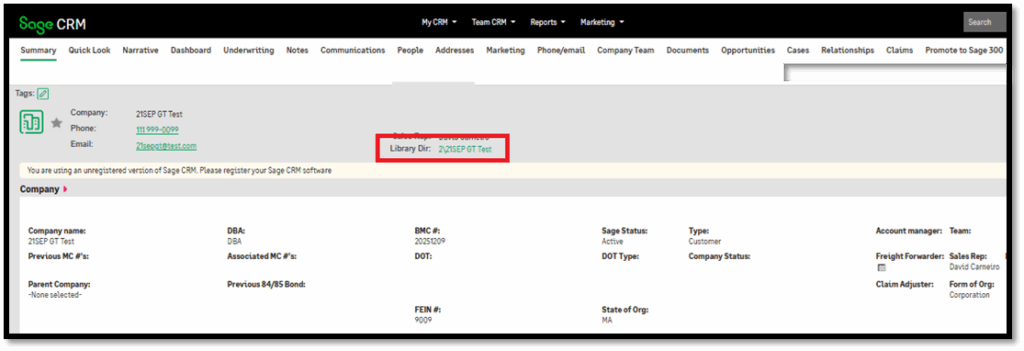
- Opening the company’s library directory directly from the Company screen.
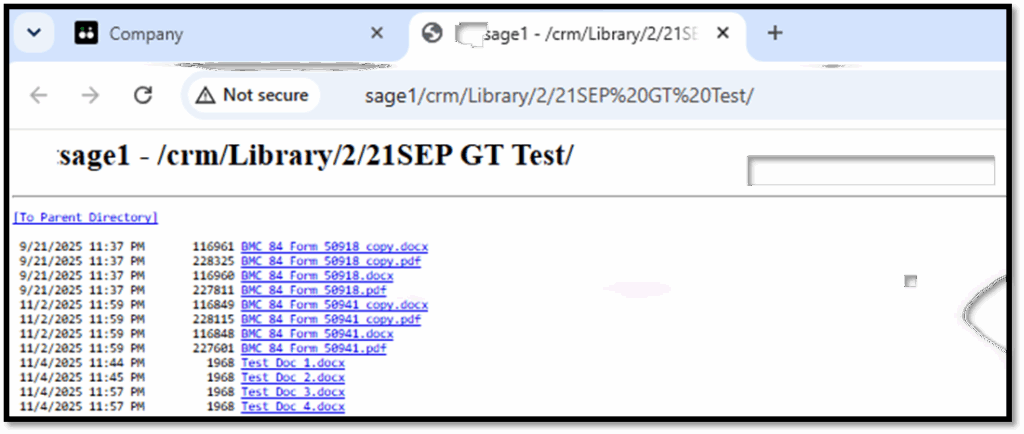
- Displaying all documents stored within the company library, regardless of the entity against which they were uploaded.
- Allowing users to open or download documents with a single click. Refer the below screenshot.
Benefits of the Customization
This enhancement provides several advantages:
- Centralized document access from the Company Summary screen.
- Access to documents across multiple related entities from a single location.
- Reduced navigation, as users no longer need to open individual Cases or Opportunities to search for attachments.
- Faster document retrieval, improving day-to-day productivity.
- Improved user experience through quick and intuitive access to the company library.
- Leverages standard Sage CRM functionality, with no changes to the existing document storage mechanism.
About Us
Greytrix – a globally recognized and one of the oldest Sage Development Partners is a one-stop solution provider for Sage ERP and Sage CRM organizational needs. Being acknowledged and rewarded for multi-man years of experience and expertise, we bring complete end-to-end assistance for your technical consultations, product customizations, data migration, system integrations, third-party add-on development, and implementation competence.
Greytrix has some unique integration solutions developed for Sage CRM with Sage ERPs namely Sage X3, Sage Intacct, Sage 100, Sage 500, and Sage 300. We also offer best-in-class Sage ERP and Sage CRM customization and development services to Business Partners, End Users, and Sage PSG worldwide. Greytrix helps in the migration of Sage CRM from Salesforce | ACT! | SalesLogix | Goldmine | Sugar CRM | Maximizer. Our Sage CRM Product Suite includes add-ons like Greytrix Business Manager, Sage CRM Project Manager, Sage CRM Resource Planner, Sage CRM Contract Manager, Sage CRM Event Manager, Sage CRM Budget Planner, Gmail Integration, Sage CRM Mobile Service Signature, Sage CRM CTI Framework.
Greytrix is a recognized Sage Champion Partner for GUMU™ Sage X3 – Sage CRM integration listed on Sage Marketplace and Sage CRM – Sage Intacct integration listed on Sage Intacct Marketplace. The GUMU™ Cloud framework by Greytrix forms the backbone of cloud integrations that are managed in real-time for the processing and execution of application programs at the click of a button.
For more information on our integration solutions, please contact us at sage@greytrix.com. We will be glad to assist you.