
Ask any controller or accounting manager what they dread most each month, and there’s a good chance “closing the books” comes up before anything else. It’s not that the work itself is impossible — it’s that the process is scattered. A spreadsheet here, a Slack message there, a sticky note reminding someone to run the reconciliation before the 5th. By the time everything is pulled together, half the month is gone and nobody’s entirely sure what actually got done versus what just felt done.
That chaos is exactly what a Sage Intacct checklist is built to fix. It’s one of those features that doesn’t get much attention in product demos, but once a finance team starts using it, it’s hard to imagine going back to the old way of tracking things.
So, What Exactly Is a Checklist in Sage Intacct?
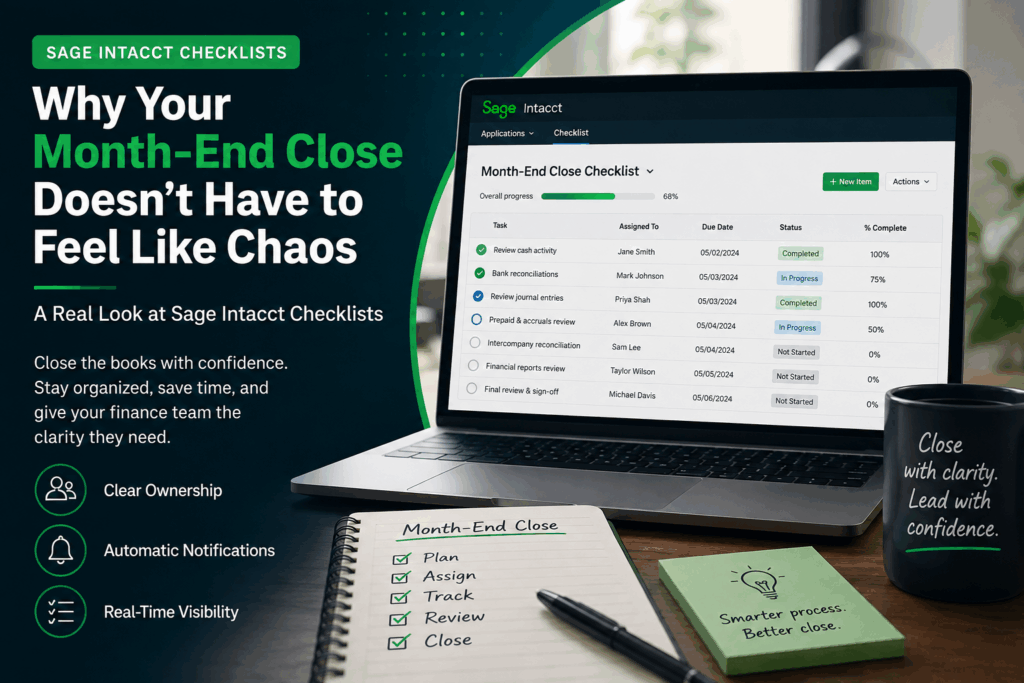
Think of it as a task manager built specifically for accounting workflows — because that’s essentially what it is. Instead of juggling separate spreadsheets and calendar reminders, you build a checklist directly inside Intacct for whatever recurring process you’re managing: month-end close, year-end close, an audit prep list, or really any set of tasks your team runs on a regular cycle.
Every item on that checklist gets assigned to a specific person, given a due date, and tracked from start to finish. No more sending three follow-up emails to figure out if the bank rec is done. No more relying on someone’s memory. It’s all sitting in one place, visible to whoever needs to see it.
Why Finance Teams Actually Like Using Them
If you ask people why they’ve stuck with checklists once they start, the answer almost always comes back to visibility. When the entire team is pulling from the same list, there’s a lot less back-and-forth. Nobody has to ask “did you finish that yet?” because the status is right there. And for managers, it means spotting a bottleneck before it turns into a missed deadline, rather than finding out about it after the fact.
A few other things teams tend to appreciate:
- Ownership is clear. Every task has a name attached to it — there’s no ambiguity about who’s responsible.
- Notifications happen automatically. Assignees get an email the moment something lands on their plate, so nothing slips through the cracks.
- Reassigning work is painless. Priorities shift, people go on vacation, staffing changes happen — moving a task to someone else takes seconds.
- The process stays consistent. Instead of reinventing the wheel every close, the same structure carries over period after period.
- Progress is visible in real time. No need to wait for a status meeting to know where things stand.
Getting One Set Up Isn’t Complicated
This is probably the part people worry about most, and honestly, it’s the easiest part. You can build a checklist from the ground up, or — if you already ran one last month — just duplicate it and tweak whatever needs updating for the new period. Once it’s saved, Intacct takes care of the rest: assignments get created automatically, and the right people get notified without you having to lift a finger.
From there, your team just works through their items, updating status as they go. No follow-up emails required. It quietly runs in the background while everyone focuses on the actual accounting work instead of managing the process around it.
Keeping Tabs on Where Things Stand
Once assignments are live, you can view them individually, filter by team member or status, or pin them right on a dashboard so they’re visible at a glance. As each person works through their tasks, they update their percent complete, which gives managers a real-time snapshot of exactly where the close stands — no guessing, no chasing people down to ask if the final review happened yet.
For more info: Checklists
What It Looks Like in Practice
If you’re the kind of person who wants to see the mechanics before committing to a new process, Intacct’s own training resources are worth a look. The Sage Intacct Video Library has short walkthroughs on building checklists, creating assignments, and monitoring status — useful if you want to move at your own pace before rolling it out to your team.
The Bigger Picture
None of this is about adding more process for the sake of process. It’s about giving finance teams back the time they currently spend chasing status updates and hoping nothing got missed. A checklist won’t make month-end close disappear — that’s still real work — but it does remove a lot of the noise around it, and that alone tends to make the whole period feel more manageable.
If your close process still runs on a patchwork of spreadsheets, reminders, and tribal knowledge, it might be worth sitting down with someone who’s set these up before. A properly configured checklist takes a bit of upfront thought, but the payoff shows up every single month after that.
About Us
Greytrix has a wide product range for Sage Intacct- a Cloud ERP. This includes migrations from QuickBooks | Sage 50 | Sage 100 | Sage 300 to Sage Intacct. Our unique GUMU™ integrations include Sage Intacct for Sage CRM | Salesforce | FTP/SFTP | Rev.io | Checkbook | Dynamics 365 CRM | Magento | Rent Manager | Treez | Avalara Avatax | Blackline SFTP. We also offer best-in-class Sage Intacct Development Services, Consulting services, integrated apps like POS | WMS | Payroll | Shipping System | Business Intelligence | eCommerce for Sage Intacct to Sage business partners, resellers, and Sage PSG worldwide. Greytrix constantly develops apps, products, and add-ons to enhance user experience. Sage Intacct add-ons include AR Lockbox File Processing.
Greytrix GUMU™ integration for Sage CRM – Sage Intacct, Sales Commission App for Sage Intacct, and Checkbook.io ACH/Digital Check Payments for Sage powered by GUMU™ are listed on Sage Intacct Marketplace.
The GUMU™ Cloud framework by Greytrix forms the backbone of cloud integrations that are managed in real-time for the processing and execution of application programs at the click of a button.
For more information on Sage Business Cloud Services, please contact us at sagecloud@greytrix.com. We will like to hear from you.