
Imagine your finance team closing every month with job costs, change orders, and billing accurate and already in place, without manual spreadsheet work. According to Gartner, companies whose accounting teams readily accept their technology see a 75% reduction in financial errors. In construction, that accuracy can reach every project, each with its own budget, contract terms, and billing, often across several entities.
Software like Sage Intacct for construction helps companies manage that financial complexity by bringing job costing, WIP reporting, billing, and multi-entity reporting into one platform.
What Makes Construction Finance Complex
Construction finance has many moving parts, and they keep changing while your projects are underway. Each job has its own budget, schedule, and contract terms, and its costs are spread across labour, materials, equipment, and subcontractors. Committed and actual costs differ until invoices arrive, and change orders shift budgets and contract values along the way. Billing moves with the work, so over- and under-billing positions need regular attention, and when several entities report separately, they have to be brought into one picture before month-end close.
Managing all of this on spreadsheets and general-purpose accounting tools takes more effort with every job you add. That is why many firms look for finance software like Sage Intacct Construction, built for how projects run.
What Is Sage Intacct for Construction?
Sage Intacct Construction ERP is a cloud financial management and accounting platform built for the construction industry. It supports general contractors, specialty contractors, and real estate developers, adding construction-specific accounting to the core Sage Intacct financial platform. It works by connecting financial data across your business, giving your finance team real-time visibility into performance. It is also the only AICPA-preferred finance solution.
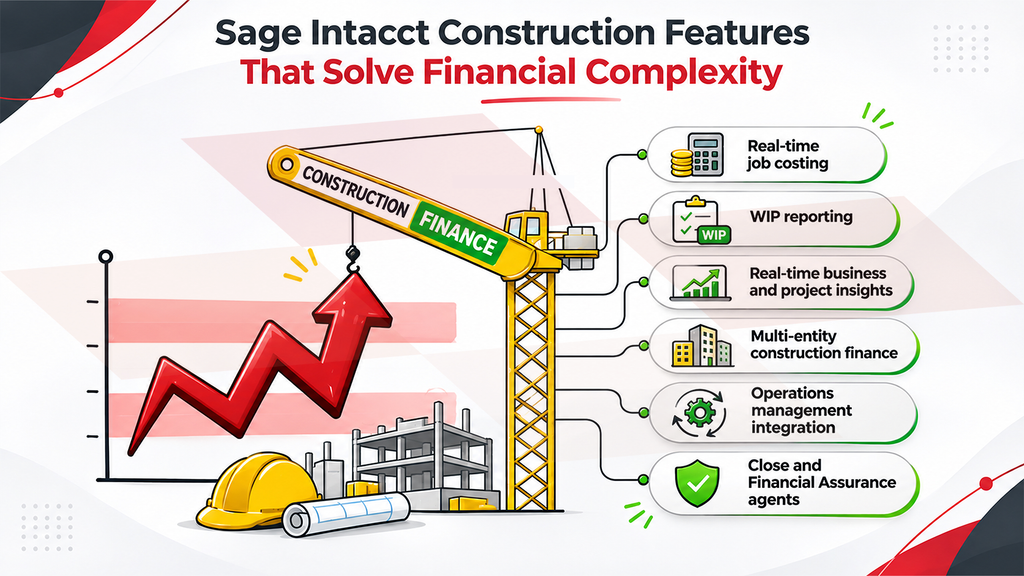
Each feature below addresses one layer of construction finance complexity.
1. Real-time job costing
Costs reach each of your jobs from many directions, so you need one place to see them. Sage Intacct tracks actual and committed costs across labour, materials, equipment, subcontractors, and change orders, giving you visibility into project profitability and cash flow without spreadsheets. When a change order adds scope, for instance, the revised budget and committed cost flow into job cost reports with no manual reconciliation.
2. WIP reporting
Billing and progress shift as work moves along, so your positions need to stay current. Sage Intacct Construction automates WIP reporting by job and sub-job, handling over- and under-billing, last-minute changes, and historical comparisons, so cash flow stays protected and reporting stays compliant without spreadsheets. You can also run historical WIP reports to compare current project margins with past ones.
3. Real-time business and project insights
With many jobs and entities running at once, speed matters. Real-time dashboards, dimension-driven reporting, and automated alerts give you instant visibility into performance, KPIs, and risks across all entities, without manual reporting. You can view financials by project, location or department, and set an alert to flag a cost that passes its committed amount.
4. Multi-entity construction finance
If you run several entities, you need one view without losing the detail of each. Sage Intacct for construction consolidates multi-entity financials and automates accurate billing, so you stay in control as new entities are added.
5. Operations management integration
Leads, estimates, and field activity often start outside the finance system. With Sage Intacct construction management, you can manage leads and estimates from anywhere and set up and run projects from contract to completion with centralized visibility. Field data such as timecards can flow into job cost records.
6. Close and Financial Assurance agents
Month-end is where everything comes together, so Sage Intacct includes two built-in agents. The Close agent tracks close tasks, flags issues, and guides your team through month-end, helping you close faster by identifying bottlenecks. The Financial Assurance agent scans each journal entry as it is posted for anomalies, duplicates, and unusual transactions, helping prevent errors and fraud before they happen.
Use Cases
Here’s how features apply to four common types of construction businesses.
| Business type | Challenge | How Sage Intacct helps |
| General contractor with many jobs | A mid-project change order forces manual updates to budgets and billing | Job costing and WIP reporting update the budget and billing position together, with no manual reconciliation |
| Specialty contractor | Labour and equipment costs can overrun before anyone sees it | Real-time job costing and automated alerts show overruns while the job is still running, once field time feeds job cost |
| Multi-entity or acquisitive group | Entities report separately, and numbers are merged in spreadsheets | Multi-entity finance and dashboards give one consolidated view across entities |
| Growing firm moving off spreadsheets or legacy systems | Estimating, project data and accounting sit apart | Operations management integration, the Close agent and the Financial Assurance agent carry work from estimate to month-end close in one connected flow |
Choosing the Right Implementation Partner
Two partners can quote the same software and deliver very different projects. A few things set them apart:
- Construction edition experience: Ask whether they have delivered Sage Intacct Construction, and not only standard Sage Intacct.
- A realistic plan: Look for a timeframe set in the initial phases and a roadmap shared throughout the project.
- Migration and integration: Ask how open commitments and subcontract balances will move over, and how systems such as payroll will connect.
- Sage experience: Look for a long track record across the Sage ecosystem.
- Security and support: Look for recognized certifications such as ISO 27001 and SOC 2, and clear support after go-live.
How to Get Started with Sage Intacct for Construction
Getting started follows a clear path from first conversation to go-live, and an experienced implementation partner can guide you through each stage. Implementation typically takes three to six months, depending on scope and planning.
- Define what you need: Identify which areas matter most to your finance team, such as job costing, WIP reporting, or consolidation.
- See it in action: Request a demo using your own jobs and reports, and ask for the Construction edition by name, since it differs from standard Sage Intacct.
- Request a quote: Sage Intacct construction pricing is tailored to your organization’s size and needs, so you receive a customized quote.
- Plan the implementation: Agree on the modules, integrations, and timeline up front, so scope is clear before work begins.
- Configure and migrate: Modules and cost codes are set up, and data moves over from your current system.
- Train and go live: Your team is trained, and the system is tested before go-live, and learning resources remain available afterward.
Conclusion
Financial complexity is part of construction, but it can be managed. With software built for how projects run, and a partner who sets it up around your jobs and entities, your finance team can keep costs, billing, and reporting accurate across every project. Greytrix has worked in the Sage ecosystem for more than 25 years and can help you put Sage Intacct to work in your business. Connect with our experts to explore Sage Intacct for construction in detail.
FAQs
1. Is Sage Intacct for Construction right for a company our size?
Sage Intacct is built for growing and mid-sized organizations, typically with more than $4 million in annual revenue or more than 20 employees. For very small contractors with simple jobs, setup may outweigh the benefit.
2. How much does Sage Intacct for Construction cost?
Sage Intacct construction pricing is subscription-based and depends on your business size, number of users, modules, and level of customization. As a Sage Intacct implementation partner, Greytrix reviews your financial processes and integration needs first, then provides a customized pricing estimate.
3. Can Sage Intacct Construction ERP connect to the tools we already use?
4. Is Sage Intacct Construction cloud-based, and can our field teams use it?
Yes. Sage Intacct runs on a true cloud architecture, so your team can access it from anywhere. Field teams can enter time, costs and receipts remotely, and once projects and cost codes are configured, entries are assigned to the appropriate cost codes.
5. What training and support does Greytrix provide?
Greytrix trains your users as part of implementation and supports your team through go-live. After that, its consultants provide ongoing support, including troubleshooting, system updates and additional training, with 24/7 support available.
6. Can Greytrix migrate data from our current system?
Yes. Greytrix offers migration services to Sage Intacct from systems such as Sage 50, Sage 100, Sage 300 and QuickBooks.
About Us
Greytrix has a wide product range for Sage Intacct- a Cloud ERP. This includes migrations from QuickBooks | Sage 50 | Sage 100 | Sage 300 to Sage Intacct. Our unique GUMU™ integrations include Sage Intacct for Sage CRM | Salesforce | FTP/SFTP | Rev.io | Checkbook | Dynamics 365 CRM | Magento | Rent Manager | Treez | Avalara Avatax | Blackline SFTP. We also offer best-in-class Sage Intacct Development Services, Consulting services, integrated apps like POS | WMS | Payroll | Shipping System | Business Intelligence | eCommerce for Sage Intacct to Sage business partners, resellers, and Sage PSG worldwide. Greytrix constantly develops apps, products, and add-ons to enhance user experience. Sage Intacct add-ons include AR Lockbox File Processing.
Greytrix GUMU™ integration for Sage CRM – Sage Intacct, Sales Commission App for Sage Intacct, and Checkbook.io ACH/Digital Check Payments for Sage powered by GUMU™ are listed on Sage Intacct Marketplace.
The GUMU™ Cloud framework by Greytrix forms the backbone of cloud integrations that are managed in real-time for the processing and execution of application programs at the click of a button.
For more information on Sage Business Cloud Services, please contact us at sagecloud@greytrix.com. We will like to hear from you.