
Staying on top of financial and inventory processes is all about clarity, accuracy, and efficiency—and that’s exactly what these latest updates of Sage Intacct deliver. From smarter customer statements in Accounts Receivable, to real time visibility of unposted journal entries in the General Ledger, each enhancement is designed to make everyday workflows simpler and more reliable. Together, they help finance and operations teams save time, reduce errors, and gain deeper insights into the data that drives better decisions.
Accounts Receivable: New Transaction Options for Customer Statements
Sage Intacct have made it easier to control what shows up in our customer statements. When we run open item statements, we now have new transaction options that give us more flexibility and clarity.
What’s New
We can now choose from:
Show all transactions
Show open invoices and credits
Show open invoices only
Why This Matters
Quickly decide which transactions appear in the statement.
Include both open invoices and credits, or just invoices—depending on our needs.
Get a clear picture of what will be shown without having to generate the statement first.
How to Use It
Go to Accounts Receivable > All > Invoices > Print or email > Statements.
Select Open items as the statement type.
Choose one of the new transaction options:
Show all transactions
Show open invoices and credits
Show open invoices
(Optional) Apply any additional filters.
Click View to generate our statement.
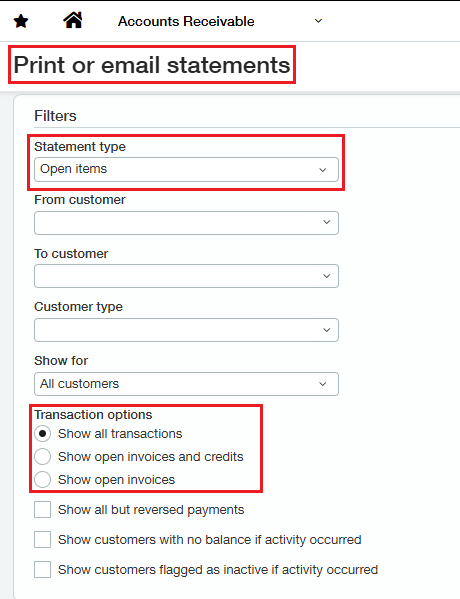
More Info : New transaction options when running customer statements
General Ledger: See Unposted Journal Entries in our Reports
Sage Intacct have added more transparency to our financial reporting. We can now choose to include unposted journal entries in both the General Ledger report and the Journals report. This gives us a real-time view of our data—even before entries are officially posted. (Note: this applies to journal entries only, not subledger transactions.)
Why This Helps
Better visibility – Preview the impact of draft, submitted, or partially approved entries.
Faster reconciliation – Spot issues and analyze data earlier in the process.
Continuous close support – Plan and automate more effectively with tools like Close Workspace.
Audit-ready – Filter selections are clearly shown in report footers for compliance transparency.
How It Works
In the Filters section of supported reports, look for the Include these transactions dropdown.
Choose one of the following:
Posted transactions only
Unposted transactions only
Posted and unposted transactions
If we include unposted transactions, click Select to refine which ones to show based on their state:
Draft
Submitted
Partially Approved
Declined (If organization doesn’t use approvals, will only see the Draft option.)
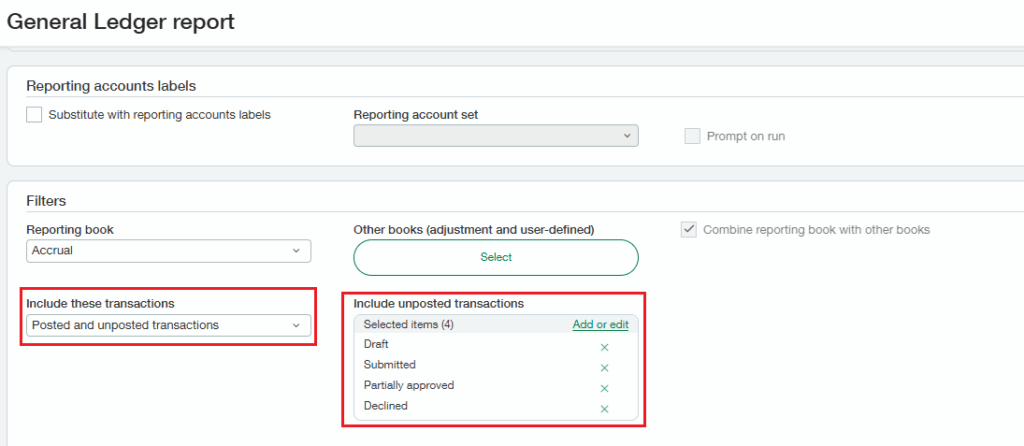
A new Txn state column will appear in report so you can easily identify unposted entries.
Note: This feature isn’t available for consolidation books since those contain only system-generated entries that are always fully posted.
More info: Include unposted journal entries in General Ledger reports
Summary: Easily customize customer statements in Accounts Receivable with new transaction options. Choose to display all transactions, only open invoices, or open invoices with credits—bringing more clarity and control to our reporting.
You can now include unposted journal entries in General Ledger and Journals reports, giving finance teams real‑time visibility, faster reconciliation, and audit‑ready transparency.
About Us
Greytrix has a wide product range for Sage Intacct- a Cloud ERP. This includes migrations from QuickBooks | Sage 50 | Sage 100 | Sage 300 to Sage Intacct. Our unique GUMU™ integrations include Sage Intacct for Sage CRM | Salesforce | FTP/SFTP | Rev.io | Checkbook | Dynamics 365 CRM | Magento | Rent Manager | Treez | Avalara Avatax | Blackline SFTP. We also offer best-in-class Sage Intacct Development Services, Consulting services, integrated apps like POS | WMS | Payroll | Shipping System | Business Intelligence | eCommerce for Sage Intacct to Sage business partners, resellers, and Sage PSG worldwide. Greytrix constantly develops apps, products, and add-ons to enhance user experience. Sage Intacct add-ons include AR Lockbox File Processing.
Greytrix GUMU™ integration for Sage CRM – Sage Intacct, Sales Commission App for Sage Intacct, and Checkbook.io ACH/Digital Check Payments for Sage powered by GUMU™ are listed on Sage Intacct Marketplace.
The GUMU™ Cloud framework by Greytrix forms the backbone of cloud integrations that are managed in real-time for the processing and execution of application programs at the click of a button.
For more information on Sage Business Cloud Services, please contact us at sagecloud@greytrix.com. We will like to hear from you.