
Anyone who has worked with purchase orders and vendor invoices knows how messy things can get. Someone orders one thing, something else gets delivered, and the invoice shows a completely different number. And then the finance team gets dragged in to figure out what really happened. It’s not fun.
Sage Intacct has had match tolerances for a while to help keep these things in check. It basically double-checks whether what you ordered, what you received, and what you’re being billed for actually line up. Most of the time it does; sometimes it doesn’t.
The 2025 R4 update adds something that honestly makes life easier: it shows you exactly why a transaction didn’t match.
What Match Tolerances Actually Do
Think of them like guardrails. You can set a small allowance for price or quantity differences—for example, if the price goes up by 1% or the shipment is short by a tiny amount, it may still be acceptable.
But if the difference is bigger than what you’re okay with, Intacct stops the transaction and says, “Hey, something’s off here. Please take a look.”
It’s simple, but it prevents a lot of accidental overpayments and helps catch vendors who keep changing prices without notice.
So What’s New in R4?
Before this release, you’d see that there was a mismatch, but you wouldn’t always know exactly what the mismatch was. You had to dig a bit.
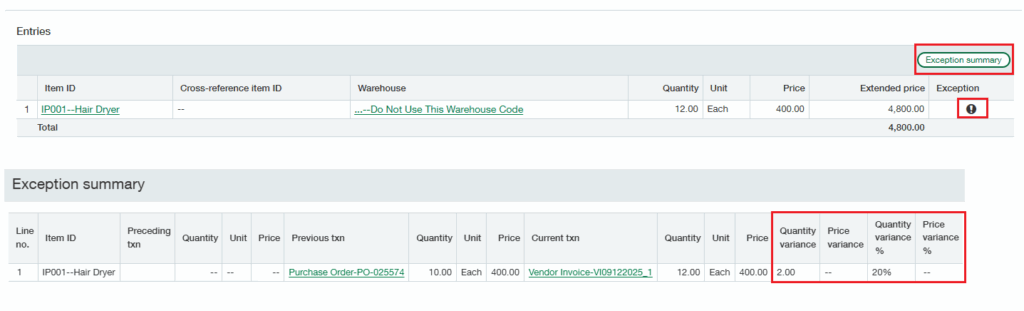
Now, Intacct shows a clear Exception summary—basically a small panel that explains:
- what quantity didn’t match
- how much the unit price changed
- the percentage difference between the documents
No guessing, no hunting.
If you ordered 10 items and the vendor invoice says 12, you’ll see that clearly. If the price jumped by 5%, it’ll tell you that too.
This makes reviewing exceptions way quicker.
Why This Helps in Real Life
Anyone approving vendor invoices will appreciate this. Instead of comparing lines manually or opening multiple screens, the system points out:
- what changed
- where it changed
- and by how much
It also makes audits and internal reviews easier because there’s no mystery around why something was flagged.
Sometimes the difference is harmless. Sometimes it’s a red flag. Now you can tell immediately.
A Quick Look at the Process
Here’s roughly how it works:
- You turn on match tolerances from the Purchasing settings.
- You set your acceptable limits.
- When a new purchasing transaction is created, Intacct compares it with the original one.
- If the difference is bigger than your limit, the system shows you the new Exception summary.
- From there, you decide whether to fix it, accept it, or override it.
Nothing complicated—just clearer information at the right time.
For more info : Broader visibility into match tolerance exceptions
Wrapping It Up
The 2025 R4 update doesn’t change how match tolerances work at their core. But the added visibility makes them far more useful. Finance and purchasing teams get clearer explanations, faster reviews, and fewer back-and-forth moments.
It’s one of those small enhancements that ends up saving a surprising amount of time.
About Us
Greytrix has a wide product range for Sage Intacct- a Cloud ERP. This includes migrations from QuickBooks | Sage 50 | Sage 100 | Sage 300 to Sage Intacct. Our unique GUMU™ integrations include Sage Intacct for Sage CRM | Salesforce | FTP/SFTP | Rev.io | Checkbook | Dynamics 365 CRM | Magento | Rent Manager | Treez | Avalara Avatax | Blackline SFTP. We also offer best-in-class Sage Intacct Development Services, Consulting services, integrated apps like POS | WMS | Payroll | Shipping System | Business Intelligence | eCommerce for Sage Intacct to Sage business partners, resellers, and Sage PSG worldwide. Greytrix constantly develops apps, products, and add-ons to enhance user experience. Sage Intacct add-ons include AR Lockbox File Processing.
Greytrix GUMU™ integration for Sage CRM – Sage Intacct, Sales Commission App for Sage Intacct, and Checkbook.io ACH/Digital Check Payments for Sage powered by GUMU™ are listed on Sage Intacct Marketplace.
The GUMU™ Cloud framework by Greytrix forms the backbone of cloud integrations that are managed in real-time for the processing and execution of application programs at the click of a button.
For more information on Sage Business Cloud Services, please contact us at sagecloud@greytrix.com. We will like to hear from you.