
The Send Email Notification feature in Sage Intacct Singapore Localization is a helpful tool that enables companies to effectively interact with their clients and suppliers straight from the system. With the help of this function, users can send bulk or selective email notifications, making sure that crucial communications pertaining to transactions or compliance are received by the appropriate recipient.
Users may load the recipient list, send messages instantaneously, and filter recipients based on customer/vendor range and notification status on the Send Notification interface. Organisations that manage several transactions every day and wish to automate communication while upholding compliance and transparency would particularly benefit from it.
New Stuff: Top 7 Advantages of Sage Intacct for Construction Businesses
In this blog, we are going to discuss the Send Email Notification feature in Singapore Localization with Sage Intacct and how it helps in sending notifications to customers/vendors directly from the Sage Intacct environment.
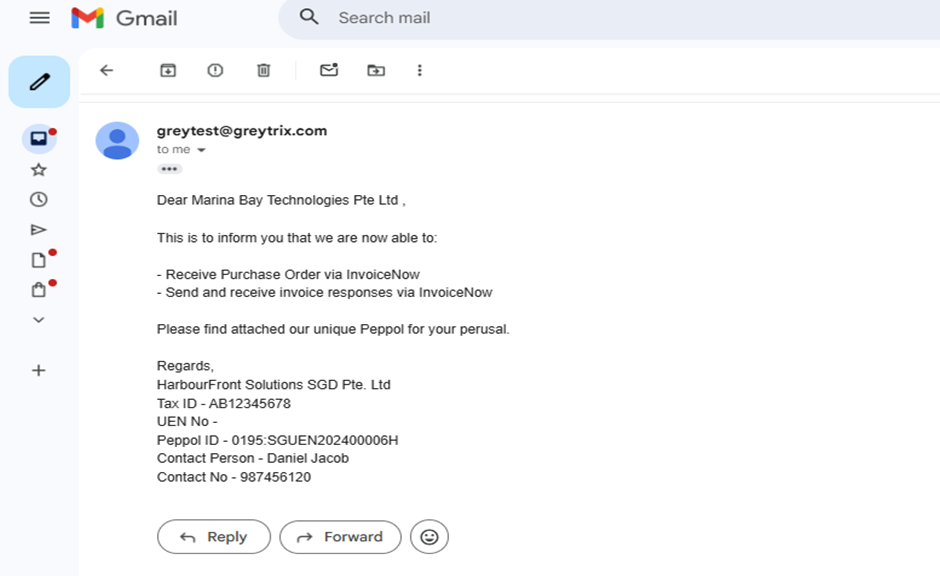
Send Email Notification Process in Sage Intacct
In Singapore Localization, users can send email notifications easily in just a few steps.
- Navigate to the Singapore e-Invoice module.
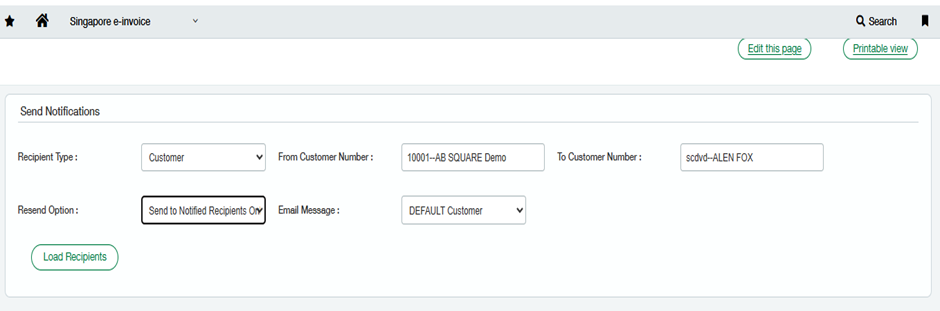
- Open the Send Notifications screen. (Refer Fig 1)
- Select the Recipient Type (Customer/Vendor).
- Enter the From Customer/Vendor Number and To Customer/Vendor Number to define the range.
- Choose the Resend Option based on requirement.
- Select the Email Message Template.
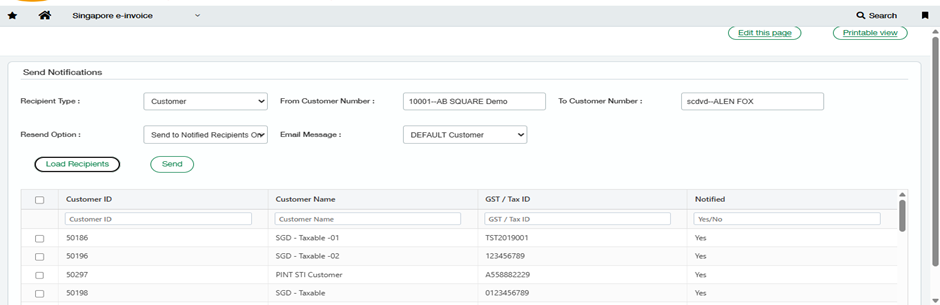
- Click on Load Recipients to fetch the list of recipients. (Refer Fig 2)
- Select the required recipients and click Send.
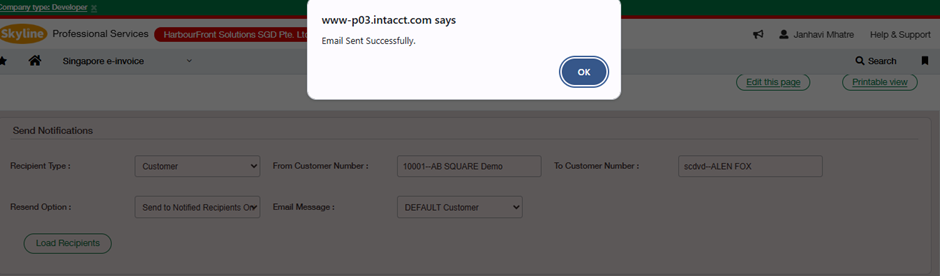
- Once completed, the system displays the confirmation message “Email Sent Successfully.” (Refer Fig 4
Key Functionalities Available in Send Notifications Screen
The Send Notification screen provides an organized layout where users can filter, select, and send email notifications efficiently.
1. Recipient Type
This option allows the user to choose whether the notification should be sent to:
- Customer
- Vendor
This makes the screen flexible for both AR and AP-related communication.
2. Customer/Vendor Range Selection
Users can define the range of recipients by selecting:
- From Customer Number
- To Customer Number
This helps in sending notifications in bulk without manually selecting every customer/vendor.
3. Resend Option
The resend option provides multiple choices, such as:
- Send to All Recipients
- Send to Unnotified Recipients
- Send to Notified Recipients Only
This feature is extremely helpful when notifications need to be resent due to missing responses, failed deliveries, or compliance follow-ups.
4. Email Message Template
The Email Message dropdown allows users to select predefined templates such as:
- DEFAULT Customer
- DEFAULT Vendor
(or any other configured templates)
This ensures consistent email communication with a professional format.
5. Load Recipients
Once all filters are applied, clicking on Load Recipients displays the recipient list in a grid format. (Refer Fig 2)
The list includes:
- Customer/Vendor ID
- Customer/Vendor Name
- GST/Tax ID
- Notification Status (Yes/No)
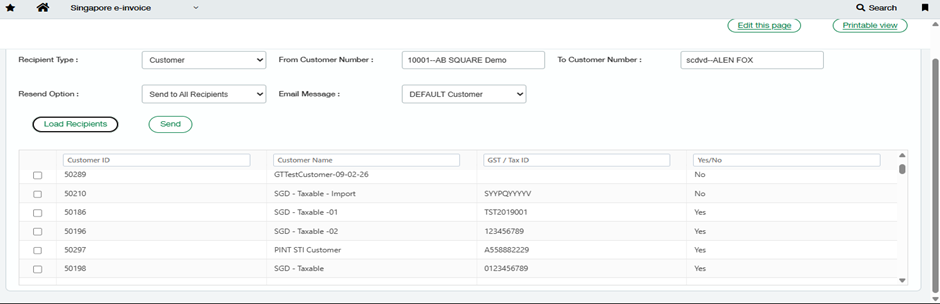
6. Notified Status Tracking
The system maintains a Notified column with status:
- Yes → Email already sent
- No → Email not yet sent
This feature provides better visibility and tracking of communication history. (Refer Fig 3).
7. Send Notification
After selecting the recipients, the user can click Send to trigger the email notification process. The system then sends the email and shows a success pop-up: “Email Sent Successfully.” (Refer Fig. 4)
Benefits of the Send Email Notification Feature
The Send Email Notification functionality offers several benefits, such as:
- Quick and automated email communication
- Template-based standardised messages
- Tracking mechanism through “Notified” status
- Reduced manual effort and improved productivity
- Better compliance readiness and audit tracking
About Us :-
Greytrix – a globally recognized and one of the oldest Sage Development Partner is a one-stop solution provider for Sage ERP and Sage CRM organizational needs. Being acknowledged and rewarded for multi-man years of experience and expertise, we bring complete end-to-end assistance for your technical consultations, product customizations, data migration, system integrations, third party add-on development and implementation competence.
Greytrix has a wide product range for Sage Intacct- a Cloud ERP. This includes migrations from QuickBooks | Sage 50 | Sage 100 | Sage 300 to Sage Intacct. Our unique GUMU™ integrations include Sage Intacct for Sage CRM| Salesforce| FTP/SFTP | Rev.io | Checkbook| Dynamics 365 CRM | Magento | Rent Manager | Treez| Avalara Avatax | Blackline SFTP. We also offer best-in-class Sage Intacct Development Services, Consulting services, integrated apps like POS | WMS | Payroll |Shipping System | Business Intelligence | eCommerce for Sage Intacct to Sage business partners, resellers, and Sage PSG worldwide. Greytrix constantly develops apps, products, and add-ons to enhance user experience. Sage Intacct add-ons include AR Lockbox File Processing.
For more information on Sage Business Cloud Services, please contact us at sagecloud@greytrix.com. We will like to hear from you.