
Three meaningful updates that sharpen how your team handles payments, bills, and automated transaction workflows.
Clearer currency fields across payment pages
Working with foreign currencies in Accounts Payable used to mean navigating ambiguously labelled fields. This release addresses that by introducing consistent, clearly named currency fields across all payment-related pages — giving your team a shared language whether they’re reconciling bank statements or reviewing ledger entries.
Posted payments
Fields now clearly distinguish bank, transaction, and base amounts.
Payment requests
Multi-currency columns now reflect the correct currency context.
AP Advances & manual payments
The same consistent naming applies across advances and manual entries.
The updated field labels are:
Bank currency -> Currency of the bank account used for payment
Bank amount -> Payment amount in the bank’s currency
Txn currency -> Currency in which the payment was issued and recorded
Txn amount -> Payment amount in the transaction currency
Base currency -> Operating currency of the entity
Base amount -> Payment amount in the entity’s operating currency
These changes also flow through to ledgers, registers, and any custom reports that include foreign currency payment data.
Defined editing rules for bills with posted deferred adjustments
This update is relevant to teams in France working with charges constatées d’avance (CCA). Previously, it wasn’t always clear which bill fields could still be edited after a deferred adjustment had been posted. That ambiguity is now resolved.
The principle: Fields that affect posted accounting data are locked. Fields that don’t — like memos, attachments, and custom fields — remain open for editing.
Fields locked after a deferred adjustment is posted:
Bill date, Vendor and contact fields, Currency and exchange rate fields, Deferred adjustment fields (template, start date, end date)
All bill line fields (except memo and custom fields)
Fields that remain editable:
Memo fields, Attachments, Custom fields
More flexibility in AP Automation
AP Automation receives two practical improvements this release, designed to give AP teams more control over how bills are processed and reviewed.
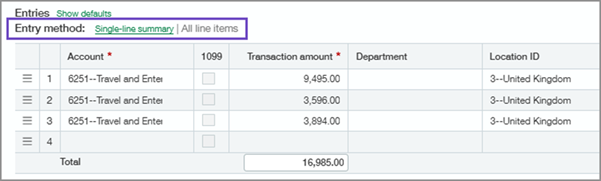
Flexible line entry on draft bills
Switch between single-line summary and full line-item entry directly within a draft bill — no upfront configuration needed. Your selections also help train future automation accuracy.
Upload bills from the Automated Transactions list
No more jumping between screens. Upload bill documents directly from the Automated Transactions list. The system creates the draft and surfaces it in both the Automated Transactions and Bills lists automatically.
If a purchase transaction is predicted incorrectly, you can reclassify it as an AP bill — and optionally set that vendor to always create bills going forward.
Improved remittance support for bank file payments
If the company relies on bank file payments rather than checks — especially across borders — we’ve probably felt the gap in remittance communication. This release closes it. AP teams can now configure dedicated remittance emails and PDF attachments specifically for bank file payments, completely separate from check remittance settings.
Dedicated email templates: Set up AP remittance email templates specifically for bank file payments without touching your existing check remittance setup.
Configurable PDF stubs: Choose from blank, with logo, or without logo — giving vendors a clear, professional remittance document alongside each payment.
Company and entity logos: Apply logos at the company or entity level. Entity-specific logos override the company default where configured.
Once configured, the process is fully automatic — no manual selection needed at payment time. Sage Intacct applies the right template and PDF stub when the bank file payment is confirmed, and sends the remittance directly to the vendor.
Step 1 — Set up a remittance email template
- Go to Company > Setup > Settings > Email templates > Add
- Enter the required information and set Template type to AP remittance
- Select Save
Step 2 — Configure bank file remittance
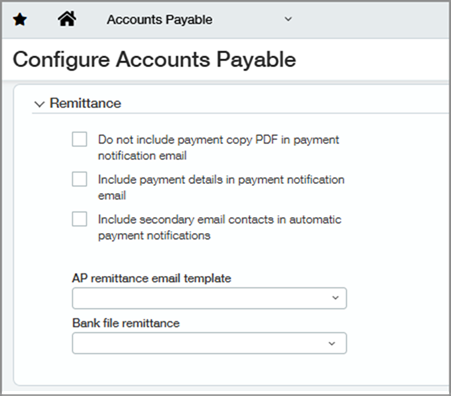
- Go to Accounts Payable > Setup > Configuration
- In the Remittance section, select your AP remittance email template for bank file payments. This template applies only to bank file payments and does not affect check remittance.
- Optionally, configure entity-level templates to use entity-specific logos. Otherwise, the company-level template applies.
- Select your preferred Bank file remittance PDF stub: blank, with logo, or without logo
- Select Save
Step 3 — Send bank file payments with remittance
- Create and post AP payments using the bank file payment method
- Sage Intacct automatically applies the configured template and PDF stub — no manual selection needed at payment time
- The remittance email is sent to the vendor with full payment details: payments, bills, adjustments, and advances. Recipient is determined by the template’s To address. If none is set, Sage Intacct sends to the vendor contact email.
For bank file payments with a configured email template, Sage Intacct does not create a history entry on the History tab of posted payments when you send payment notification emails or print payment copies. You can still send notification emails from the Print payment copies page even if the vendor email field is empty — Sage Intacct uses the template’s To address, or falls back to noreply@intacct.com if that’s also empty.
About Us
Greytrix has a wide product range for Sage Intacct- a Cloud ERP. This includes migrations from QuickBooks | Sage 50 | Sage 100 | Sage 300 to Sage Intacct. Our unique GUMU™ integrations include Sage Intacct for Sage CRM | Salesforce | FTP/SFTP | Rev.io | Checkbook | Dynamics 365 CRM | Magento | Rent Manager | Treez | Avalara Avatax | Blackline SFTP. We also offer best-in-class Sage Intacct Development Services, Consulting services, integrated apps like POS | WMS | Payroll | Shipping System | Business Intelligence | eCommerce for Sage Intacct to Sage business partners, resellers, and Sage PSG worldwide. Greytrix constantly develops apps, products, and add-ons to enhance user experience. Sage Intacct add-ons include AR Lockbox File Processing.
Greytrix GUMU™ integration for Sage CRM – Sage Intacct, Sales Commission App for Sage Intacct, and Checkbook.io ACH/Digital Check Payments for Sage powered by GUMU™ are listed on Sage Intacct Marketplace.
The GUMU™ Cloud framework by Greytrix forms the backbone of cloud integrations that are managed in real-time for the processing and execution of application programs at the click of a button.
For more information on Sage Business Cloud Services, please contact us at sagecloud@greytrix.com. We will like to hear from you.