
As businesses in Singapore continue to embrace digital transformation, e-invoicing has become an integral part of streamlining financial operations and ensuring tax compliance. While generating individual e-invoices is straightforward for many organizations, businesses with a high volume of daily transactions often face the challenge of processing hundreds or even thousands of invoices.
To address this, our Aggregate Transactions feature in Sage Intacct enables organizations to consolidate eligible transactions into a single aggregate document before submitting them for Singapore e-invoicing.
New Stuff: How to Process Customer Refunds Through Accounts Payable in Sage Intacct
Introducing the Aggregate Transactions Screen
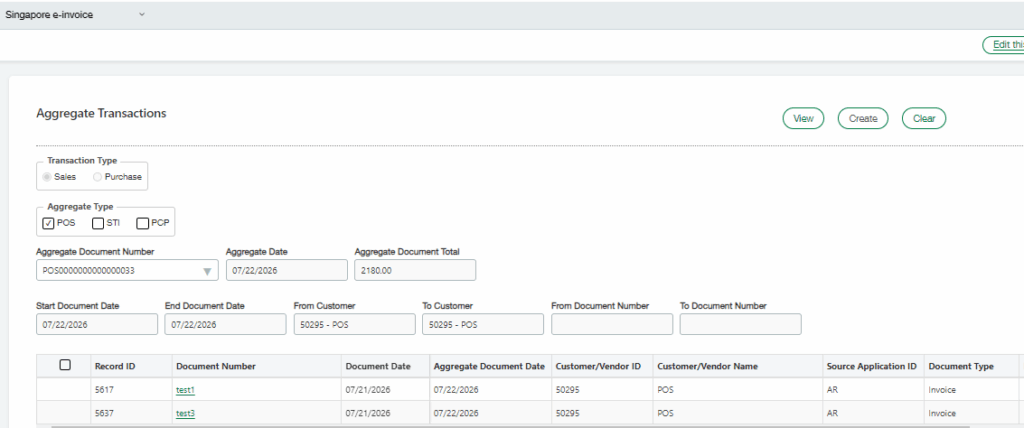
To simplify the aggregation process, we have developed a dedicated Aggregate Transactions screen within Sage Intacct as seen in the screenshot below:
Key Features
The screen allows users to filter transactions using several business-specific criteria.
1. Transaction Type
Users can choose whether they want to aggregate:
- Sales transactions
- Purchase transactions
2. Aggregate Type
The solution supports multiple aggregate categories, including:
- POS
- STI
- PCP
These options allow organizations to generate aggregate documents based on the applicable business or regulatory requirements.
3. Aggregate Date
- The aggregate document can be generated for a specific reporting date.
- This provides better control over daily, weekly, or periodic transaction consolidation.
4. Flexible Search Filters
Users can narrow down eligible transactions using various search parameters, including:
- Start Document Date and End Document Date
- Customer/Vendor Range
- Document Number Range
5. Transaction Review Grid
Once the search criteria are entered, the system displays all matching transactions in a grid containing information such as:
- Record ID
- Document Number
- Document Date
- Aggregate Document Date
- Customer/Vendor ID
- Customer/Vendor Name
- Source Application ID
- Document Type
Users can review the transactions before creating the aggregate document, ensuring only the intended records are included
How the Process Works
The aggregation workflow is designed to be simple and efficient.
Step 1: Select the Transaction Type: Choose whether the aggregation is for Sales or Purchase documents.
Step 2: Choose the Aggregate Type: Select the applicable aggregate category (POS, STI, or PCP).
Step 3: Enter Filter Criteria: Specify the reporting period, customer range, or document range to identify eligible transactions.
Step 4: Create the Aggregate Document: After verifying the transactions, select the checkbox and click Create.
The system generates a single aggregate document representing the selected transactions. Thus, the screen provides an intuitive interface for identifying, reviewing, and creating aggregate documents.
About Us
Greytrix has a wide product range for Sage Intacct- a Cloud ERP. This includes migrations from QuickBooks | Sage 50 | Sage 100 | Sage 300 to Sage Intacct. Our unique GUMU™ integrations include Sage Intacct for Sage CRM | Salesforce | FTP/SFTP | Rev.io | Checkbook | Dynamics 365 CRM | Magento | Rent Manager | Treez | Avalara Avatax | Blackline SFTP. We also offer best-in-class Sage Intacct Development Services, Consulting services, integrated apps like POS | WMS | Payroll | Shipping System | Business Intelligence | eCommerce for Sage Intacct to Sage business partners, resellers, and Sage PSG worldwide. Greytrix constantly develops apps, products, and add-ons to enhance user experience. Sage Intacct add-ons include AR Lockbox File Processing.
Greytrix GUMU™ integration for Sage CRM – Sage Intacct, Sales Commission App for Sage Intacct, and Checkbook.io ACH/Digital Check Payments for Sage powered by GUMU™ are listed on Sage Intacct Marketplace.
The GUMU™ Cloud framework by Greytrix forms the backbone of cloud integrations that are managed in real-time for the processing and execution of application programs at the click of a button.
For more information on Sage Business Cloud Services, please contact us at sagecloud@greytrix.com. We will like to hear from you.