
Introduction:
In today’s business environment, having financial is not enough businesses need to analyse information quickly and turn it meaningful insights for better decision making.
Sage Intacct provides various reporting tools, including the Interactive Custom Report Writer (ICRW), which allows organizations to create customized and interactive reports based on their specific business requirement.
Unlike Standard reports, age Intacct provides various reporting tools, including the Interactive Custom Report Writer (ICRW), which allows organizations to create customized and interactive reports based on their specific business requirements.
In simple terms, ICRW transforms Sage Intacct data into flexible, interactive reports that are tailored to how a business wants to analyse its information.
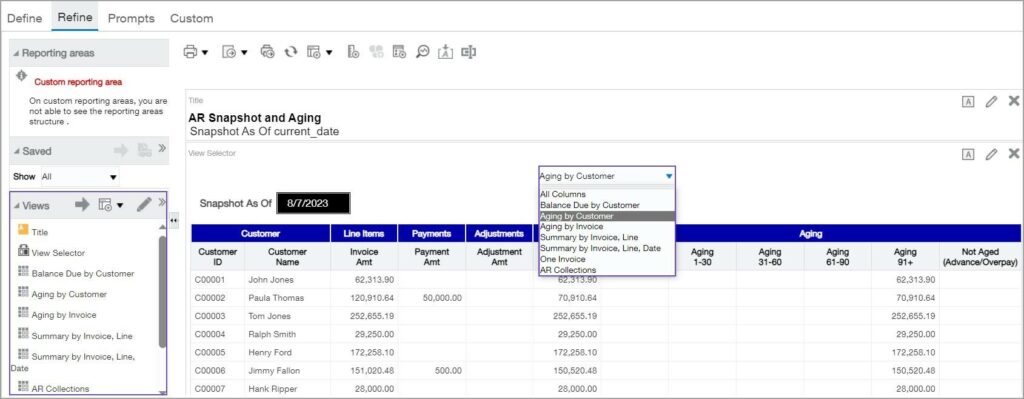
How does ICRW Work?
ICRW works by allowing businesses to turn their reporting requirements into interactive and customised reports.
The process can be summarized as:
Business Requirement – Select Data – Apply Filters – Analyse Results
First, the business identifies the information it needs, such as employee hours, project details, sales, customer, or financials transactions. The appropriate data is then selected to create the report.
Users can apply filters and prompts to focus on specific information, such as a particular data range, customer, projects, location, or billing type. This allows the same report to be used for different reporting requirement without creating a new report each time.
ICRW also allows users to view and analyse information in different ways, making it easier to identify trends, compare data, and investigate transactions.
In simple terms, ICRW takes business data and turns it into a flexible report that users can filter, explore, and analyse according to their needs.
Benefits/Features of ICRW:
The values of ICRW goes beyond simple creating customized reports. Its main benefits is that it helps businesses organize, analyse and understand their Sage Intacct data more efficiently. By bringing relevant information together in one interactive reports, ICRW can reduce manual work, improve visibility, and provides users with information that supports better business decisions.
1.Reduce Manual Reporting
One of the biggest benefits of ICRW is that it can reduce the amount of manual reporting work performed outside Sage Intacct.
Without a suitable report, users may need to export data to Excel, remove unnecessary information, apply filters, create calculations build pivot tables, format the results, and then share the completed report. When this process is repeated every week or month, it can take considerable time and may also introduce inconsistencies or errors.
With a properly designed ICRW report, much of this information can be organised and analysed directly within Sage Intacct. Users can run the report when needed and apply the required filters or prompts without having to rebuild the analysis from the beginning.
This allows employees to spend less time preparing data and more time reviewing and understanding the results.
2.Saves Time
ICRW can also time by allowing businesses to create reusable reports.
Instead of creating separate reports for different customers, locations, dates, or billing types, a single report can be designed with appropriate filters and prompts. For example, a user could select a customer, choose a date range, and select a billing type when running the report.
The same report can therefore be used repeatedly for different reporting scenarios. This reduce duplicate reporting work and makes recurring reporting processes more efficient.
For businesses that regularly prepare monthly, weekly, or management reports, this flexibility can provide significant time savings.
3.Improves Data Visibility
Businesses often have large amounts of financial and operational data in their system. Having access to the data does not necessarily mean that the information is easy to understand.
ICRW helps improve data visibility by allowing information to be presented according to the questions the business need to answer.
For example, instead of reviewing thousands of individual transactions, users can analyse can analyse information such as revenue by customer, revenue by location, hours by project, cost by department, or sales by month.
This makes it easier to identify patterns, compare performance, and focus on the information that is most relevant to the business.
4. Additional Capabilities of ICRW
Beyond these benefits of customised reporting, Sage Intacct ICRW provides several capabilities that make reports more flexible and useful for business analysis.
Flexible Analysis:
ICRW allows users to view the same information in different ways, including detailed, summarized, and pivot style views. Users can also apply filters and prompts to focus on specific customers, projects, dates, locations, or other business requirements.
Calculations and Drill-Down
ICRW supports custom calculations, allowing businesses to create additional insights from existing data, such as profit or margin calculations. Users can also drill down from summarized information to the underlying source transactions, making it easier to investigate the details behind a reported amount.
Easy Sharing and Accessibility
Reports can be exported to Excel or PDF for further analysis or sharing. Frequently used ICRW reports can also be made accessible through Sage Intacct dashboards and menus, helping users quickly access important information.
A Practical Business Example:
Consider a service company want to monitor employee labour across its projects. And they need to see employee hours by project and month, as well as they want to analyse hours based on fixed price, time and material billing.
Instead of reviewing individual transactions or preparing separate Excel reports, the company can use an ICRW report to bring the relevant information together in one place.
What can the report Show?
The report cam includes important information such as:
-Employee: Who recorded the hours?
-Customer: Which customer is associated with the work?
-Project: Which project were the hours recorded against?
-Date and Month: When was the work performed?
-Hours: How many hours were recorded?
-Billing Type: Was the work Fixed Price or Time, Material?
-Location: Where is the activity associated?
Using Filters and Prompts
Users can apply filters or prompts to analyse specific information. For example, they could select a date range, customer, location, or transaction status.
Management could run the same report for a particular month, quarter or year without needing to create a separate report each time.
Business Value
This example demonstrate how ICRW can turn sales transactions into useful business insights. Rather than manually reviewing individual invoices or preparing separate spreadsheets, management can use one interactive report to monitor sales performance and identify important trends. This can help the business understand customer performance, compare locations, monitor revenue, and make better-informed sales decisions.
Conclusion:
ICRW provides businesses with a flexible way to turn Sage Intacct data into meaningful business information. Instead of relying only on standard reports or manually preparing spreadsheets, organizations can create interactive reports that are tailored to their specific requirements. ICRW is particularly valuable because it helps translate business requirements into practical reporting solutions. By combining customized reporting, filters, calculations, different views, and drill-down capabilities, ICRW can help businesses save time, improve data visibility, and make better-informed decisions. Ultimately, the goal of ICRW is not simply to create another report—it is to help businesses understand their data and use it effectively.