
When the businesses rely on Excel files to exchange order data while entering the order information with referring to the excel manually into Sage 300 which can become slow process, repetitive, and sometime it may get the error
To solve this we have created an Excel-based Sales Order Import tool that can automate the entire process making it easier, faster, and more accurate.
This blog explains how the tool works, what each sheet contains, and how users can import Sales Orders into Sage 300 with a single click.
1. Structure of the Excel Import File
The file contains two sheets:
Sheet 1: In sheet 1 this is where users fill all Sales Order information.
Sheet 2: In sheet 2 stores Sage 300 login credentials such as Database ID, Username, and Password.These two sheets together enable a complete Sales Order import process.
2.Sheet 1: Order Entry Template
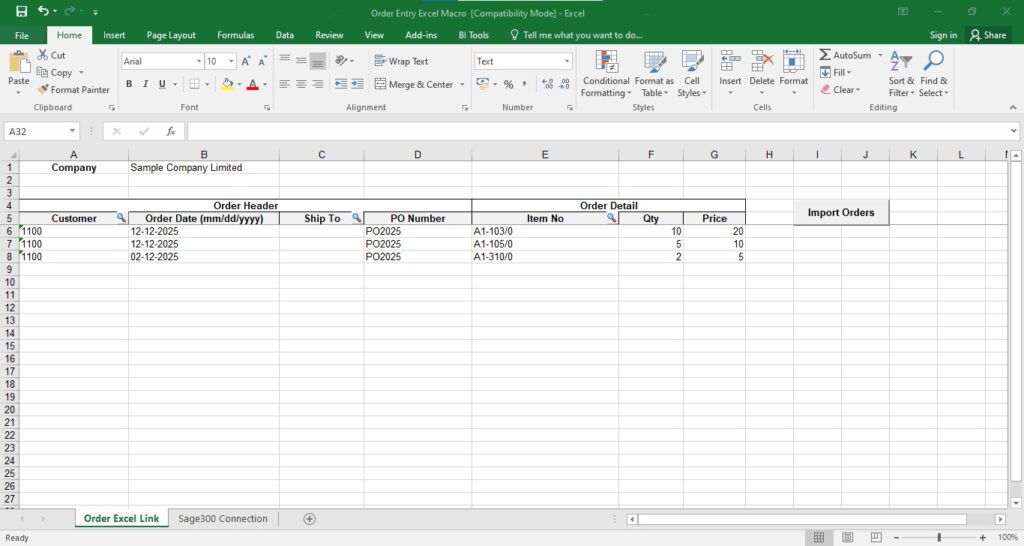
The first sheet is designed to look like an Order Entry screen.
It includes the basic fields required to create a Sales Order.
A. Order Header Information
The header area contains the header level of order fields:
- Customer
- Order Date
- Ship Via / Ship Method
Also finder buttons are available for fields like Customer and Ship Via so that users can search and select the correct values directly from Sage 300.
B. Order Line Details
Besides the header section is the order detail line grid. Each row represents one item in the order.
The primary required fields are:
- Item
- Quantity
- Price
Users can add as many item rows as needed to create a complete Sales Order.
Also finder buttons are available for item number fields so that users can search and select the correct item directly from Sage 300.
3. Sheet 2: Connection Details
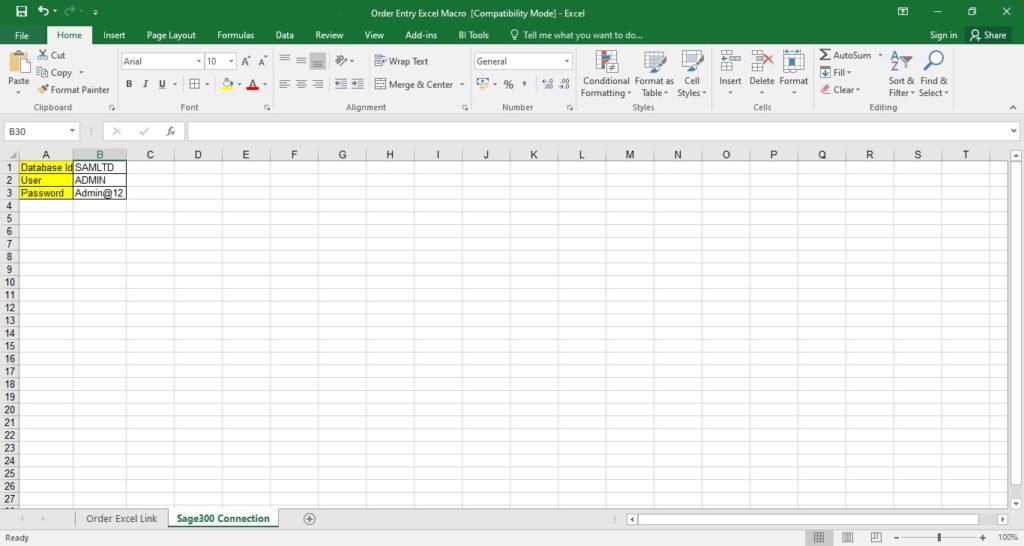
In this sheet it contains the Sage 300 login credentials fields which user have to enter:
- Database ID
- User Name
- Password
These details allow us to connect to the correct Sage 300 company for importing the sales order.
4. How Importing Works
Once both sheets are filled i.e order template sheet and connection detail sheet then the importing the sales order is very simple.
Step 1: Fill Order Header and Line Details in Sheet 1
Enter Customer, Order Date, Ship Via, and the Item lines.
Step 2: Verify Connection Details in Sheet 2
Ensure the database ID, username, and password are correct.
Step 3: Click the “Import Order” Button
The tool automatically:
Connects to Sage 300
Reads all header and line items
Validates fields such as customer, item, quantity, and dates
Creates the Sales Order inside Sage 300
Displays success or error messages. If sales order successfully imports then it will display the order number.
5. Automation and Validations
This excel handles most checks on its own:
- Validate the customer numbers
- Ensures required fields are not left empty
- Checks all item codes and quantities
- Prevents invalid or incomplete order entry
- Imports entire orders in seconds
6. Benefits of Using This Excel
- Automates the order entry process and save time by avoiding manual entry.
- Reduces error while creating the sales order manually.
- Ideal for importing sales orders received in Excel format.
- This excel file makes the sales order creation process faster and smoother.
About Us
Greytrix – a globally recognized and one of the oldest Sage Development Partners is a one-stop solution provider for Sage ERP and Sage CRM organizational needs. Being acknowledged and rewarded for multi-man years of experience, we bring complete end-to-end assistance for your technical consultations, product customizations, data migration, system integrations, third-party add-on development, and implementation competence.
Greytrix offers unique GUMU™ integrated solutions of Sage 300 with Sage CRM, Salesforce(listed on Salesforce Appexchange), Dynamics 365 CRM, and Magento eCommerce, along with Sage 300 Migration from Sage 50 US, Sage 50 CA, Sage PRO, QuickBooks, Sage Business Vision and Sage Business Works. We also offer best-in-class Sage 300 customization and development services and integration services for applications such as POS | WMS | Payroll | Shipping System | Business Intelligence | eCommerce for Sage 300 ERP and for Sage 300c development services we offer, upgrades of older codes and screens to new web screens, latest integrations using Data and web services to Sage business partners, end users and Sage PSG worldwide.
Greytrix offers 20+ add-ons for Sage 300 to enhance productivity such as GreyMatrix, Document Attachment, Document Numbering, Auto-Bank Reconciliation, Purchase Approval System, Three-way PO matching, Bill of Lading, and VAT for the Middle East. The GUMU™ integration for Dynamics 365 CRM – Sage ERP is listed on Microsoft Appsource with an easy implementation package.
The GUMU™ Cloud framework by Greytrix forms the backbone of cloud integrations that are managed in real-time for processing and execution of application programs at the click of a button.
For more details on Sage 300 and Sage 300c Services, please contact us at accpac@greytrix.com, We will like to hear from you.