
In Sage 300 ERP, Accounts Payable (A/P) Invoice Entry is an important part of the vendor payment process. It captures invoice information, vendor details, distributions, and other transaction data before the invoice is posted. When this process is initiated through an external application, an API can help reduce manual entry and provide a consistent way to create and post transactions.
In a standard integration, the external application sends the required invoice information to the API, and the API creates the A/P invoice entry in Sage 300. However, a practical requirement can arise when the invoice refers to a Remit-To Location that has not yet been created for the selected vendor. Since the Remit-To Location is maintained in Sage 300’s vendor-related setup, the integration needs to handle this situation rather than relying on a user to create the location manually.
To address this requirement, we enhanced the A/P Invoice Posting API with additional logic for Remit-To Location handling. Along with the invoice information, the API accepts Remit-To details in the request. It checks the supplied location and, when the location is not available for the vendor, creates it in Sage 300 and records the related banking and tax information in the location’s Optional Fields.
How the API Works
The calling application sends a JSON request containing the company, invoice header, vendor, distribution details, and Remit-To information. The API uses these values to prepare the A/P invoice transaction. The request also includes a PostBatch flag, which indicates whether the batch should be posted as part of the API process.
The key enhancement is the handling of the Remit-To information. The API checks whether the Remit-To Location provided in the request is already available for the specified vendor. If it exists, the API can use that location for the invoice. If it does not exist, the API creates the Remit-To Location and assigns the supplied description. It then stores the remit-to account number, bank name, IFSC code, and GSTIN in the corresponding Optional Fields. Once the Remit-To information has been handled, the API continues with the A/P invoice entry process using the invoice header and distribution details received in the JSON request. This keeps the additional setup within the integration flow and avoids a separate manual step in Sage 300.
Remit-To Location in Sage 300
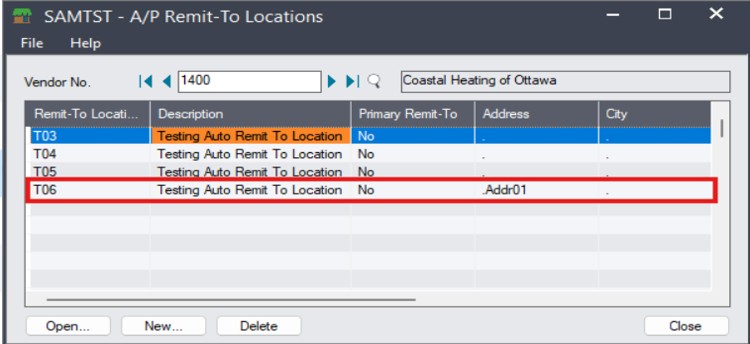
The Remit-To Location is maintained for the vendor in the A/P Remit-To Locations screen. In the example below, the location T06 is available for the vendor. The location description and address information are displayed in the location list.
New Stuff: Open RCP Report
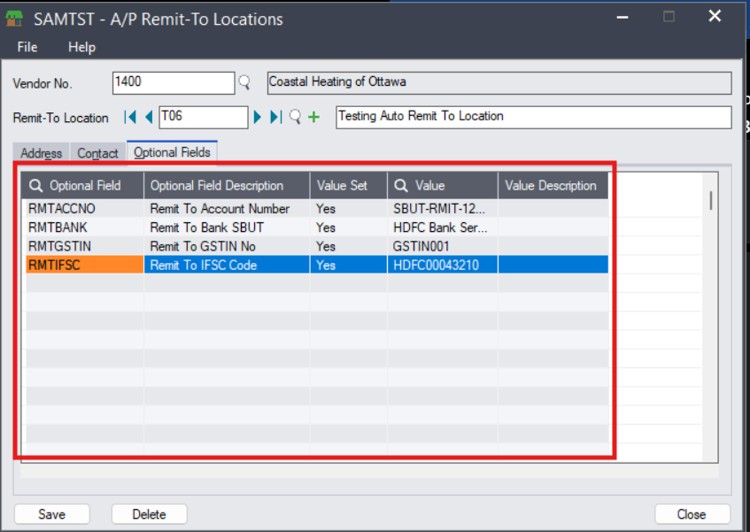
When a new Remit-To Location is created through the API, the banking and tax-related values are populated in the Optional Fields tab. This includes the Remit-To Account Number, Remit-To Bank, Remit-To GSTIN, and Remit-To IFSC Code. The values are passed through the JSON request and saved against the newly created location.
A/P Invoice Entry and Posting
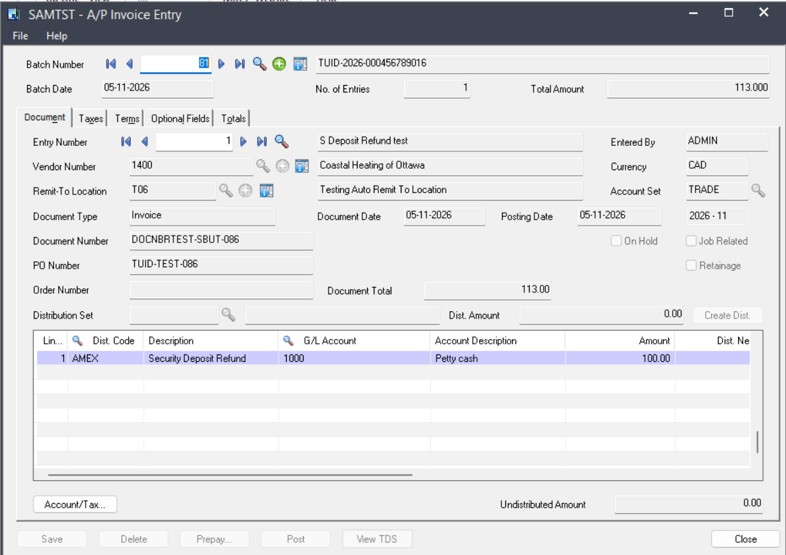
After the Remit-To Location has been found or created, the API proceeds with the A/P Invoice Entry. The invoice is associated with the vendor and the Remit-To Location supplied in the request. The distribution details, such as description, G/L account, distribution code, amount, and reference, are also used to build the invoice entry.
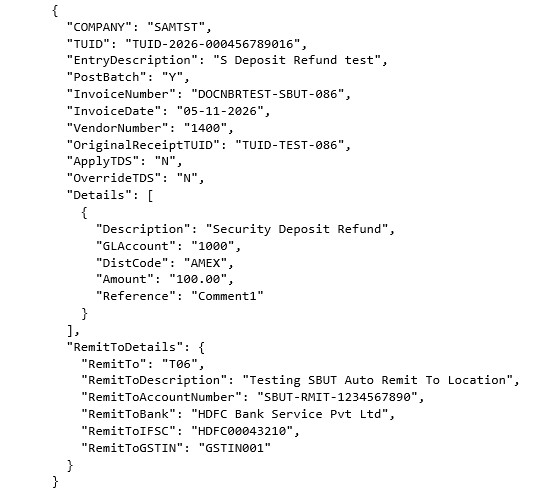
In the sample request, the PostBatch parameter is set to Y. The API therefore processes the invoice with the requested batch-posting action. This allows the external application to initiate the invoice entry and posting workflow through a single API request, subject to the validations and processing rules in Sage 300.
Sample JSON Request
The following sample illustrates the structure of the request sent by the external application. The RemitToDetails section carries the information required to identify or create the Remit-To Location and populate its Optional Fields.
Key Benefits
•Reduces manual setup: A missing Remit-To Location can be created as part of the API process.
•Keeps vendor remittance information together: Bank account, bank name, IFSC code, and GSTIN are stored in the location’s Optional Fields.
•Supports a smoother integration flow: The external application can send invoice and Remit-To information in one structured request.
•Improves consistency: The same API flow handles the Remit-To setup and the A/P invoice transaction, reducing the need for separate manual steps.
By extending the A/P Invoice Posting API with Remit-To Location creation and Optional Field population, the customization goes beyond basic invoice entry. It brings an additional Sage 300 setup requirement into the API workflow and helps make the overall accounts payable integration more complete.
About Us
Greytrix – a globally recognized and one of the oldest Sage Development Partners is a one-stop solution provider for Sage ERP and Sage CRM organizational needs. Being acknowledged and rewarded for multi-man years of experience, we bring complete end-to-end assistance for your technical consultations, product customizations, data migration, system integrations, third-party add-on development, and implementation competence.
Greytrix offers unique GUMU™ integrated solutions of Sage 300 with Sage CRM, Salesforce(listed on Salesforce Appexchange), Dynamics 365 CRM, and Magento eCommerce, along with Sage 300 Migration from Sage 50 US, Sage 50 CA, Sage PRO, QuickBooks, Sage Business Vision and Sage Business Works. We also offer best-in-class Sage 300 customization and development services and integration services for applications such as POS | WMS | Payroll | Shipping System | Business Intelligence | eCommerce for Sage 300 ERP and for Sage 300c development services we offer, upgrades of older codes and screens to new web screens, latest integrations using Data and web services to Sage business partners, end users and Sage PSG worldwide.
Greytrix offers 20+ add-ons for Sage 300 to enhance productivity such as GreyMatrix, Document Attachment, Document Numbering, Auto-Bank Reconciliation, Purchase Approval System, Three-way PO matching, Bill of Lading, and VAT for the Middle East. The GUMU™ integration for Dynamics 365 CRM – Sage ERP is listed on Microsoft Appsource with an easy implementation package.
The GUMU™ Cloud framework by Greytrix forms the backbone of cloud integrations that are managed in real-time for processing and execution of application programs at the click of a button.
For more details on Sage 300 and Sage 300c Services, please contact us at [email protected], We will like to hear from you.