
If you work with customized in Sage 300 reports long enough, sooner or later you will meet this message: “Method ‘~’ of Object ‘~’ failed”. It tells you almost nothing. There is no table name, no SQL statement and no hint about which step went wrong, so finding the real cause means a bit of detective work.
This is especially true on Citrix, where users usually connect to SQL Server with a restricted login. A customization that runs without any trouble on a developer machine can fail for an end user simply because one of its database commands needs more rights than that user has been given.
This blog walks through one such case. The error showed up while running the Extended AP Vendor Transaction and Customer Transaction GE reports, and tracing it back led to a single SQL command in the report code.
The Business Challenge
•Users running customized Sage 300 reports got the “Method ‘‘ of object ‘‘ failed” error, mostly inside the Citrix environment.
•The error text gave no clue about the failing database operation, so there was nothing obvious to fix.
•The SQL login in use was mapped to the Sage 300 company database with only db_datareader and db_datawriter roles.
•Giving the login sysadmin made the reports run, but handing out unrestricted SQL Server access is not something most IT teams are happy to do.
•The team needed to find out exactly which operation in the AP Vendor / Customer Transaction GE reports was asking for elevated rights.
The Error Message
When the affected report was launched, Sage 300 showed the following pop-up:
New Stuff: Improving Reliability in API-Based AP Invoice Processing
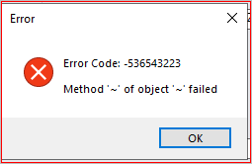
The same message can appear for many unrelated reasons, so the code alone does not point to a cause. In this case the report was failing while the customization was processing its data.
How the Issue Was Investigated
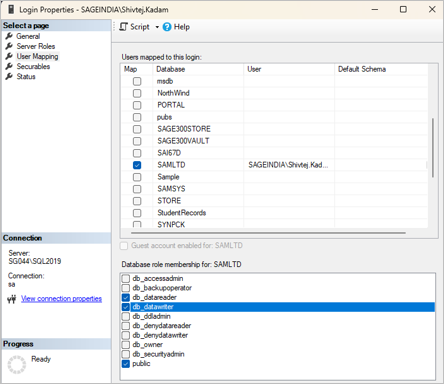
The first thing to rule out was basic access. If the SQL login cannot reach the company database at all, nothing else matters. The login was opened in SQL Server Management Studio under Security → Logins → (login) → Properties → User Mapping, and the Sage 300 company database was found mapped to the user.
Inside that database the user held these roles:
| Database role | What it allows |
| db_datareader | Read data from every table in the database. |
| db_datawriter | Insert, update and delete rows in every table. |
| public | The default role every database user belongs to. |
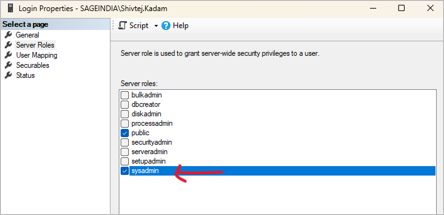
Next came the Server Roles page of the same login. Here the sysadmin role was the one that made the difference. With it ticked the report ran; without it the error came back. That was a useful clue, because it proved the problem was about permissions and not about a broken report file or a damaged installation.
Since reading and writing data was already allowed, the next step was to read the report code and look at every statement sent to the database. One of them stood out: the report was using TRUNCATE TABLE to clear its working table before each run.
Why Does the Error Occur?
Many people treat TRUNCATE TABLE as a faster version of DELETE, but SQL Server handles the two very differently. DELETE is a normal data change, so the db_datawriter role covers it. TRUNCATE TABLE needs the ALTER permission on the table, and db_datawriter does not include that.
So the user could read and write, yet the moment the report tried to truncate its table, SQL Server refused. The report component could not explain this properly and passed back its generic “Method ‘‘ of object ‘‘ failed” message instead of a proper permission error.
In other words, this was not a Sage 300 security problem. It was a mismatch between what the customization tried to do and what the SQL login was allowed to do.
The Resolution
Rather than widening the user’s access, the report code was changed. The statement that cleared the working table:
TRUNCATE TABLE TableName
was replaced with:
DELETE FROM TableName
A plain DELETE only needs the rights that db_datawriter already gives, so the restricted login can run it. The report was then tested again with the same limited login in Citrix, and AP Vendor / Customer Transaction GE reports ran successfully without any sysadmin access.
One thing to keep in mind: DELETE is slower than TRUNCATE on very large tables and writes more to the transaction log. For a small working table, as in this report, the difference is not noticeable.
| Step | What happens |
| 1. Confirm the error | Reproduce the “Method ‘~’ of object ‘~’ failed” message with the affected user. |
| 2. Open the SQL login | In SQL Server Management Studio, open the properties of the user’s login. |
| 3. Check User Mapping | Make sure the Sage 300 company database is mapped to the login. |
| 4. Check database roles | Confirm db_datareader, db_datawriter and public are selected. |
| 5. Compare with sysadmin | If the report works only with sysadmin, treat it as a permission clue, not as the fix. |
| 6. Review the code | Go through the report or application code and list every SQL command it runs. |
| 7. Spot the command | In this case the report used TRUNCATE TABLE on its working table. |
| 8. Replace the command | Change TRUNCATE TABLE to DELETE FROM where the logic allows it. |
| 9. Test again | Run the AP Vendor / Customer Transaction GE report with the restricted login and confirm it completes. |
A Note for Citrix Environments
It is tempting to settle this kind of error by ticking sysadmin and moving on. It works, but it also gives the user full control of the SQL Server instance, which is far more than a report needs. A better order of work is:
1.Find out which database operation is actually failing.
2.Check which permission that operation really requires.
3.Change the customization if it can reasonably do the job in a lighter way.
4.Grant only the permissions the application genuinely needs, and nothing beyond that.
Key Functional Points
•Applies to customized Sage 300 reports and applications that run their own SQL commands.
•Most often noticed in Citrix setups, where users log in with limited SQL rights.
•The error message does not reveal the database problem behind it, so the code has to be checked.
•Review the SQL login’s User Mapping and database roles early in the investigation.
•db_datareader and db_datawriter are enough for many customized reports.
•TRUNCATE TABLE needs ALTER permission on the table, which is more than normal data changes need.
•Replacing it with DELETE FROM removes the need for extra rights when the design permits.
•sysadmin should not be the first thing tried.
•Always re-test the report with the restricted login after changing the code.
Business Benefits
•Solves the report error without handing out sysadmin access.
•Keeps the SQL Server security setup tighter and easier to audit.
•Cuts down permission-related problems for users working through Citrix.
•Helps the support team trace a vague Sage 300 error back to the real database command.
•Lets the customized Extended reports run on standard database roles.
•Makes future troubleshooting quicker for both support and development teams.
•Follows the good practice of giving users only the access their work requires.
About Us
Greytrix – a globally recognized and one of the oldest Sage Development Partners is a one-stop solution provider for Sage ERP and Sage CRM organizational needs. Being acknowledged and rewarded for multi-man years of experience, we bring complete end-to-end assistance for your technical consultations, product customizations, data migration, system integrations, third-party add-on development, and implementation competence.
Greytrix offers unique GUMU™ integrated solutions of Sage 300 with Sage CRM, Salesforce(listed on Salesforce Appexchange), Dynamics 365 CRM, and Magento eCommerce, along with Sage 300 Migration from Sage 50 US, Sage 50 CA, Sage PRO, QuickBooks, Sage Business Vision and Sage Business Works. We also offer best-in-class Sage 300 customization and development services and integration services for applications such as POS | WMS | Payroll | Shipping System | Business Intelligence | eCommerce for Sage 300 ERP and for Sage 300c development services we offer, upgrades of older codes and screens to new web screens, latest integrations using Data and web services to Sage business partners, end users and Sage PSG worldwide.
Greytrix offers 20+ add-ons for Sage 300 to enhance productivity such as GreyMatrix, Document Attachment, Document Numbering, Auto-Bank Reconciliation, Purchase Approval System, Three-way PO matching, Bill of Lading, and VAT for the Middle East. The GUMU™ integration for Dynamics 365 CRM – Sage ERP is listed on Microsoft Appsource with an easy implementation package.
The GUMU™ Cloud framework by Greytrix forms the backbone of cloud integrations that are managed in real-time for processing and execution of application programs at the click of a button.
For more details on Sage 300 and Sage 300c Services, please contact us at accpac@greytrix.com, We will like to hear from you.