For Sage CRM customizations, Client Side API has always been proved stress- free and effortless to work with client side customizations. It has reduced complexity as compared to JavaScript, to much better extent by introducing built in functions. Today I would share one such amazing trick related to screen customization which highlights key info as required by user.
Related Post: Sage CRM 7.2 Client Side API Manipulate List Block Columns
A very basic thing while working with client side customization is selecting an object of the field. Once done, we can then perform any operation on the selected object. This operation can be anything like changing style, highlighting fields data etc. Below is the syntax used to select company name field on company screen.
var oCompName=crm.fields(“comp_name”);
With above syntax, we can select only one field at a time. Let’s say, if you want to highlight two fields Company Name, Facebook on company summary. Then this can be achieved in single line of code as shown below.
<snippet>
crm.ready(function(){
crm.fields(“comp_name comp_facebook”).highlight();
});
</snippet>
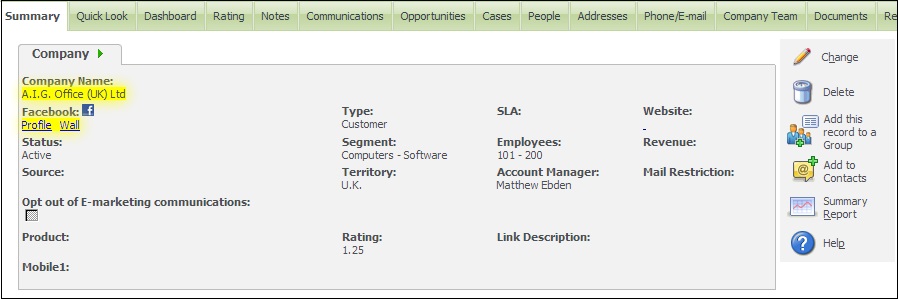
As shown in code snippet above, multiple fields can be selected by providing a list of fields separated by SPACE.
Also, if you want to select all the fields other than these fields, then below syntax can be used.
<snippet>
crm.ready(function(){
crm.fields(“!comp_name !comp_facebook”).highlight();
});
</snippet>
As per the above snippet, all fields except comp_name and comp_facebook field will be selected. This way we can achieve customizations with minimum lines of code. You can try this out with different screens of other entities too!
Also Read:
1) Managing FCK Editor’s behavior with SageCRM Style sheet
2) GUMU Sage CRM – Sage 100 supports Multi Company
3) Clone Quotes and Orders in Sage CRM
4) View Sage CRM Reports in PDF format from any Sage CRM screen
5) Steps to install GUMU Sage 100 Module
