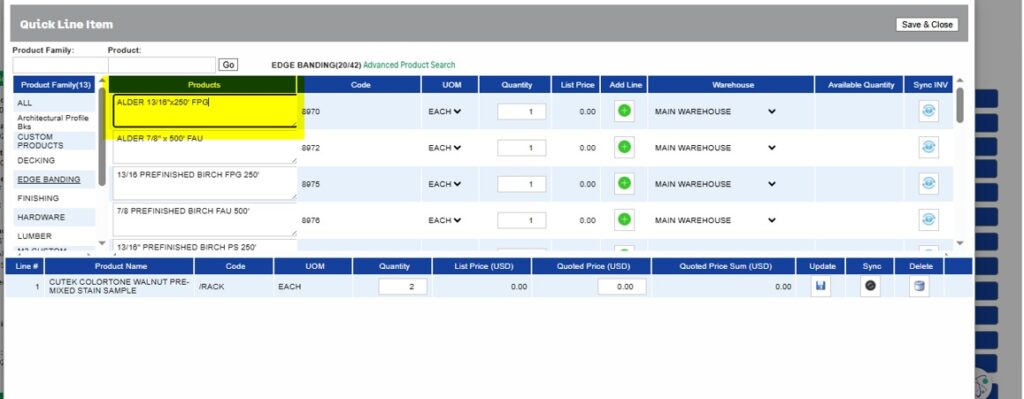
In dynamic sales environments, flexibility in managing product information is just as important as pricing accuracy. To address a specific client requirement, we implemented a customization in the QLE (Quick Line Entry) screen that enhances how item descriptions are handled during the quoting and order process.
This solution ensures users have better control over item descriptions while maintaining data integrity once items are finalized.
Overview of the Customization
This was delivered as a client-specific customization, focusing on improving usability and allowing controlled editing of item descriptions at different stages of the quote and order creation process.
Key Features and Functionality
1. Editable Item Description in Upper Grid
The Item Description column in the upper grid of the QLE screen would be fully editable:
- This applies regardless of the product family.
- Users can freely update descriptions before adding items to the quote.
2. Pre-Addition Description Modification
Before an item is added to the lower grid:
- Users can modify the item description as needed.
- This ensures that the correct and context-specific description is captured right from the beginning.
3. Controlled Editing After Item Addition
Once the item is added to the lower grid:
- The description field becomes read-only.
- This prevents accidental changes and helps maintain consistency in finalized quote/Order line items.
However, flexibility is still maintained:
- If a user needs to update the description after adding the item, they can do so via the New Line Entry screen.
4. Enhanced Visibility in New Line Entry Screen
To support post-addition edits:
- A new column called “Item Description” has been introduced in the New Line Entry screen.
- This column displays the updated descriptions, ensuring users have clear visibility of any modifications made.
Business Benefits
This customization delivers several practical advantages:
- Improved Accuracy: Ensures correct item descriptions are captured before finalizing line items.
- Controlled Flexibility: Allows edits at the right stage without compromising data integrity.
- Better User Experience: Simplifies the process of updating descriptions when needed.
- Enhanced Visibility: Clearly displays modified descriptions in the New Line Entry screen.
This enhancement showcases how client-driven customizations can significantly improve everyday business workflows. By enabling editable item descriptions at the right stage and restricting changes post-addition, the solution strikes a balance between flexibility and control.
Such targeted improvements not only streamline operations but also ensure higher accuracy and efficiency in the quoting and order process—ultimately contributing to better customer communication and smoother sales cycles.