
GUMU™ for Sage CRM – Sage 100 is a real-time, bi-directional integration that seamlessly connects CRM and ERP processes. One of its key strengths is its flexibility, allowing businesses to tailor the integration to match their specific operational requirements.
At Greytrix, we continuously enhance our GUMU™ Sage CRM – Sage 100 integration to improve data visibility and streamline business workflows. In this enhancement, we focused on providing real-time commission insights directly within Sage CRM, enabling users to access critical financial data without switching systems.
This blog highlights a client-requested customization to display customer-wise and salesperson-wise commission details within Sage CRM.
Commission Visibility in Sage CRM
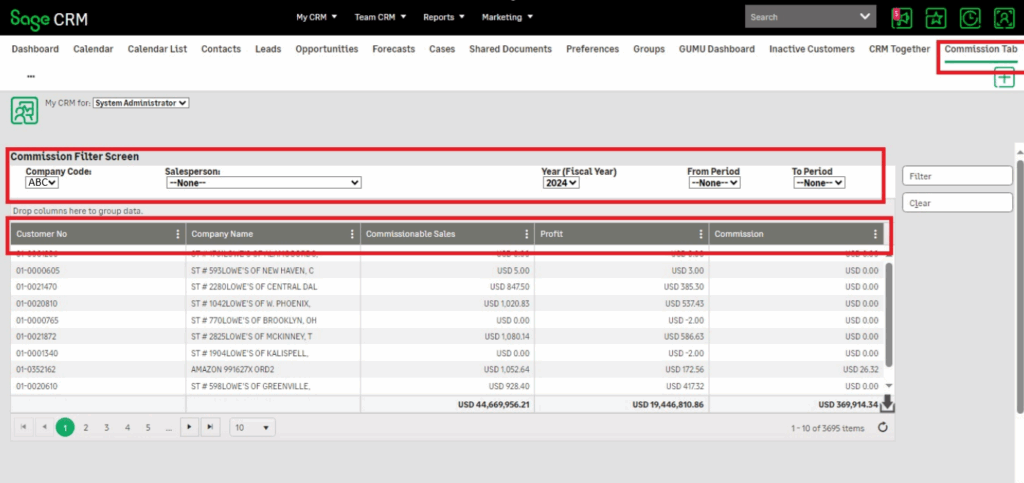
To provide better insights into commission data, we introduced dedicated Commissions Tabs in two key areas of Sage CRM:
1. My CRM Context – Customer-Level Commission Overview
A new Commissions Tab has been added in the My CRM context, which displays a consolidated view of all customers along with their commission details.
Key Columns:
- Customer No
- Company Name
- Commissionable Sales
- Profit
- Commission
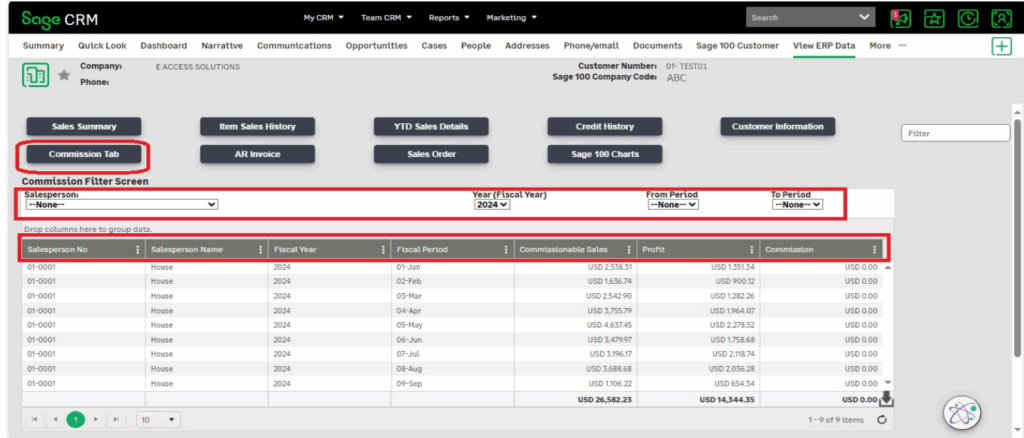
- Customer Context – Salesperson-Level Commission Details
Within the View ERP Data tab of the Customer screen, a Commissions Tab is added to display commission details specific to the selected customer.
Key Columns:
- Sales Person No
- Sales Person Name
- Fiscal Year
- Fiscal Period
- Commissionable Sales
- Profit
- Commission
Flexible Data Filtering
To enhance usability and analysis, the Commission grids support multiple filters
My CRM Context Filters:
- Company Code
- Salesperson
- Year (Fiscal Year)
- From Period
- To Period
Customer Context Filters:
- Salesperson
- Year (Fiscal Year)
- From Period
- To Period
Time-Based Data View:
By default, commission data for the current year is displayed.
Users can also view historical data for the previous two years using filters.
Summary Totals for Better Insights
To provide quick insights:
- Total Commissionable Sales
- Total Profit
- Total Commission
are displayed on both Commission tabs, helping users analyze performance at a glance.
Key Benefits:
- Centralized commission data within Sage CRM
- No need to switch between Sage CRM and Sage 100
- Improved visibility of customer and salesperson performance
- Faster decision-making with real-time data
- Enhanced reporting and analysis capabilities
Conclusion:
This enhancement to GUMU™ for Sage CRM – Sage 100 empowers businesses with better financial visibility by bringing commission data directly into the CRM interface. Sales and management teams can now access, filter, and analyze commission information efficiently, leading to improved productivity and informed decision-making.
For more information about GUMU™ integration link, please refer below links:
Blog link:
https://www.greytrix.com/blogs/sagecrm/tag/gumumas/
YouTube video link:
https://www.youtube.com/watch?v=r1QlaTC0PX4
For any queries related to GUMU integration, you can contact us at sage@greytrix.com