
At GUMU™, we continuously strive to enhance Sage CRM functionality by introducing practical improvements that simplify business processes and improve user experience. In this blog, we are excited to introduce a new enhancement to the Quick Line Entry (QLE) screen — Improving Cost Accuracy with Drop Ship-Based Cost Control in Sage CRM
Recently, one of our clients required greater control over item costing when processing drop-shipped products. They wanted the system to automatically retrieve the item’s Average Unit Cost from Sage 100 while allowing users the flexibility to override the cost when a product is being drop shipped.
To meet this requirement, we implemented a customization that introduces a Drop Ship checkbox and a Cost field within the QLE line items grid. This enhancement provides controlled cost management while maintaining consistency with Sage 100 costing information.
Automatic Cost Population from Sage 100
When a Non-Stock Item is added to the QLE screen, the system automatically retrieves and populates the Average Unit Cost from Sage 100 into the Cost field.
This eliminates manual cost entry and ensures users begin with the most accurate costing information available within the ERP system.
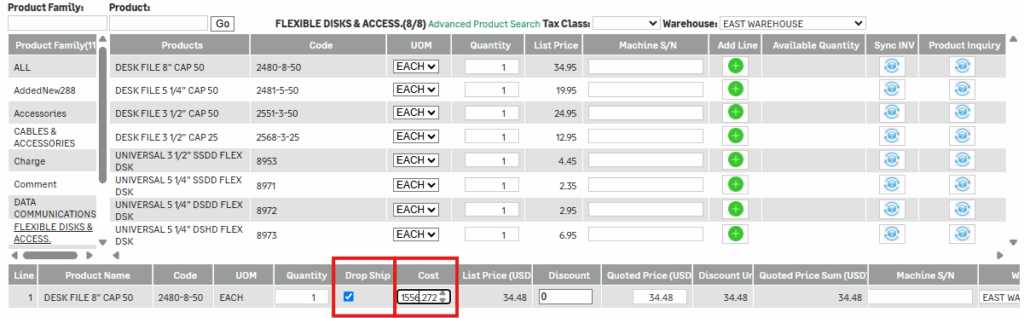
In the example above, the Cost field has been automatically populated with the Average Unit Cost retrieved from Sage 100 and the Drop Ship is checked which makes the cost Field editable .
Controlled Cost Editing Using Drop Ship
To provide flexibility for drop-shipped products, the Cost field behavior is controlled through the Drop Ship checkbox.
When the Drop Ship checkbox is selected:
· The Cost field becomes editable.
· Users can enter any cost value required for the transaction.
· The originally retrieved Average Unit Cost can be overridden if necessary.
This allows users to accommodate supplier-specific costs, special purchasing arrangements, or unique drop shipment scenarios.
Automatic Cost Restoration
To ensure data consistency, the system automatically restores the original Sage 100 cost when Drop Ship is disabled.
If a user:
· Checks the Drop Ship option.
· Modifies the Cost value.
· Later unchecks the Drop Ship option.
The system will automatically:
· Restore the original Average Unit Cost retrieved from Sage 100.
· Remove any manually entered cost value.
· Return the Cost field to a read-only state.
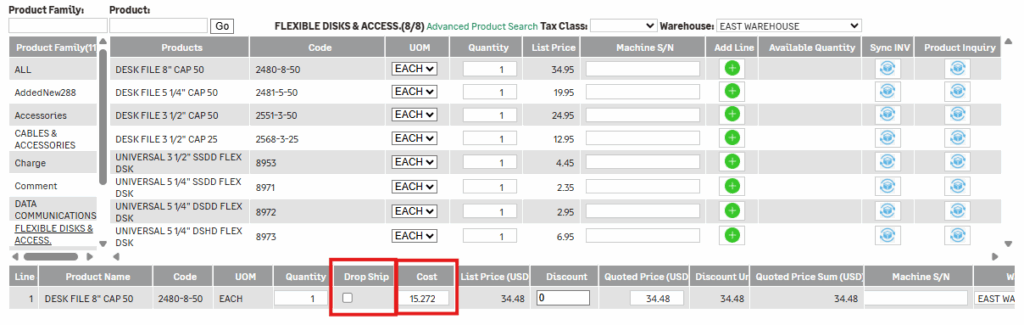
As shown above, once the Drop Ship checkbox is unchecked, the Cost field automatically reverts to the original Average Unit Cost value, ensuring that standard costing rules remain intact.
Benefits of This Enhancement
This enhancement provides several operational benefits:
· Automatic retrieval of Average Unit Cost from Sage 100.
· Reduced manual data entry.
· Improved costing accuracy.
· Controlled cost modifications for drop-shipped items.
· Prevention of unintended cost changes.
· Consistent behavior across all users.
· Better alignment between Sage CRM and Sage 100.
Conclusion
The Drop Ship and Cost Functionality enhancement brings greater control and flexibility to the QLE process. By automatically loading Average Unit Costs from Sage 100, allowing cost overrides only for drop-shipped items, and restoring default costs when Drop Ship is disabled, organizations can improve costing accuracy, reduce manual effort, and maintain consistent transaction processing throughout the sales cycle.