
GUMU™ for Sage CRM – Sage 100 is a real-time, bi-directional integration that keeps customer, sales, and order data moving seamlessly between the two systems. It’s built to eliminate manual re-entry and keep both platforms in sync, giving users real-time visibility into the customer information that matters most.
On a recent integration project, one client needed something more specific than general sync: control over shipping data during Quote and Order processing. They wanted reps to instantly recognize where an order was shipping via the Ship-to Code, and they wanted the Shipper Account Number to be adjustable per transaction — without ever touching the customer’s default address record.
We built two targeted enhancements to get there.
1. Ship-to Code Enhancement
The Ask
- Show the Ship-to Code directly on the Quote and Order Summary screens.
- Auto-populate it from the customer’s default shipping address.
- Refresh it automatically when a different shipping address is chosen.
- Keep it stable even if someone edits the address details.
- Carry it through to Sage 100 when the Order is promoted.
What Changed
A new, read-only Ship-to Code field now sits on the Quote and Order Summary screens. Because it’s read-only, users get full visibility without any risk of accidentally overwriting it.
Automatic population kicks in the moment a new Quote or Order is created — the Ship-to Code tied to the customer’s default shipping address loads immediately, with no manual lookup required.
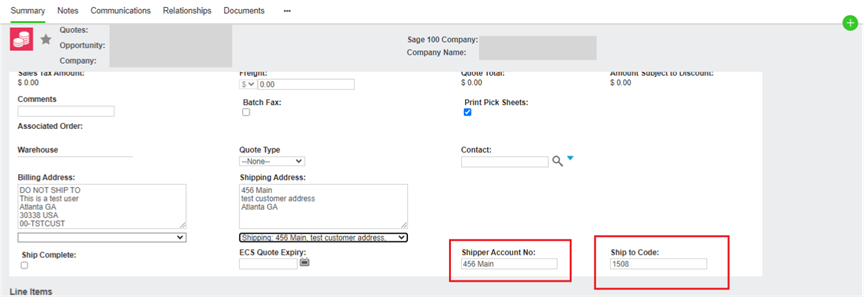
Automatic updates on address changes mean that switching the Ship-to Address dropdown instantly refreshes the Ship-to Code to match, so the field never falls out of sync with what’s actually selected.
Stability during edits was the trickier part: users can freely edit the shipping address details on a Quote or Order, but the Ship-to Code stays anchored to the originally selected Location Code. Editing an address doesn’t quietly swap the shipping location underneath the user.
Clean promotion to Sage 100 rounds it out — whatever Ship-to Code is showing on the Summary screen travels with the Order when it’s promoted, so the correct shipping location lands in Sage 100 without any extra steps.
Why It Helps
- Immediate visibility into the shipping location, right on the screen users already work from.
- Automatic refresh keeps the field trustworthy after an address change.
- The original Location Code is preserved even through address edits.
- Accurate promotion to Sage 100 means fewer downstream corrections.
- Overall: fewer manual errors, more order accuracy.
2. Shipper Account Number Integration
The Ask
- Add a Shipper Account Number field to customer addresses in Sage CRM.
- Keep it synchronized between Sage CRM and Sage 100.
- Make sure it’s part of every customer sync process, not just some.
- Let users override it per Quote or Order without touching the customer’s default record.
- Promote the transaction-specific value to Sage 100 on Order promotion.
What Changed
A new Shipper Account Number field now lives on the Customer Address screen in Sage CRM, fully wired into Sage 100 so shipping account details stay consistent across both platforms.
Coverage across every sync path was essential — the field is integrated into Customer Import, Sage 100-to-Sage CRM real-time sync, Sage CRM-to-Sage 100 promotion, and the Sage CRM-to-Sage 100 update process. Wherever customer data moves between the systems, the Shipper Account Number moves with it.
Automatic loading on new transactions means that when a Quote or Order is created, the default Shipper Account Number from the selected address loads automatically, cutting down manual entry.
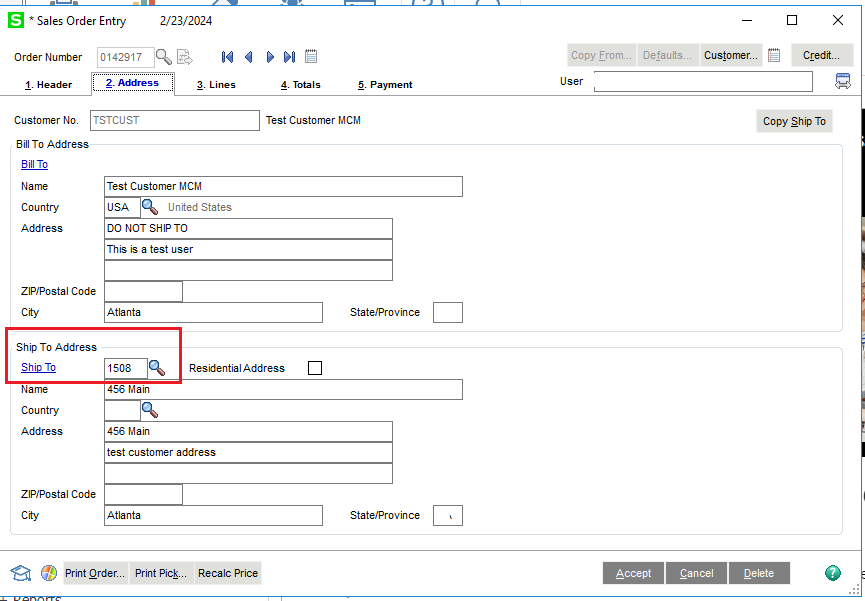
Transaction-level overrides give users real flexibility: the Shipper Account Number can be changed directly on the Quote or Order Summary screen, and that change applies only to the transaction at hand — the customer’s default Address record stays untouched.
Promotion to Sage 100 carries the transaction-specific value through, so Sage 100 receives exactly what was entered on that Order while the customer’s master shipping data remains unaffected.
Why It Helps
- Keeps Sage CRM and Sage 100 aligned on shipping account data at all times.
- Saves time by defaulting the shipping account automatically.
- Lets reps adjust for one-off transactions without corrupting master data.
- Ensures Sage 100 gets accurate, transaction-specific shipping details.
- Balances flexibility with data integrity — rather than trading one for the other.
Wrapping Up
Together, the Ship-to Code and Shipper Account Number enhancements tighten up shipping data management across the Sage CRM–Sage 100 integration. Reps get instant clarity on shipping location, shipping account details load automatically, and one-off changes no longer put the customer’s master data at risk. With both fields reliably promoted to Sage 100, the result is cleaner order processing, fewer downstream fixes, and better overall control over how shipping information flows between the two systems.
About Us
Greytrix – a globally recognized and one of the oldest Sage Development Partners is a one-stop solution provider for Sage ERP and Sage CRM organizational needs. Being acknowledged and rewarded for multi-man years of experience and expertise, we bring complete end-to-end assistance for your technical consultations, product customizations, data migration, system integrations, third-party add-on development, and implementation competence.
Greytrix has some unique integration solutions developed for Sage CRM with Sage ERPs namely Sage X3, Sage Intacct, Sage 100, Sage 500, and Sage 300. We also offer best-in-class Sage ERP and Sage CRM customization and development services to Business Partners, End Users, and Sage PSG worldwide. Greytrix helps in the migration of Sage CRM from Salesforce | ACT! | SalesLogix | Goldmine | Sugar CRM | Maximizer. Our Sage CRM Product Suite includes add-ons like Greytrix Business Manager, Sage CRM Project Manager, Sage CRM Resource Planner, Sage CRM Contract Manager, Sage CRM Event Manager, Sage CRM Budget Planner, Gmail Integration, Sage CRM Mobile Service Signature, Sage CRM CTI Framework.
Greytrix is a recognized Sage Champion Partner for GUMU™ Sage X3 – Sage CRM integration listed on Sage Marketplace and Sage CRM – Sage Intacct integration listed on Sage Intacct Marketplace. The GUMU™ Cloud framework by Greytrix forms the backbone of cloud integrations that are managed in real-time for the processing and execution of application programs at the click of a button.
For more information on our integration solutions, please contact us at sage@greytrix.com. We will be glad to assist you.