
Sage CRM client side API methods of Sage CRM 7.2 are very useful to customize Sage CRM screens, layouts etc. In this blog post, we will explain how users can enable Collapsible Panels feature in Sage CRM v7.2.
New Stuff: Printing current Sage CRM Screens to PDF
Refer our blogs on Sage CRM v7.2 features at the end of this blog
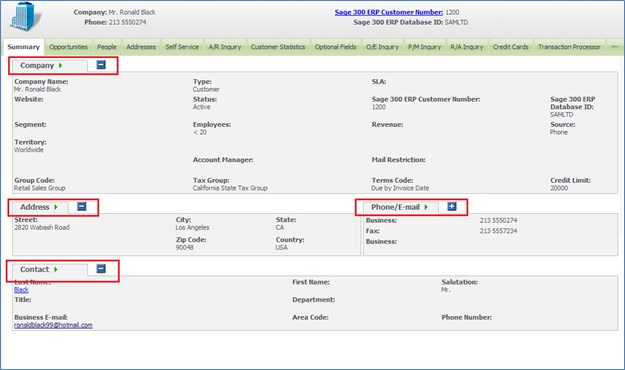
Let’s consider that you want to apply Collapsible feature for Company Summary screen. On Company Summary screen, below panels are visible.
1) Company
2) Address
3) Phone/E-Mail
4) Contact
These panels can be made collapsible with client side API in Sage CRM v7.2. Here are the steps that you need to follow.
1) Login to Sage CRM.
2) Navigate to below path.
Administration | Customization | Company
3) Navigate to Screens tab and click on the CompanyTopContent screen.
4) Copy and Paste below code into the Custom Content section of screen.
<script>
crm.ready(function ()
{
crm.collapsiblePanels(true)
})
</script>
5) Click on Save button.
Once done, navigate to Company Summary screen and you will find that a new image with Hyphen ( – ) sign has been added at the right side of each of the Panel. Refer the screenshot below.
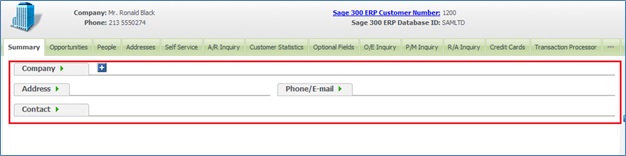
On clicking of button, you will observe that the respective panels collapse. Refer the screenshot below.
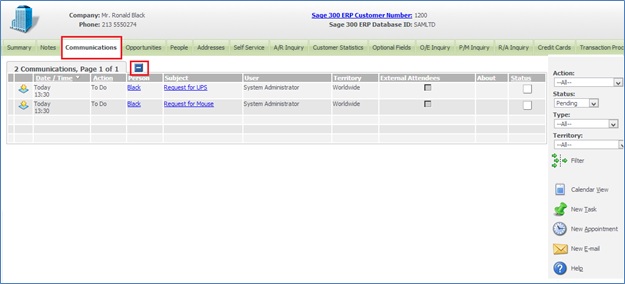
You will also observe that the same image has been added on other tabs of Company. Refer below screenshot of Communications tab of Company entity.
If there are multiple panels on the screen, similar feature can be applied. This way, if user wants to see the last panel, he just needs to click on [+] sign to expand the panel and view the Panel details.
Also Read:
1) Additional Information in Entity Top Content Screens – Sage CRM v7.2
2) Add Print Button to Print Entity information in Sage CRM v7.2
3) Display Background Color on Required Fields in Sage CRM v7.2
4) Information and Error Message feature in Sage CRM v7.2
5) Features of Outlook integration with SageCRM 7.2