
Anyone running warehouse or accounting operations knows the drill: physical stock moves in minutes, but the paperwork to record it can take hours.
A delivery truck arrives with critical supplies. Someone grabs a box off the pallet because an emergency repair needs to happen right now. Physically, the item is gone. System-wise, the receiving paperwork is still sitting on a desk waiting to be keyed into Sage Intacct.
Until recently, that timing gap put businesses in a real bind.
The Conflict in the Old Setup
To use Sage Intacct’s Supplies Inventory tool, the system previously forced you to turn on a setting that blocked negative inventory globally.
That created a massive bottleneck. If your sales team needed negative inventory enabled to keep customer orders shipping without delay, you couldn’t use internal supply tracking at all. You had to sacrifice control over internal supplies just to keep customer sales moving, or vice versa.
What Changed in the Latest Update?
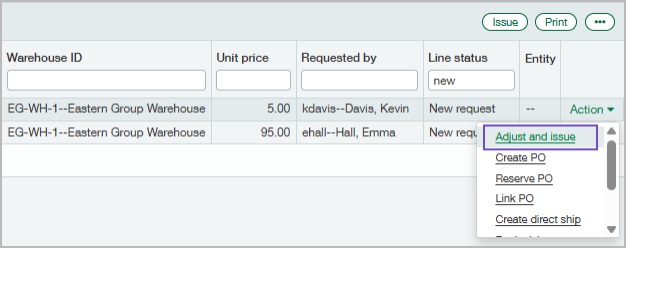
Sage Intacct eliminated that forced tradeoff by adding a new option in the Supplies workbench called Adjust and issue.
You can now leave negative inventory enabled globally for customer sales while still using Supplies Inventory for internal supplies. The system no longer forces an “all-or-nothing” rule on your workflows.
What Happens Behind the Scenes?
When an urgent supply request comes in for stock you physically have—but haven’t officially received in the software—you simply select Adjust and issue.
Sage Intacct automatically handles two steps in one go:
- Creates an Adjustment: It adjusts the inventory count upward so the system acknowledges the item exists.
- Creates an Issue: It immediately logs the item as issued to the requesting department or staff member.
Your team gets the physical materials they need right away, and your books stay balanced without waiting on the receiving queue.
How to Set It Up in 4 Steps
Setting this up takes just a few minutes in your administration settings:
- Go to Inventory Control and check Supplies Inventory.
- Uncheck the option labeled Do not allow negative inventory globally.
- Save your changes.
- Edit the SYS-Supplies adj increase transaction definition to configure your required General Ledger (GL) posting rules.
Once that is saved, the “Adjust and issue” choice will appear directly in your Supplies workbench when processing new requests.
The Golden Rule: When to Use It
Think of this feature as an operational safety valve, not a daily shortcut.
- Use it when: You face a true timing lag—the items are physically on your shelf and urgently needed, but the receiving entry hasn’t caught up yet.
- Skip it for: Normal receiving routines, correcting routine inventory miscounts, or trying to issue items that don’t physically exist in your facility.
Keeping this distinction clear ensures your daily operations stay fast while your accounting audit trail remains clean.
About Us
Greytrix has a wide product range for Sage Intacct- a Cloud ERP. This includes migrations from QuickBooks | Sage 50 | Sage 100 | Sage 300 to Sage Intacct. Our unique GUMU™ integrations include Sage Intacct for Sage CRM | Salesforce | FTP/SFTP | Rev.io | Checkbook | Dynamics 365 CRM | Magento | Rent Manager | Treez | Avalara Avatax | Blackline SFTP. We also offer best-in-class Sage Intacct Development Services, Consulting services, integrated apps like POS | WMS | Payroll | Shipping System | Business Intelligence | eCommerce for Sage Intacct to Sage business partners, resellers, and Sage PSG worldwide. Greytrix constantly develops apps, products, and add-ons to enhance user experience. Sage Intacct add-ons include AR Lockbox File Processing.
Greytrix GUMU™ integration for Sage CRM – Sage Intacct, Sales Commission App for Sage Intacct, and Checkbook.io ACH/Digital Check Payments for Sage powered by GUMU™ are listed on Sage Intacct Marketplace.
The GUMU™ Cloud framework by Greytrix forms the backbone of cloud integrations that are managed in real-time for the processing and execution of application programs at the click of a button.
For more information on Sage Business Cloud Services, please contact us at sagecloud@greytrix.com. We will like to hear from you.