
The Outgoing Documents Report in Singapore Localization for Sage Intacct provides organizations with a centralized view of all electronic documents transmitted through the InvoiceNow (Peppol) network. It enables finance teams to efficiently monitor document transmission, track processing statuses, and review customer responses, ensuring smooth and effective management of outbound e-Invoicing transactions.
The report also offers comprehensive filtering options, allowing users to search and analyze documents based on document date, customer code, source module, document type, Peppol status, IRAS status, and response status. Additionally, the Export to Excel feature allows users to easily extract report data for further analysis, reconciliation, reporting, and audit purposes.
In this blog, we will explore the Outgoing Documents Report feature in Singapore Localization for Sage Intacct, including its powerful filtering capabilities, document tracking features, and reporting options. We will also discuss how the report helps organizations monitor and manage the complete lifecycle of outgoing Invoice Now (Peppol) documents, from initial transmission to processing and response, ensuring greater visibility, accuracy, and control over e-Invoicing transactions.
New Stuff: Manage Supplies Without Blocking Negative Inventory
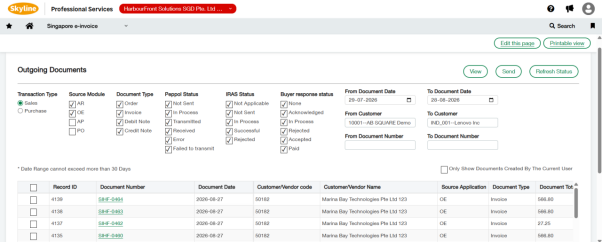
Outgoing Documents Report Process in Sage Intacct
The Outgoing Documents Report allows users to retrieve and monitor outbound documents in a few simple steps.
1. Navigate to the Singapore e-Invoice Module
Open the Outgoing Documents Report from the Singapore e-Invoice menu.
2. Select the Document Date Range
Specify the period for which you want to retrieve outgoing documents.
Configure:
- From Document Date
- To Document Date
This helps users generate reports for a specific business period.
3. Select Customer Range
Filter documents based on customer codes.
Configure:
- From Customer Code
- To Customer Code
This allows users to generate reports for individual customers or a range of customers.
4. Select Source Module
Choose one or more source modules from which documents should be retrieved.
Available modules include:
- AR (Accounts Receivable)
- OE (Order Entry)
- AP (Accounts Payable)
- PO (Purchase Orders)
5. Select Document Type
Choose the document types to include in the report.
Available options include:
- Invoice
- Debit Note
- Credit Note
This enables users to retrieve only the required document categories.
6. Filter by Peppol Status
Monitor document transmission status using Peppol status filters. These filters help identify successfully transmitted documents as well as documents requiring attention.
7. Filter by IRAS Status
Track document processing status within IRAS.
Available options include:
- Not Applicable
- Not Sent
- In Process
- Successful
- Rejected
This helps organizations monitor regulatory processing and compliance.
8. Filter by Response Status
Review recipient responses using the Response Status filter.
Available statuses include:
- None
- Acknowledged
- In Process
- Rejected
- Accepted
- Paid
This provides visibility into the recipient’s interaction with the electronic document.
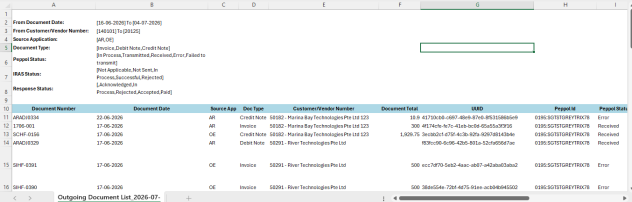
9. Export Report
Click Export to Excel to download the filtered report.
Benefits of the Outgoing Documents Report
The Outgoing Documents Report offers several advantages, including:
- Centralized monitoring of all outgoing InvoiceNow (Peppol) documents
- Quick identification of failed or pending transmissions
- Easy tracking of Peppol, IRAS, and recipient response statuses
- Flexible filtering by customer, module, document type, and date
- Simplified reporting through Excel export
Reduced manual effort in tracking document statuses
About Us :-
Greytrix – a globally recognized and one of the oldest Sage Development Partner is a one-stop solution provider for Sage ERP and Sage CRM organizational needs. Being acknowledged and rewarded for multi-man years of experience and expertise, we bring complete end-to-end assistance for your technical consultations, product customizations, data migration, system integrations, third party add-on development and implementation competence.
Greytrix has a wide product range for Sage Intacct- a Cloud ERP. This includes migrations from QuickBooks | Sage 50 | Sage 100 | Sage 300 to Sage Intacct. Our unique GUMU™ integrations include Sage Intacct for Sage CRM| Salesforce| FTP/SFTP | Rev.io | Checkbook| Dynamics 365 CRM | Magento | Rent Manager | Treez| Avalara Avatax | Blackline SFTP. We also offer best-in-class Sage Intacct Development Services, Consulting services, integrated apps like POS | WMS | Payroll |Shipping System | Business Intelligence | eCommerce for Sage Intacct to Sage business partners, resellers, and Sage PSG worldwide. Greytrix constantly develops apps, products, and add-ons to enhance user experience. Sage Intacct add-ons include AR Lockbox File Processing. For more information on Sage Business Cloud Services, please contact us at sagecloud@greytrix.com. We will like to hear from you.