
In Sage 300 ERP,The Order Entry screen in Sage 300 is mainly used to create customer orders. It is the initial step in the sales process. When a user enters an order, it means the customer has requested the goods, but the goods are not yet delivered and no invoice is created. Because of this, Order Entry is treated as an operational process and not a financial process. At this stage, the customer is not yet billed and no payment is expected.
When an order is created in Sage 300, the system only saves the order information such as customer code, item details, quantity, price, and order date. It does not update the customer’s outstanding balance and no entry is created in Accounts Receivable or the General Ledger. This is the main reason why a normal Order Entry does not appear in the standard AR Ledger report, because the AR Ledger shows only financial transactions.
However, we have created a custom Excel-based AR Ledger report that is specially designed to also print Order Entry details where Shipment and Invoice have not been created. This report is very useful for tracking pending customer orders that are not yet billed. Even though these orders do not affect the AR balance, we are still showing them in the Excel report for business tracking and follow-up purposes.
New Stuff: – Income Statement Report for Budget Accounts
Please refer below screenshot of the user interfaces for the “Sage 300 AR Ledger Report”.
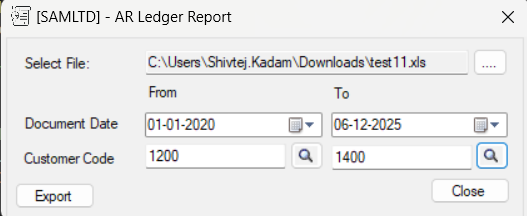
The report will be exported in selected folder as an excel file-based format with parameter as of from & To Document Date, Item, Customer code.
Steps:
- Select the Excel file by clicking on the browse (….) button and choosing the required save location with the file name.
- Select the From and To values in the Document Date fields to define the required date range.
- After that enter the Customer Code From and To values.
- Click on the Export button to generate the AR Ledger Report in Excel format without Shipment and Invoice details at the selected file location.
Below is the screenshot of excel-based generated output of the “Sage 300 AR Ledger Report”:
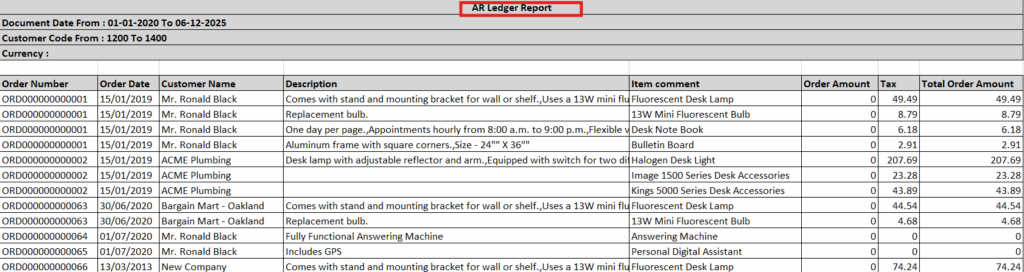
This report includes following fields and can be modified according to the requirement.
- Customer Number
- Customer Name
- Document date
- Item Number
- Item Description
- Order name
- Order date
- Item comment
- Order amount
- Tax
- Total order amount
In this way, the report provides a clear picture of AR Ledger Report, enabling better decision-making and effective monitoring of business growth. We can also customize this report output with required additional fields.
About Us:-
Greytrix – a globally recognized and one of the oldest Sage Gold Development Partner is a one-stop solution provider for Sage ERP and Sage CRM organizational needs. Being acknowledged and rewarded for multi-man years of experience, we bring complete end-to-end assistance for your technical consultations, product customizations, data migration, system integrations, third party add-on development and implementation competence.
Greytrix offers unique GUMU™ integrated solutions of Sage 300 with Sage CRM, Salesforce.com, Dynamics 365 CRM and MagentoeCommerce along with Sage 300 Migration from Sage 50 US, Sage 50 CA, Sage PRO, QuickBooks, Sage Business Vision and Sage Business Works. We also offer best-in-class Sage 300 customization and development services and integration services for applications such as POS | WMS | Payroll | Shipping System | Business Intelligence | eCommerce for Sage 300 ERP and for Sage 300c development services we offer, upgrades of older codes and screens to new web screens, latest integrations using Data and web services to Sage business partners, end users and Sage PSG worldwide.Greytrix offers 20+ addons for Sage 300 to enhance productivity such as GreyMatrix, Document Attachment, Document Numbering, Auto-Bank Reconciliation, Purchase Approval System, Three way PO matching, Bill of Lading and VAT for Middle East. The GUMU™ integration for Dynamics 365 CRM – Sage ERP is listed on Microsoft Appsource with easy implementation package.
For more details on Sage 300 and Sage 300c Services, please contact us at accpac@greytrix.com, We will like to hear from you.