
Anyone who works with purchasing knows this problem well—supplier delivery dates keep changing, and keeping those dates updated in the system takes more time than it should.Manually updating ETAs for multiple Purchase Orders in Sage 300 can be time consuming. The ETA Import feature makes this easier by allowing bulk updates through a file upload.
In this blog explains how the ETA Import screen works
What is the ETA Import Feature ?
The ETA Import feature allows users to upload supplier ETA details into Sage 300 using an Excel or CSV file. Instead of opening each PO and changing delivery dates line by line, all updates can be done in one file.
For teams dealing with frequent supplier updates, this feature removes a lot of manual effort and reduces the chances of missing or incorrect dates.
Import ETA screen workflow
The screen is very simple and doesn’t require much learning. At the top, you select the file using the Browse button. Once the file is selected, Sage 300 reads the data and shows it in a preview grid.
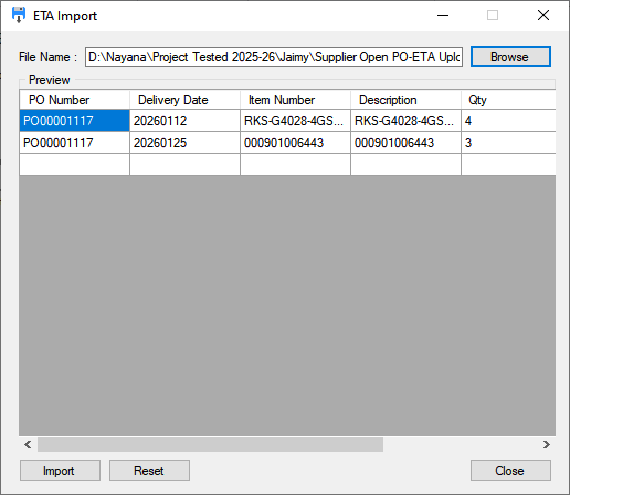
The grid structure are as follows:
1.PO number- identifies the specific Purchase Order being updated.
2.Item number – represents the individual item listed within the Purchase Order.
3.Delivery date – shows the expected date on which the item is scheduled to be received
4.Quantity – indicates the number of units ordered for that item.
5.Item description – provides a brief description of the item
This step is useful because It check whether the correct file has been uploaded.If anything looks wrong—maybe a date format issue or incorrect PO—you can fix the file before importing.
Why This Feature Is Useful
From a practical point of view, the ETA Import feature saves a lot of time. Purchasing teams don’t have to worry about updating dozens of POs one by one.Since data comes directly from a file, the risk of typing errors is also much lower.
Most importantly, it keeps ETA information up to date, which helps teams plan inventory better and communicate more accurately with internal teams and customers.
About Us
Greytrix – a globally recognized and one of the oldest Sage Development Partners is a one-stop solution provider for Sage ERP and Sage CRM organizational needs. Being acknowledged and rewarded for multi-man years of experience, we bring complete end-to-end assistance for your technical consultations, product customizations, data migration, system integrations, third-party add-on development, and implementation competence.
Greytrix offers unique GUMU™ integrated solutions of Sage 300 with Sage CRM, Salesforce(listed on Salesforce Appexchange), Dynamics 365 CRM, and Magento eCommerce, along with Sage 300 Migration from Sage 50 US, Sage 50 CA, Sage PRO, QuickBooks, Sage Business Vision and Sage Business Works. We also offer best-in-class Sage 300 customization and development services and integration services for applications such as POS | WMS | Payroll | Shipping System | Business Intelligence | eCommerce for Sage 300 ERP and for Sage 300c development services we offer, upgrades of older codes and screens to new web screens, latest integrations using Data and web services to Sage business partners, end users and Sage PSG worldwide.
Greytrix offers 20+ add-ons for Sage 300 to enhance productivity such as GreyMatrix, Document Attachment, Document Numbering, Auto-Bank Reconciliation, Purchase Approval System, Three-way PO matching, Bill of Lading, and VAT for the Middle East. The GUMU™ integration for Dynamics 365 CRM – Sage ERP is listed on Microsoft Appsource with an easy implementation package.
The GUMU™ Cloud framework by Greytrix forms the backbone of cloud integrations that are managed in real-time for processing and execution of application programs at the click of a button.
For more details on Sage 300 and Sage 300c Services, please contact us at accpac@greytrix.com, We will like to hear from you.