
In Sage 300 ERP, the purchasing team needs to ensure that materials are purchased from the right vendors at the correct prices. However, when the same item is available from multiple vendors, manually selecting the appropriate vendor and entering the unit cost for each PW Requisition can be time-consuming and may increase the risk of vendor selection and pricing errors.
To address this challenge, we developed a Vendor Catalog Customization for Sage 300 ERP. This enhancement automatically retrieves the Vendor Number and Unit Cost based on the selected Item Number, making the requisition process faster, more accurate, and more efficient for users.
The customization introduces a new Vendor Catalog screen, similar to the standard IC Item Pricing screen, where users can maintain Vendor Number, Item Number, Unit Cost, and specify a Default Vendor. Once the vendor and pricing details are maintained, the system automatically retrieves the appropriate vendor and unit cost when an item is selected during PW Requisition entry. This reduces manual data entry, minimizes errors, and improves the overall efficiency of the purchasing process.
Please refer below screenshot of the user interfaces for the “PW Requsition Screen”.
New Stuff: AP Invoice Macro: A Smarter Way to Process Supplier Invoices
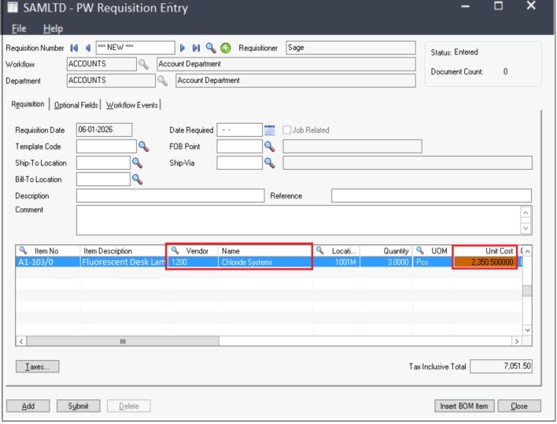
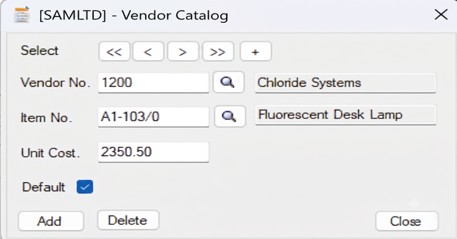
The Vendor Catalog customization automatically retrieves the Vendor Number and Unit Cost based on the selected Item Number during PW Requisition entry. This reduces manual data entry, ensures the correct vendor is selected, and maintains consistent pricing.
| Steps | User Action | System Action |
|---|---|---|
| 1 | Create Vendor Catalog records by maintaining Vendor No., Item No., Unit Cost, and Default Vendor. | Stores vendor-wise pricing information for each item. |
| 2 | Open the PW Requisition screen and create a new requisition. | Waits for item selection. |
| 3 | Enter the Item Number in the detail line and press Tab. | Searches the Vendor Catalog for the selected item. |
| 4 | If a matching record exists and a Default Vendor is configured. | Automatically fills the Vendor Number and Unit Cost. |
| 5 | Continue entering the remaining requisition details. | Saves the requisition with the correct vendor and pricing information. |
Let’s consider a simple example.
A company purchases Fluorescent Desk Lamps from three different suppliers.
Vendor –> Unit Cost
Chloride Systems: £1.00
Bright Electrical: £1.15
ABC Lighting: £0.95
Suppose the purchasing department has negotiated a contract with Chloride Systems, making it the preferred supplier.
Without any customization, every time a user creates a PW Requisition, they must:
•Remember the preferred vendor.
•Search for the correct vendor number.
•Enter the correct purchase price manually.
•Verify that the entered price is correct.
This manual process can result in:
•Incorrect vendor selection
•Incorrect pricing
•Delays in creating requisitions
•Inconsistent purchasing practices across users
Overall, this customization provides a smarter and more efficient purchasing experience while helping businesses maintain consistency and better control over vendor pricing.
About Us
Greytrix – a globally recognized and one of the oldest Sage Development Partners is a one-stop solution provider for Sage ERP and Sage CRM organizational needs. Being acknowledged and rewarded for multi-man years of experience, we bring complete end-to-end assistance for your technical consultations, product customizations, data migration, system integrations, third-party add-on development, and implementation competence.
Greytrix offers unique GUMU™ integrated solutions of Sage 300 with Sage CRM, Salesforce(listed on Salesforce Appexchange), Dynamics 365 CRM, and Magento eCommerce, along with Sage 300 Migration from Sage 50 US, Sage 50 CA, Sage PRO, QuickBooks, Sage Business Vision and Sage Business Works. We also offer best-in-class Sage 300 customization and development services and integration services for applications such as POS | WMS | Payroll | Shipping System | Business Intelligence | eCommerce for Sage 300 ERP and for Sage 300c development services we offer, upgrades of older codes and screens to new web screens, latest integrations using Data and web services to Sage business partners, end users and Sage PSG worldwide.
Greytrix offers 20+ add-ons for Sage 300 to enhance productivity such as GreyMatrix, Document Attachment, Document Numbering, Auto-Bank Reconciliation, Purchase Approval System, Three-way PO matching, Bill of Lading, and VAT for the Middle East. The GUMU™ integration for Dynamics 365 CRM – Sage ERP is listed on Microsoft Appsource with an easy implementation package.
The GUMU™ Cloud framework by Greytrix forms the backbone of cloud integrations that are managed in real-time for processing and execution of application programs at the click of a button.
For more details on Sage 300 and Sage 300c Services, please contact us at accpac@greytrix.com, We will like to hear from you.