
Calculating sales commission is not always as simple as checking the sales made by each salesperson. In some businesses, commission is considered only when the customer actually makes the payment. Because of this, the sales invoice and the customer collection may fall into two different periods.
For example, a salesperson may create an invoice in one month, but the customer may pay it several weeks later. If the company follows a collection-based commission process, the payment date becomes important when reviewing the commission.
The Sales Commission on Collection add-on for Sage 300 helps users review commission information based on customer collections. It provides options to select the salesperson, reporting period, and overdue payment conditions before generating the report.
Understanding the Sales Commission on Collection Add-on
The Sales Commission on Collection add-on provides a simple way to review commission information without manually checking each transaction.
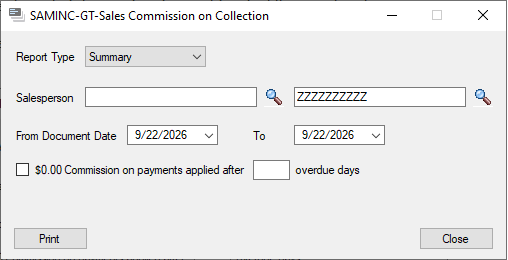
The add-on includes options to select the report type, salesperson, and document date range. It also provides an option for handling payments applied after a specified number of overdue days.
These options help users generate commission reports according to their reporting requirement and applicable business rules.
Selecting the Report Type
The first option available in the add-on is Report Type.
In the example shown, Summary is selected. This option can be used when the user needs a summarized view of the commission information.
The report type should be selected based on the information the user wants to review. For a regular commission review, a summary report can provide a quick overview without requiring the user to examine every transaction individually.
Selecting a Salesperson
The next option is the Salesperson selection.
A salesperson can be entered directly in the field, or the lookup button can be used to find the required salesperson. This is useful when the finance team needs to review commission information for a particular salesperson.
For example, instead of reviewing commission information for the entire sales team, the user can select an individual salesperson and generate the report for the required period.
Entering the Date Range
The date selection is another important part of the add-on.
Users can enter a From Document Date and a To Document Date to specify the period for which the report should be generated.
Suppose the finance team wants to review collections for September. They can enter the required starting and ending dates and generate the report for that period.
It is important to verify the selected dates before printing the report, especially when the report is used for monthly commission processing.
Handling Overdue Payments
One useful option available in the add-on is:
“$0.00 Commission on payments applied after ___ overdue days.”
This option can be used when the business has a rule that commission should not be awarded for payments applied after a specified number of overdue days.
For example, a company may decide that payments applied more than 30 days after the due date will not qualify for commission. In this case, the user can select the checkbox and enter 30 in the overdue days field.
This setting helps the commission report account for the company’s overdue payment rules when calculating or reviewing commission information.
Running the Sales Commission on Collection Report
Once the required details have been entered, the user can generate the report by clicking Print.
A typical process for using the add-on is:
- Select the required Report Type.
- Select the Salesperson.
- Enter the From Document Date.
- Enter the To Document Date.
- Select the overdue payment option, if applicable.
- Enter the number of overdue days, if required.
- Click Print to generate the report.
About Us
Greytrix – a globally recognized and one of the oldest Sage Development Partners is a one-stop solution provider for Sage ERP and Sage CRM organizational needs. Being acknowledged and rewarded for multi-man years of experience, we bring complete end-to-end assistance for your technical consultations, product customizations, data migration, system integrations, third-party add-on development, and implementation competence.
Greytrix offers unique GUMU™ integrated solutions of Sage 300 with Sage CRM, Salesforce(listed on Salesforce Appexchange), Dynamics 365 CRM, and Magento eCommerce, along with Sage 300 Migration from Sage 50 US, Sage 50 CA, Sage PRO, QuickBooks, Sage Business Vision and Sage Business Works. We also offer best-in-class Sage 300 customization and development services and integration services for applications such as POS | WMS | Payroll | Shipping System | Business Intelligence | eCommerce for Sage 300 ERP and for Sage 300c development services we offer, upgrades of older codes and screens to new web screens, latest integrations using Data and web services to Sage business partners, end users and Sage PSG worldwide.
Greytrix offers 20+ add-ons for Sage 300 to enhance productivity such as GreyMatrix, Document Attachment, Document Numbering, Auto-Bank Reconciliation, Purchase Approval System, Three-way PO matching, Bill of Lading, and VAT for the Middle East. The GUMU™ integration for Dynamics 365 CRM – Sage ERP is listed on Microsoft Appsource with an easy implementation package.
The GUMU™ Cloud framework by Greytrix forms the backbone of cloud integrations that are managed in real-time for processing and execution of application programs at the click of a button.
For more details on Sage 300 and Sage 300c Services, please contact us at accpac@greytrix.com, We will like to hear from you.