
GUMU™ for Sage CRM – Sage 100 application is a real time bi-directional integration link. One of its exclusive features is that it is a customizable link and we can customize GUMU to suite your company business process.
In today’s fast-paced business environment, maintaining accurate and up-to-date prospect data across systems is essential for effective sales and customer management. Organizations using Sage CRM alongside Sage X3 can now benefit from a powerful two-way synchronization capability that ensures consistency, efficiency, and real-time visibility of prospect information.
This blog explores how this integration empowers account managers and system administrators to manage prospect data effortlessly across both platforms.
🚀 Overview of the Solution
With this customization, Sage CRM users can:
- Import prospect data from Sage X3 into Sage CRM
- Create and promote new prospects from Sage CRM to Sage X3
- Update existing prospect information in real time
- Manage associated contacts and addresses seamlessly
This functionality is enabled through the GUMU for Sage CRM – Sage X3 Integration.
⚙️ Getting Started: Enabling Prospect Synchronization
Before using this feature, system administrators must enable prospect synchronization:
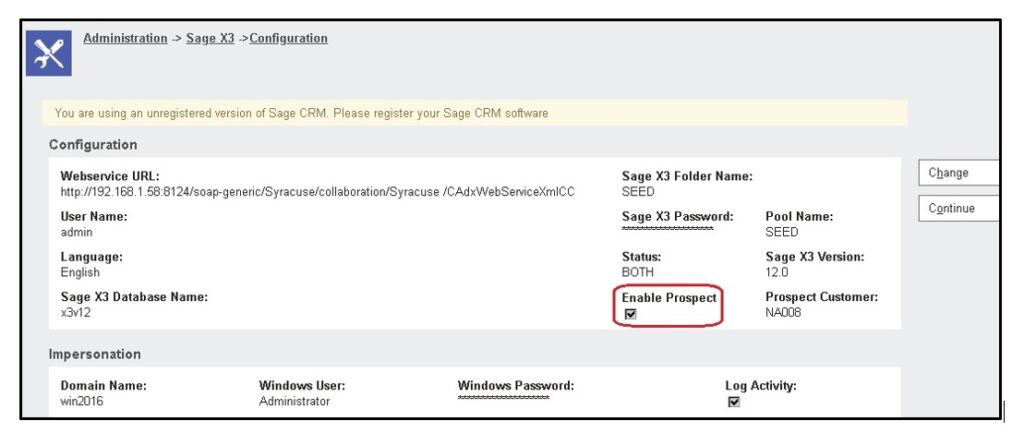
- Navigate to:
Administration → Sage EM → Configuration - Select the required configuration
- Enable the “Prospect Synchronization” option
Once activated, users can begin synchronizing prospect data.
🔄 Importing Prospect Data from Sage X3 to Sage CRM
Users can synchronize prospect data using two methods:
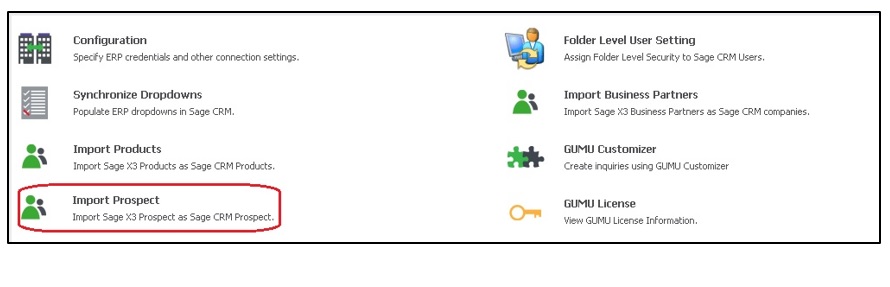
1. Manual Import via Import Prospect Page
This option provides flexibility with filtering criteria:
- Date-Based Import:
Sync prospects updated or created after a selected date - Prospect Number Range:
Import prospects within a specified range in alphabetical order
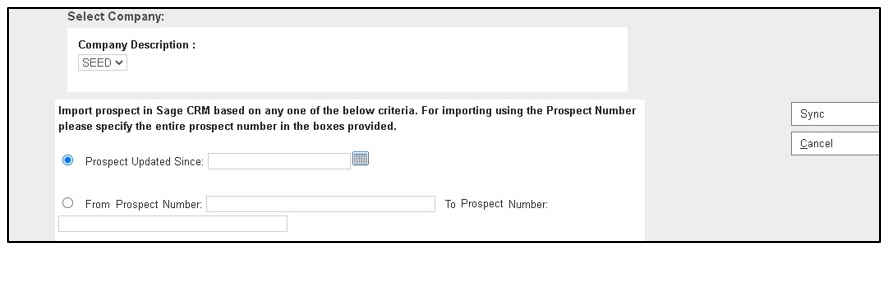
Key Highlights:
- Data is stored under the Company entity in Sage CRM
- Records are inserted initially and updated on subsequent syncs
- Available only when prospect sync is enabled in configuration
2. Automated Synchronization via Windows Scheduler
For hands-free operation:
- A batch file utility is provided
- Users can schedule it using Windows Task Scheduler
- Automatically syncs prospects updated/created in the last 24 hours
This ensures your CRM always reflects the latest data without manual effort.
⬆️ Promoting Prospects from Sage CRM to Sage X3
Creating prospects in Sage CRM and pushing them to Sage X3 is simple:
- Create a company in Sage CRM
- Set Sage EM Type = Prospect
- Save the record
- Click “Promote Prospect”
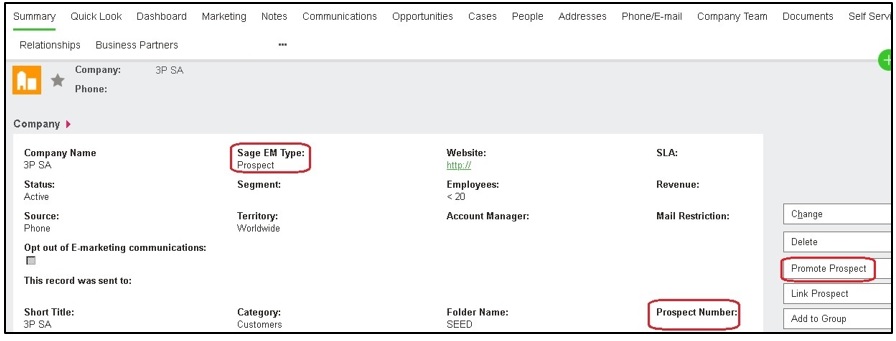
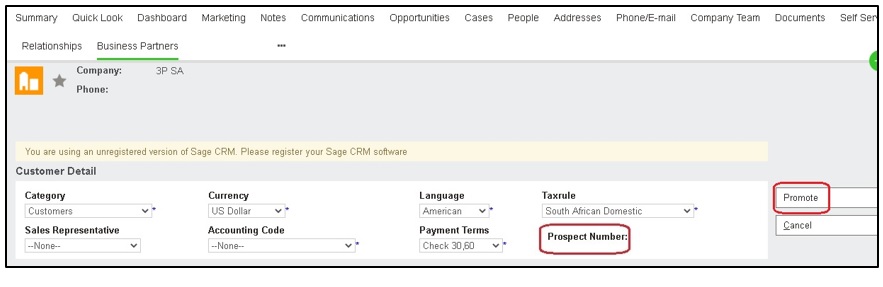
What Happens Next?
- If all required fields are filled → Prospect is created in Sage X3 instantly
- If not → User is prompted to complete missing details
- On success → A prospect number is generated
- On error → User can correct and retry
- Multiple contacts and addresses marked with Sage EM type are also synced
🔁 Converting Prospect to Customer
The conversion flow is managed primarily in Sage X3:
- Create and promote prospect from Sage CRM
- Convert prospect to customer in Sage X3
- Import the converted customer back into Sage CRM
Important Notes:
- Conversion does not occur directly in Sage CRM
- During import, Sage CRM automatically updates the record type from Prospect to Customer
✏️ Real-Time Updates from Sage CRM
One of the most powerful features of this integration is real-time synchronization:
- Update prospect details directly in Sage CRM
- Add or modify contacts and addresses
Changes are instantly reflected in Sage X3 without additional steps.
💡 Business Benefits
This integrated approach delivers significant advantages:
- Data Consistency: Eliminates duplication and mismatches
- Operational Efficiency: Reduces manual data entry
- Real-Time Visibility: Keeps sales teams informed with up-to-date data
- Scalability: Supports growing business needs with automated processes
By enabling seamless synchronization between Sage CRM and Sage X3, businesses can streamline prospect management, improve data accuracy, and enhance collaboration between sales and operations teams.