
• Who We Are
    • About Us
    • Factor - D
    • Our Networks
    • Accolades
  • What We Do

    SERVICES

    • Consulting / Implementation
    • Migration
    • Development
    • Consulting / Implementation
    • Migration
    • Development

    SOLUTIONS

    • GUMUTM Integration
    • GUMUTM Copilot
    • BPortaly
    • Sales Commission
    • ShipEazy Shipping Solution
    • IOT

    COMPREHENSIVE SERVICES FOR

    ERP
    • Acumatica
    • Sage Intacct
    • Sage X3
    • Sage 300
    • Sage 100
    • Sage 500
    • SAP

    CRM

    • Salesforce
    • D365 CRM
    • Sage CRM
    • Creatio
    Other Solutions
    • E-commerce
    • EDI
    • POS

    SERVICES

    • Consulting / Implementation
    • Migration
    • Development

    OUR SOLUTIONS

    • GUMU Integration
    • BPortaly
    • Sales Commission
    • Shipping
    • IOT

    COMPREHENSIVE SERVICES FOR

    • ERP
    • Acumatica
    • Sage Intacct
    • Sage X3
    • Sage 300
    • Sage 100
    • Sage 500
    • CRM
    • Salesforce
    • D365 CRM
    • Sage CRM
    • Creatio

    Other Solutions

    • E-commerce
    • EDI
    • POS
  • Resources
    • Case Study
    • Blogs
    • Videos
    • Ebooks
    • News
  • +1 888 221 6661
Contact us
Career |
  • Africa
  • Middle East

Sage CRM – Tips, Tricks and Components

Explore the possibilities with Sage CRM insights through our comprehensive blogs. As a leading Sage partner, Greytrix helps businesses maximize their Sage CRM potential with its rich expertise and immense knowledge. Here, you will find blogs that feature expert advice, tips & tricks, best practices, and comprehensive guides on customizing and configuring Sage CRM for your business. Stay informed with our regular updates and expert insights!

GUMU™ Sage CRM – Sage 100 – Integration is compatible with Unified login

By greysagecrm | October 30, 2017
0 Comment

We offers Sage CRM integration with Sage 100 using GUMU connector. It is real time and bidirectional integration and empowers the enterprise to leverage information within the organization to make smarter business decisions while making data available across desktop, web and mobile devices.

New Stuff: New Feature in GUMU for Sage CRM – Sage 100 Integration – Quick Order Entry

Our GUMU™ Sage CRM – Sage 100 integration requires a dedicated Sage 100 user for writing data into Sage 100. In Sage 100 ERP, there is functionality called “Unified Login” by which user can make use of windows domain user to login into Sage 100. When using unified logon, separate logons and passwords are not stored within Sage 100 ERP. Instead, Sage 100 ERP authenticates the user’s Windows logon and password. Users are not required to re-enter their logon name when accessing Sage 100 ERP after logging on to their Sage 100 workstations on their PCs.
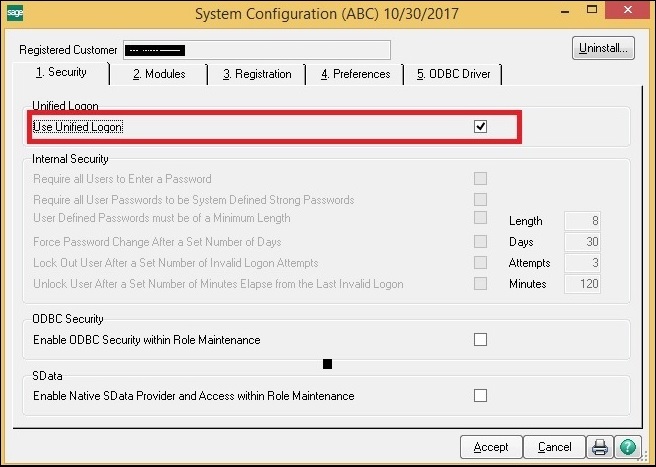
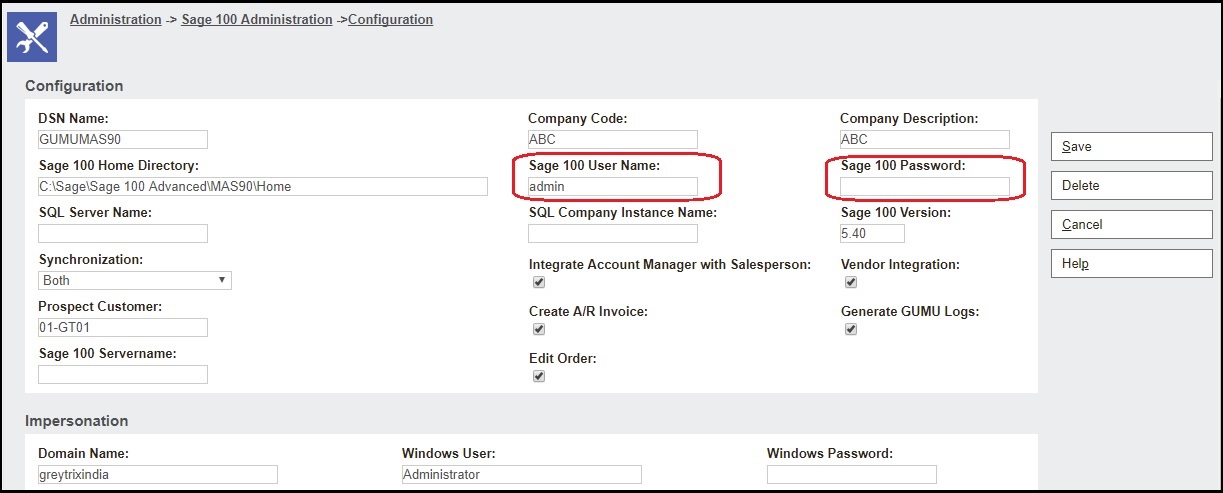
We tested our GUMU™ integration connector with enabling Unified login feature and it is compatible with this feature. When you setup Unified login in Sage 100, you will have to keep Sage 100 Password as blank for Sage 100 user (which is actually domain windows user) configured in GUMU Sage CRM side configuration as given below.
About Us

Greytrix is one stop solution provider for Sage ERP and Sage CRM needs. We provide complete end-to-end assistance for your technical consultations, product customizations, data migration, system integrations, third-party add-on development and implementation expertise.

Greytrix has some unique integration solutions for Sage CRM with Sage ERP’s (Sage X3, Sage 100, Sage 500 and Sage 300).We also offer best-in-class Sage ERP and Sage CRM customization and development services to Business Partners, End Users and Sage PSG worldwide. Greytrix helps in migrating to Sage CRM from ACT, Goldmine and other CRM’s.

For more information on our integration solutions, please contact us at sage@greytrix.com. We will be glad to assist you.

Related Posts

  • GUMU™ for Sage CRM – Sage 100 Integration – Sage 100 type field
  • GUMU Sage CRM – Sage 100 integration – Help Button
  • GUMU for Sage CRM – Sage PRO integration – Sage CRM side configuration
Category: Integration Sage CRM Tags: authentication, gumucrmmas, GUMUMAS, INTEGRATION, Sage 100, unified, Unified login, windows user
Post navigation
← How to resolve ‘Wrong Sage X3 database name’ – Troubleshooting Tips Promote Order using GUMU™ Integration if Credit Limit is exceeded →

Greytrix Website and Blogs

    • Greytrix
    • GUMU™ Cloud
    • Greytrix Africa
    • Sage X3 – Tips, Tricks and Components
    • Sage 100 & 500 ERP Tips and Tricks
    • Sage 300 – Tips, Tricks and Components
    • Salesforce.com Tips and Tricks by Greytrix


sage crm integration

Recent Posts

  • Automating Order Status Sync Between Sage 100 and Sage CRM Using Windows Scheduler
  • Updating Customer Latitude and Longitude Using GUMU™ for Sage CRM – Sage X3
  • Salesperson Mapping for Vendors in Sage CRM & Sage 100
  • Enhancing Quote-to-Order Efficiency with New Company Creation and Customer Promotion
  • Streamlining Line Item Clarity with QLE Comment Enhancement

Archives

Awards

Premier Partner of the Year Premier Partner of the Year
Platinum Partner of the Year Platinum Partner of the Year
The CEO Story The CEO Story
Gold Partner pf the Year Gold Partner pf the Year
Top Excellence Distributor Top Excellence Distributor
  • na.sales@greytrix.com
  • +1 888 221 6661
  • B301, 3rd Floor, Everest Nivara Infotech Park, MIDC, Turbhe,
    Navi Mumbai 400 705. India

Our Global Locations >>

Who We Are

  • About Us
  • Our AI expertise
  • Factor - D
  • Our Network
  • Accolades
  • Career
  •  

CRM

  • Salesforce
  • D365 CRM
  • Sage CRM
  • Creatio
  •  
  •  
  •  

Solutions

  • GUMUTM Integration
  • GUMUTM Copilot
  • BPortaly
  • Sales Commission
  • Shipping
  • IOT
  •  

ERP

  • Acumatica
  • Sage Intacct
  • Sage X3
  • Sage 300
  • Sage 100
  • Sage 500
  • SAP

Services

  • Consultation & Implementation
  • Migration
  • Development
  •  
  •  
  •  

Other Solutions

  • E-commerce
  • EDI
  • POS

Resources

  • Case Study
  • Blogs
  • Videos
  • E-books
  • E-brochure
  • News
  • Sitemap

Connect

  • Contact Us
  • Privacy Policy
  • Terms Of Use
  •  
ISO 27001:2022 and SOC 2 Certified Company

© 2026. Greytrix, All Rights Reserved