
Accurate order dates are important for maintaining correct order information and ensuring that the Order record reflects the actual date on which the order is created. To improve the order creation experience, a customization has been introduced on the Order screen to ensure that the Order Date is set to the current date when a Quote is converted to an Order.
With this enhancement, when a Quote is converted to an Order, the orde_salesorderdate field is automatically set to the current date instead of inheriting the quot_salesorderdate from the Quote.
When a new Order is created directly, the orde_salesorderdate field continues to default to the current date as part of the existing standard behavior.
Solution Overview
The customization updates the Order Date behavior specifically when converting a Quote to an Order.
The system supports the following Order Date behavior:
- Quote → Order: The orde_salesorderdate is set to the current date.
- New Order: The orde_salesorderdate defaults to the current date as part of the standard behavior.
This ensures that the Order Date represents the actual date of Order creation rather than carrying forward the date from the originating Quote.
New Features & Enhancements
1. Current Order Date When Converting a Quote to an Order
When a Quote is converted to an Order, the system automatically sets the orde_salesorderdate field to the current date.
Instead of inheriting the Quote’s quot_salesorderdate, the Order receives the date on which the conversion is performed.
Conversion Flow:
Quote’s quot_salesorderdate
↓
Quote converted to Order
↓
orde_salesorderdate = Current Date
The Order Date is therefore updated to the current date during the Quote-to-Order conversion process.
Benefits
- Ensures the Order Date reflects the actual Order creation date.
- Prevents the Quote’s sales order date from being carried forward.
- Provides accurate date information on the Order screen.
- Maintains consistency in Order creation.
- Improves the accuracy of Order records.
2. Current Date for New Orders
When a user creates a new Order directly, the orde_salesorderdate field already defaults to the current date as part of the standard behavior.
No additional customization is required for this scenario.
New Order Flow:
Create New Order
↓
orde_salesorderdate = Current Date
This existing behavior remains unchanged with the customization.
How the Order Date Works
The enhanced Order Date behavior can be summarized as follows:
Scenario 1: Quote to Order Conversion
Existing Quote
↓
Convert Quote to Order
↓
orde_salesorderdate is set to Current Date
The Order Date does not inherit the Quote’s quot_salesorderdate.
Scenario 2: New Order Creation
Create New Order
↓
orde_salesorderdate defaults to Current Date
The standard behavior for directly creating a new Order remains unchanged.
Example
For example, assume a Quote has the following date:
quot_salesorderdate = September 15, 2026
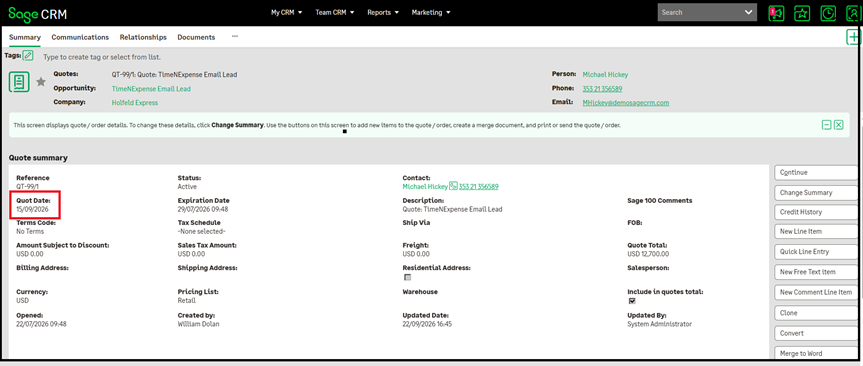
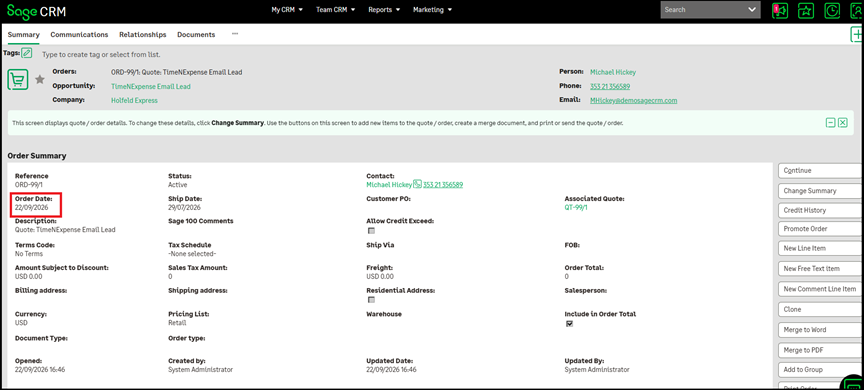
If the Quote is converted to an Order on:
September 22, 2026
The system sets:
orde_salesorderdate = September 22, 2026
The Order therefore reflects the actual date on which the Order was created rather than the date stored on the originating Quote.
Alternatively, when a user creates a new Order directly on September 22, 2026, the system automatically sets:
orde_salesorderdate = September 22, 2026
This provides consistent Order Date behavior for both Order creation scenarios.
Improved Order Creation Experience
With this customization, users no longer need to manually update the Order Date after converting a Quote to an Order.
The system automatically applies the current date during the conversion process.
For example:
- When a Quote is converted to an Order → orde_salesorderdate is set to the current date.
- When a new Order is created directly → orde_salesorderdate defaults to the current date through standard behavior.
- The Quote’s quot_salesorderdate is not carried forward to the Order during conversion.
This provides accurate and consistent date information while creating Orders.
Key Benefits
The Order Date customization provides several advantages:
- Current Order Date when converting a Quote to an Order.
- Prevents inheritance of the Quote’s sales order date.
- Accurate Order creation date.
- Existing standard behavior for directly created Orders remains unchanged.
- No manual date correction required after Quote conversion.
- Improved consistency of Order records.
- Better accuracy of Order Date information.
- Improved overall Order creation experience.
Conclusion
The Order screen customization ensures that the orde_salesorderdate field reflects the actual date of Order creation when converting a Quote to an Order.
When a Quote is converted to an Order, the system sets orde_salesorderdate to the current date instead of inheriting the Quote’s quot_salesorderdate. For Orders created directly, the orde_salesorderdate field continues to default to the current date as part of the standard behavior.
This provides consistent and accurate Order Date information and eliminates the need for users to manually update the date after converting a Quote to an Order.