
The Reorder Quantity Report in Sage 300 provides insights into which inventory items that need to be replenished based on reorder point, minimum stock, or demand. It evaluates quantities on hand, committed stock, pending purchase orders, and procurement policies to recommend restocking.
In our previous blog, we discussedIn a previous post, we explained the IC Reorder Quantity in Sage 300, which is designed to initiate the reordering process for items that are no longer available in stock under the Inventory Control module.
In this blog, we’ll explore what the Reorder Quantity Report is, why it’s important, and how it helps businesses make smarter purchasing decisions.
New stuff:- Backorder Report – New Enhancements in Excel Output
This report provides a list of products that are either out of stock or have insufficient quantities in the selected warehouses. It also shows the suggested reorder amounts, the expected replenishment cost, and the usual suppliers for those items.
Use this report when you’re set to order inventory and want a clear list of the items and amounts that need to be restocked.
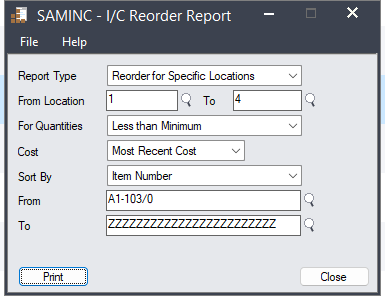
Below are the parameters that user need to select.
- Report Type – This option allows users to choose whether they want to reorder items for a specific location or for all locations.
- From & To Location – In this option, the user needs to select the source location and the destination location for item reordering.
- For Quantity – Users are able to set stock level parameters here, such as such as less than minimum, less than or equal to zero, less than sales projected etc..
- Cost – This parameter specifies whether to use the vendor cost or the most recent cost.
- Sort by – Users can use this field to sort the report based on criteria such as vendor number, item number, or item type.
- From & To – According to the selected sort criteria, the system updates the “From” and “To” fields to reflect the relevant data.
Please find the below screenshot of Quantity reorder report UI
After selecting the parameters, the report will display which items are reordered, for which locations and the quantities.
Please find the below screenshot of Reorder Quantity Report.
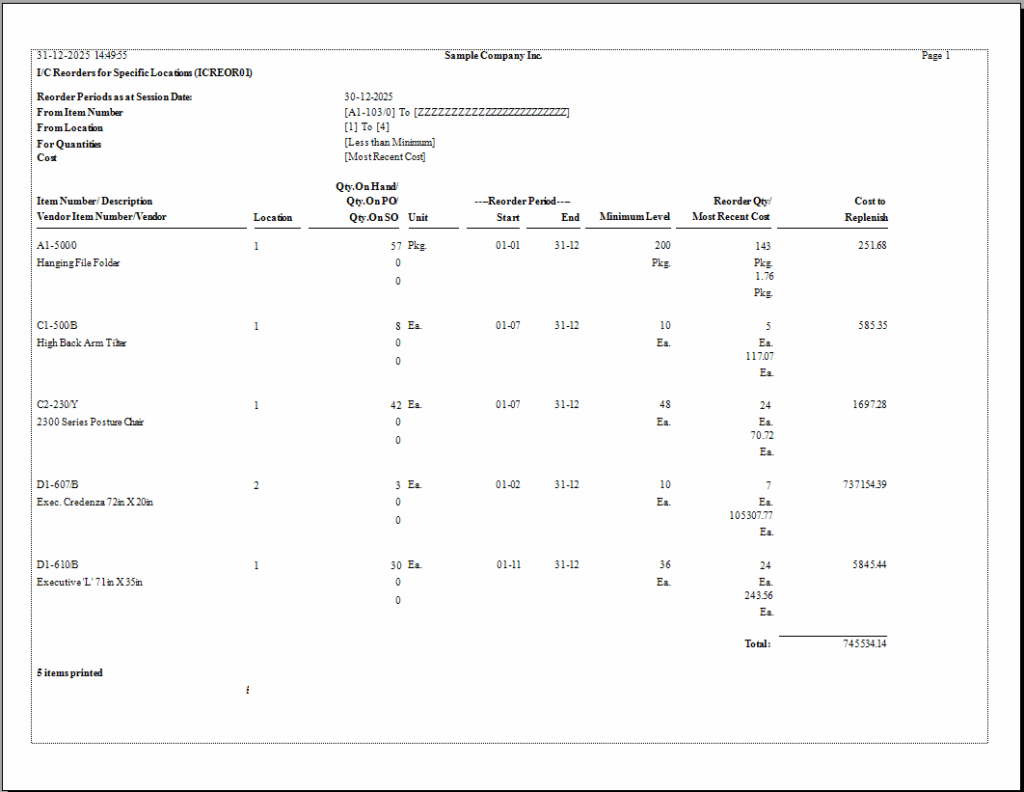
As shown in the output above, the report for the specified parameters is generated successfully. It allows the user to easily view item quantities along with their respective locations. With the help of this report, the user can quickly determine when items need to be reordered for each location in the future.
The Reorder Quantity Report in Sage 300 plays a vital role in maintaining smooth inventory operations. By leveraging this tool, organizations can ensure availability of products at the right time, minimize costs, and strengthen their supply chain efficiency.
About Us:-
Greytrix – a globally recognized and one of the oldest Sage Gold Development Partner is a one-stop solution provider for Sage ERP and Sage CRM organizational needs. Being acknowledged and rewarded for multi-man years of experience, we bring complete end-to-end assistance for your technical consultations, product customization, data migration, system integration’s, third party add-on development and implementation competence.
Greytrix offers unique GUMU™ integrated solutions of Sage 300 with Sage CRM, Salesforce.com, Dynamics 365 CRM and MagentoeCommerce along with Sage 300 Migration from Sage 50 US, Sage 50 CA, Sage PRO, QuickBooks, Sage Business Vision and Sage Business Works. We also offer best-in-class Sage 300 customization and development services and integration services for applications such as POS | WMS | Payroll | Shipping System | Business Intelligence | eCommerce for Sage 300 ERP and for Sage 300c development services we offer, upgrades of older codes and screens to new web screens, latest integration’s using Data and web services to Sage business partners, end users and Sage PSG worldwide. Greytrix offers 20+ addons for Sage 300 to enhance productivity such as GreyMatrix, Document Attachment, Document Numbering, Auto-Bank Reconciliation, Purchase Approval System, Three way PO matching, Bill of Lading and VAT for Middle East. The GUMU™ integration for Dynamics 365 CRM – Sage ERP is listed on Microsoft Appsource with easy implementation package.
For more details on Sage 300 and Sage 300c Services, please contact us at accpac@greytrix.com, We will like to hear from you.