
In Sage 300 ERP, the Sage 300 to Oracle Integration helps organizations transfer financial data in a structured and automated way. In this integration, data is extracted from Sage 300 and written into a TXT file using a pipe-delimited format ( | ), which allows Oracle systems to easily read and process the information. The integration primarily fetches General Ledger (GL) data from Sage 300 and formats it according to the structure required by Oracle for importing accounting transactions.
The integration program reads the required data from Sage 300, processes it, and generates a pipe-delimited TXT file containing the accounting details required by Oracle. This automated approach reduces manual effort, improves data accuracy, and ensures a smooth transfer of financial data between Sage 300 and Oracle systems.
By automating data extraction and TXT file creation from the GL module, this customization , minimizes errors, and ensures consistency between Sage 300 transactions.
New Stuff:– “Record Already Exists” Error During AP Invoice Import in Sage 300
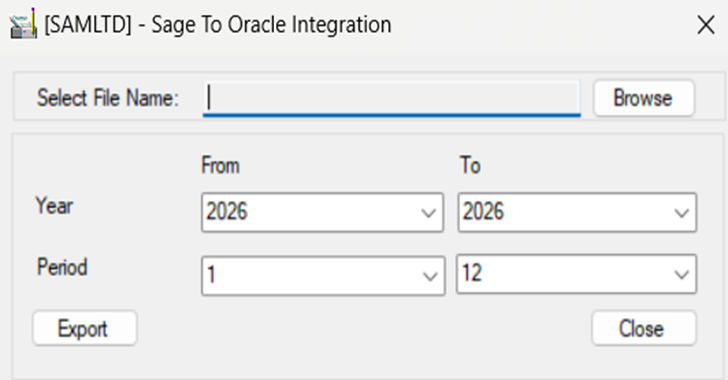
Please refer below screenshot of the user interfaces for the “Sage To Oracle Integration”.
To support Oracle’s accounting structure, optional fields such as COSTCENTRE, ORACLECC, and GLNACCT are created in Sage 300. These optional fields help map Sage 300 accounts with Oracle Natural Accounts and Cost Centers. The COSTCENTRE field is configured under GL Account Optional Fields, while GLNACCT and ORACLECC are created under Common Services Optional Fields. During the integration process, both the optional field values and their descriptions are fetched from Sage 300, which helps maintain proper account mapping and improves clarity in the generated data.
Additionally, the value present inside the COSTCENTRE optional field is used to populate the newly created optional field ORACLECC. When the value matches, the description of the ORACLECC optional field is fetched and written into the TXT file, ensuring that the correct Oracle cost center mapping is captured in the integration output.
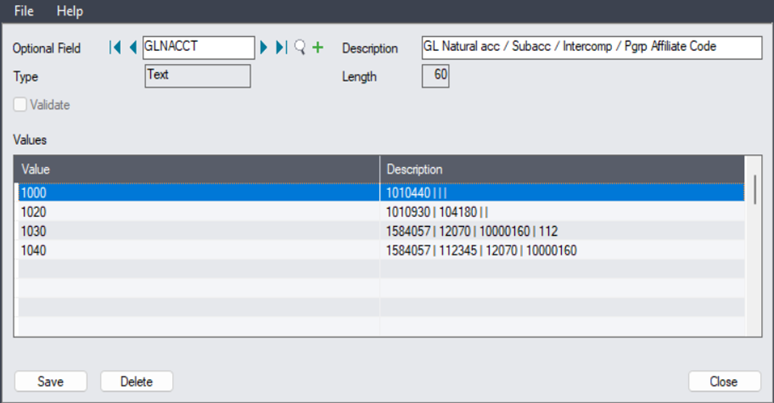
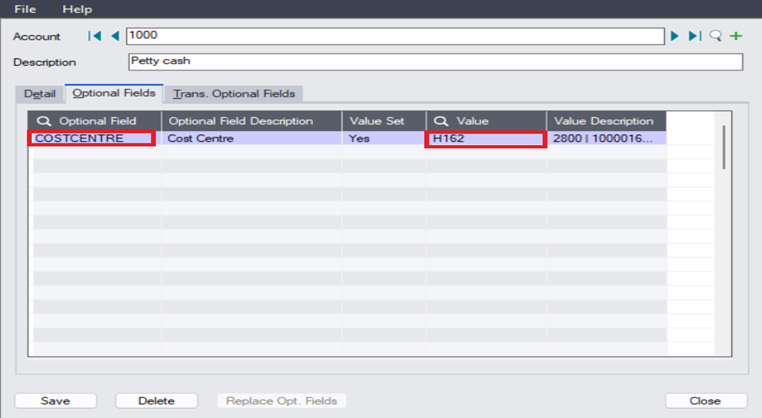
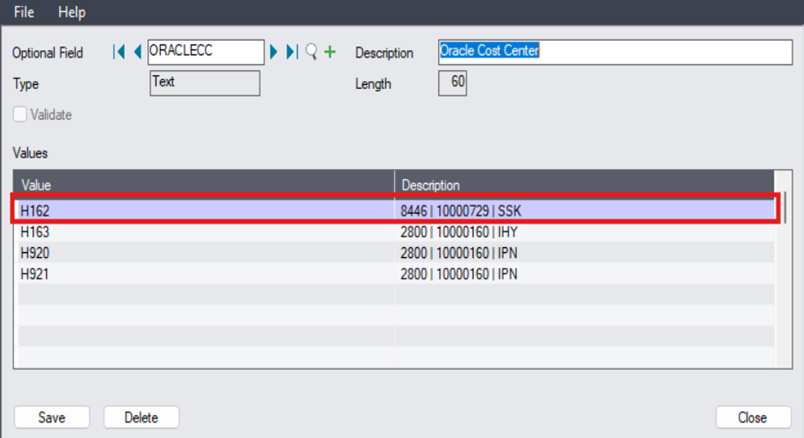
Output:
HDR|Accounting_Date|Accounting_Period|Template_ID|Ledger_Name|Company|Cost_Center|Product_Group|Geography|Natural_Account|SubAccount|Intercompany|Product_Group_Affiliate|Business_Type|Journal_Description|Journal_Line_Description|Entered_Currency|Entered_Amount|Source_System_Code
DAT|03-03-2026|Mar-26|PGSLED|IN-INR-LOCAL-PL|11580|8446|10000729|SSK|1010440||||99|PGS – TEST 1000|ACC 1000|INR|100.00|SAGE
DAT|03-03-2026|Mar-26|PGSLED|IN-INR-LOCAL-PL|11580||||1010930|104180|||99|PGS – TEST 1020|ACC 1020|INR|-50.00|SAGE
DAT|03-03-2026|Mar-26|PGSLED|IN-INR-LOCAL-PL|11580||||1010930|104180|||99|PGS – TEST 1020|ACC 1020|INR|-50.00|SAGE
DAT|03-04-2026|Mar-26|PGSLED|IN-INR-LOCAL-PL|11580|8446|10000729|SSK|1010440||||99|ACC 1000- 1|ACC 1000|INR|100.00|SAGE
DAT|03-04-2026|Mar-26|PGSLED|IN-INR-LOCAL-PL|11580||||1010930|104180|||99|ACC 1020-2|ACC 1020|INR|-50.00|SAGE
DAT|03-04-2026|Mar-26|PGSLED|IN-INR-LOCAL-PL|11580|8446|10000729|SSK|1010440||||99|ACC 1000-1|ACC 1000|INR|-50.00|SAGE
DAT|03-04-2026|Mar-26|PGSLED|IN-INR-LOCAL PL|11580|8446|10000729|SSK|1584057|112345|12070|10000160|99|ACC 1040|ACC 1040 -1|INR|153.58|SAGE
DAT|03-04-2026|Mar-26|PGSLED|IN-INR-LOCAL-PL|11580|8446|10000729|SSK|1010440||||99|1200-Chloride Systems|DOC/INV/141|INR|-1.54|SAGE
TRL|03-31-2026|8|2395.97|-2395.97
Optional Fields:
Steps For adding the Optional field into sage 300.
- Go to common service add the ORACLECC, GLNACCT, COSTCENTR as optional field.
- Add values and Description into it.
- Add COSTCENTR in GL Optional Field.
- Go to GL Account.
- Click on optional field.
This Exe includes following fields and can be modified according to the requirement.
- HDR – Header Level Data
- DAT – Detail Level Data
- TRL – Trail/Last Level Data
In this way, the report provides a clear picture of GL activity, enabling better decision-making and effective monitoring of business growth. We can also customize this report output with required additional fields.
About Us:-
Greytrix – a globally recognized and one of the oldest Sage Gold Development Partner is a one-stop solution provider for Sage ERP and Sage CRM organizational needs. Being acknowledged and rewarded for multi-man years of experience, we bring complete end-to-end assistance for your technical consultations, product customizations, data migration, system integrations, third party add-on development and implementation competence.
Greytrix offers unique GUMU™ integrated solutions of Sage 300 with Sage CRM, Salesforce.com, Dynamics 365 CRM and MagentoeCommerce along with Sage 300 Migration from Sage 50 US, Sage 50 CA, Sage PRO, QuickBooks, Sage Business Vision and Sage Business Works. We also offer best-in-class Sage 300 customization and development services and integration services for applications such as POS | WMS | Payroll | Shipping System | Business Intelligence | eCommerce for Sage 300 ERP and for Sage 300c development services we offer, upgrades of older codes and screens to new web screens, latest integrations using Data and web services to Sage business partners, end users and Sage PSG worldwide.Greytrix offers 20+ addons for Sage 300 to enhance productivity such as GreyMatrix, Document Attachment, Document Numbering, Auto-Bank Reconciliation, Purchase Approval System, Three way PO matching, Bill of Lading and VAT for Middle East. The GUMU™ integration for Dynamics 365 CRM – Sage ERP is listed on Microsoft Appsource with easy implementation package.
For more details on Sage 300 and Sage 300c Services, please contact us at accpac@greytrix.com, We will like to hear from you.