
Managing inventory efficiently in Sage 300 ERP requires knowing which items are moving and which are not. Sometimes stock remains in the warehouse without any shipment activity for a specific period. Identifying such items helps businesses take corrective actions such as promotions, stock adjustments, or procurement planning.
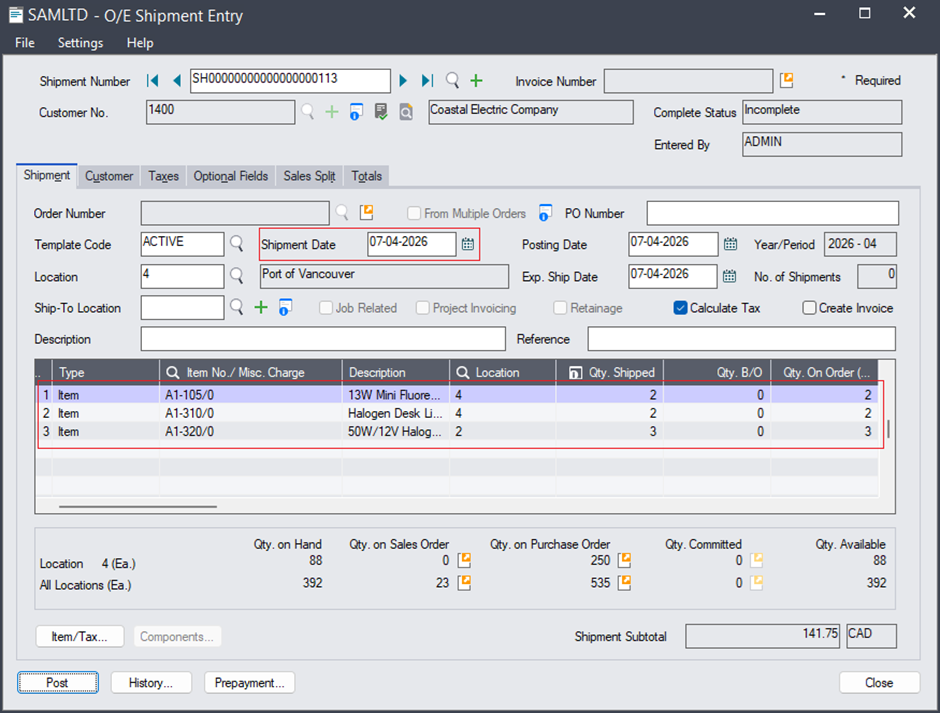
To address this requirement, the Inventory Movement Report allows users to quickly identify items that have not been shipped during a selected date range, while still having available stock in the system.
New Stuff: – Enhanced Control in Tenant API for AR Receipt & AR Prepayment
Purpose of the Report
This report helps users identify items that:
- Have available quantity in stock
- Belong to a selected item range
- Exist within a selected location range
- Do not have any shipment transactions within the selected date range
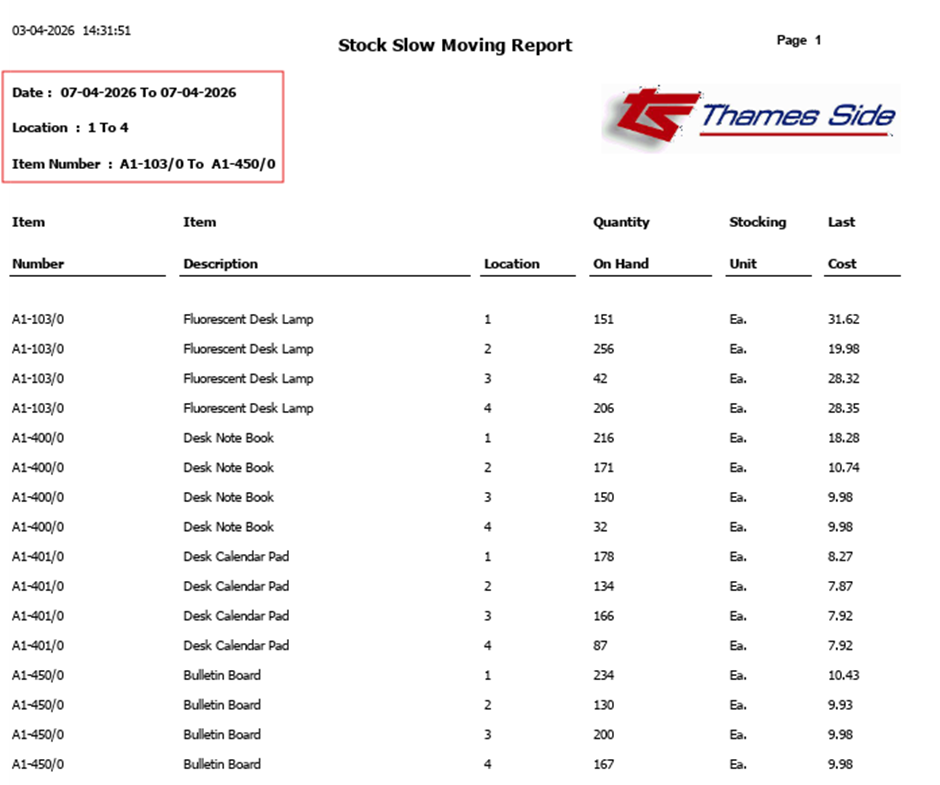
In simple terms, the report highlights stock items that have not moved during a specified period.
Filters Available in the Report
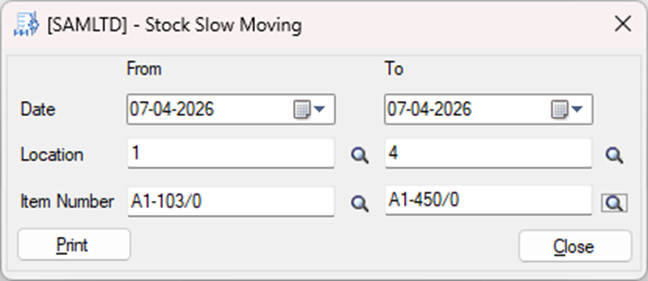
When running the report, users can define the following filters:
Item Range
Users can specify the starting and ending item numbers.
The report will include all items within this range.
Example:
- Item From: A1-100/0
- Item To: A1-500/0
This will include all items between these two item numbers.
Location Range
Users can specify the starting and ending locations.
Example:
- Location From: 1
- Location To: 5
Only inventory stored in these locations will be considered.
Date Range
Users can define the period during which shipment activity will be checked.
Example:
- Date From: 01-Jan-2026
- Date To: 31-Jan-2026
The system will verify whether any shipment transactions occurred for each item during this period.
How the Report Works
The report performs the following checks:
- It identifies items that currently have stock available.
- It checks shipment records for those items.
- It filters out items that had shipment activity within the selected date range.
- The final result shows only the items without shipment activity in that period.
This allows users to quickly identify slow-moving or non-moving stock.
Benefits of Using This Report
This report provides several advantages:
- Helps identify slow-moving inventory
- Assists in inventory planning and stock control
- Enables better warehouse management
- Helps management take decisions regarding sales promotions or stock clearance
Conclusion
The Inventory Movement Report provides a simple and effective way to identify items that have not been shipped during a specific period while still being available in stock. By using the available filters, users can quickly focus on specific item ranges, locations, and time periods to gain better visibility into inventory movement.
Regular use of this report can help organizations improve inventory control and make better business decisions regarding stock management.
About Us:-
Greytrix – a globally recognized and one of the oldest Sage Gold Development Partner is a one-stop solution provider for Sage ERP and Sage CRM organizational needs. Being acknowledged and rewarded for multi-man years of experience, we bring complete end-to-end assistance for your technical consultations, product customizations, data migration, system integrations, third party add-on development and implementation competence.
Greytrix offers unique GUMU™ integrated solutions of Sage 300 with Sage CRM, Salesforce.com, Dynamics 365 CRM and MagentoeCommerce along with Sage 300 Migration from Sage 50 US, Sage 50 CA, Sage PRO, QuickBooks, Sage Business Vision and Sage Business Works. We also offer best-in-class Sage 300 customization and development services and integration services for applications such as POS | WMS | Payroll | Shipping System | Business Intelligence | eCommerce for Sage 300 ERP and for Sage 300c development services we offer, upgrades of older codes and screens to new web screens, latest integrations using Data and web services to Sage business partners, end users and Sage PSG worldwide.Greytrix offers 20+ addons for Sage 300 to enhance productivity such as GreyMatrix, Document Attachment, Document Numbering, Auto-Bank Reconciliation, Purchase Approval System, Three way PO matching, Bill of Lading and VAT for Middle East. The GUMU™ integration for Dynamics 365 CRM – Sage ERP is listed on Microsoft Appsource with easy implementation package.
For more details on Sage 300 and Sage 300c Services, please contact us at accpac@greytrix.com, We will like to hear from you.