
Managing purchase receipts in Sage 300 ERP requires visibility into which receipts have been fully invoiced and which still have invoicing pending. When a receipt is only partially invoiced, or its invoice has not yet been entered, users need an easy way to identify the remaining work.
The Open RCP Report helps users review receipts that are not completely invoiced. It provides receipt-line details and applicable additional-cost information, so users can check invoicing status on screen or export the results to Excel.
Purpose of the Report
The Open RCP Report helps users identify receipts and related costs where invoicing is still pending. It provides visibility into:
•Receipt details and the invoicing status of each receipt line
•Lines that are completed, partially invoiced, or not yet invoiced
•Applicable additional costs that are still pending to be invoiced
•Receipts based on receipt number, vendor number, and receipt date
•Receipt information, Additional Cost information, or both
Receipts whose receipt lines are all completely invoiced are excluded from the report, unless additional-cost invoicing is still pending.
New Stuff: Method ‘’ of Object ‘’ Failed in Sage 300: Fixing It in a Citrix Environment
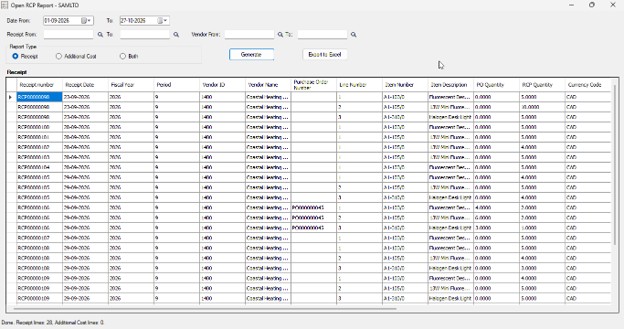
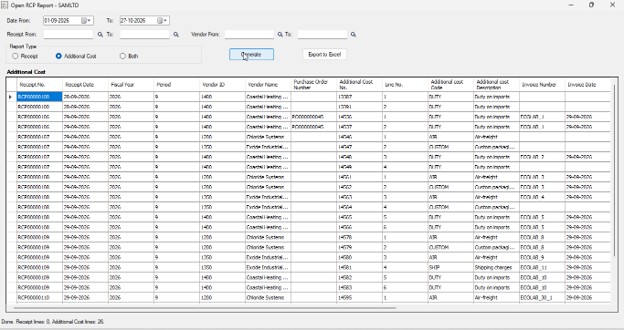
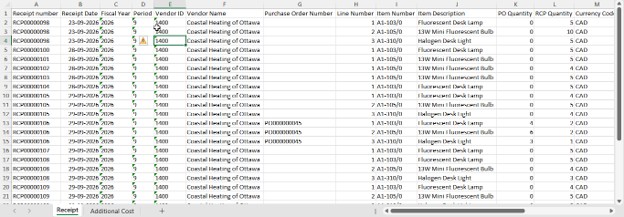
Filters Available in the Report
When running the report, users can define the following filters:
Receipt Number Range
Users can specify the starting and ending receipt numbers. The report will include receipts within the selected range.
Example:
•Receipt From: [starting receipt number]
•Receipt To: [ending receipt number]
Leave the fields blank when no receipt-number range is required.
Vendor Number Range
Users can specify the starting and ending vendor numbers to limit the report to receipts associated with the selected vendors.
Example:
•Vendor From: [starting vendor number]
•Vendor To: [ending vendor number]
Leave the fields blank when no vendor range is required.
Receipt Date Range
Users can select the From Date and To Date to determine which receipts are included.
Example:
•Date From: 01-Jan-2026
•Date To: 31-Jan-2026
The From Date cannot be later than the To Date.
Report Type
Users can choose which information to display:
•Receipt – displays receipt information
•Additional Cost – displays additional-cost information for receipts included in the report
•Both – displays receipt and additional-cost information together on the screen and includes both sections in the Excel workbook
How the Report Works
The report follows these steps:
•It retrieves receipt details matching the selected date, receipt-number, and vendor-number filters.
•It checks the invoiced quantity and invoiced amount for each receipt line.
•A line is marked Completed when the invoiced quantity and amount meet or exceed the receipt quantity and amount; it is marked Incomplete when no quantity or amount has been invoiced; otherwise, it is marked Partial.
•Receipts with at least one Incomplete or Partial receipt line remain in the report. Receipts whose lines are all Completed are excluded, unless an additional-cost line is still pending.
•The results are displayed in a grid. Users can export the selected report type to an Excel workbook for further review.
Information Available in the Report
Receipt details include information such as:
•Receipt number and receipt date
•Fiscal year and period
•Vendor ID and vendor name
•Purchase order number, line number, item number, and item description
•Purchase order quantity, receipt quantity, currency, exchange rate, and amounts
•Outstanding status, invoice number, invoice date, and entered-by information
Additional-cost details include information such as:
•Receipt number and receipt date, fiscal year, and period
•Vendor and purchase order information
•Additional-cost number, line number, code, and description
•Invoice number and invoice date
•Currency, exchange rate, original amount, utilised amount, and outstanding amount
•Additional-cost line status and entered-by information
Exporting the Report to Excel
Users can export the report to an Excel workbook. The workbook contains a Receipt sheet, an Additional Cost sheet, or both sheets, depending on the selected report type. The exported information can be used for further review, follow-up, or reporting.
Benefits of Using This Report
The Open RCP Report provides several advantages:
•Helps users identify receipts that still require invoicing follow-up
•Makes it easier to review invoicing status at receipt-line level
•Provides visibility into outstanding additional costs
•Excludes receipts that are fully invoiced, subject to the additional-cost pending rule
•Allows users to review results on screen and export them to Excel
Conclusion
The Open RCP Report provides a convenient way to identify receipts with pending invoicing in Sage 300 ERP. By showing receipt-line status and applicable additional-cost details, it helps users understand what remains to be invoiced and supports more efficient follow-up. The available filters and Excel export make it easier to focus on the required receipts and information.
About Us
Greytrix – a globally recognized and one of the oldest Sage Development Partners is a one-stop solution provider for Sage ERP and Sage CRM organizational needs. Being acknowledged and rewarded for multi-man years of experience, we bring complete end-to-end assistance for your technical consultations, product customizations, data migration, system integrations, third-party add-on development, and implementation competence.
Greytrix offers unique GUMU™ integrated solutions of Sage 300 with Sage CRM, Salesforce(listed on Salesforce Appexchange), Dynamics 365 CRM, and Magento eCommerce, along with Sage 300 Migration from Sage 50 US, Sage 50 CA, Sage PRO, QuickBooks, Sage Business Vision and Sage Business Works. We also offer best-in-class Sage 300 customization and development services and integration services for applications such as POS | WMS | Payroll | Shipping System | Business Intelligence | eCommerce for Sage 300 ERP and for Sage 300c development services we offer, upgrades of older codes and screens to new web screens, latest integrations using Data and web services to Sage business partners, end users and Sage PSG worldwide.
Greytrix offers 20+ add-ons for Sage 300 to enhance productivity such as GreyMatrix, Document Attachment, Document Numbering, Auto-Bank Reconciliation, Purchase Approval System, Three-way PO matching, Bill of Lading, and VAT for the Middle East. The GUMU™ integration for Dynamics 365 CRM – Sage ERP is listed on Microsoft Appsource with an easy implementation package.
The GUMU™ Cloud framework by Greytrix forms the backbone of cloud integrations that are managed in real-time for processing and execution of application programs at the click of a button.
For more details on Sage 300 and Sage 300c Services, please contact us at [email protected], We will like to hear from you.