
We implemented a Purchase Order (PO) signature workflow in Sage X3 for a client where, when a user creates a PO and clicks the “Send for approval” button, the workflow automatically routes it to the assigned approver.
The client later requested an enhancement: whenever a user makes any modification in the Comments section of an existing PO, the workflow should be triggered again — regardless of whether it has already been sent for approval or approved.
Steps to Implement the Requirement:
To achieve the above requirement, we implemented the following steps:
Step 1:
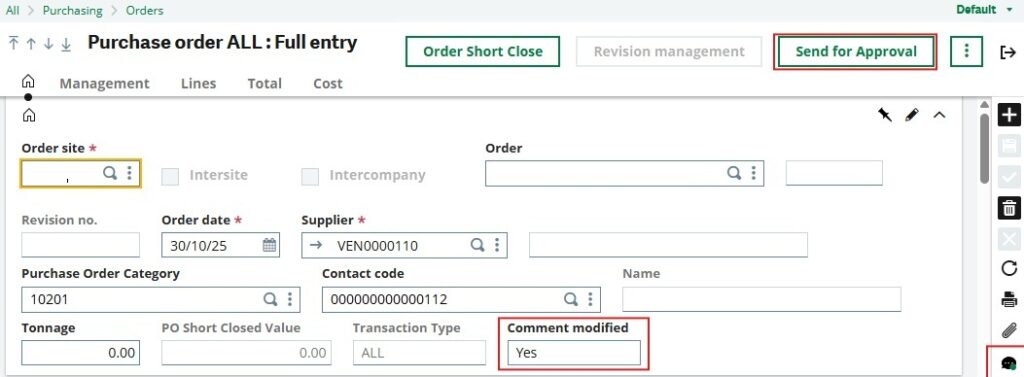
Added a custom field ‘Comment Modified’ on the Purchase Order (PO) header screen. This field is display-only and uses local menu 1 to hold the values ‘Yes’ or ‘No’.
New Stuff: How to Enable or Disable Electronic Signature in Portugal for Companies
Step 2:
Created a custom miscellaneous-type Action named ZCOMNT, using the Standard processing template and other relevant parameters as shown in the screenshot below.

Step 3:
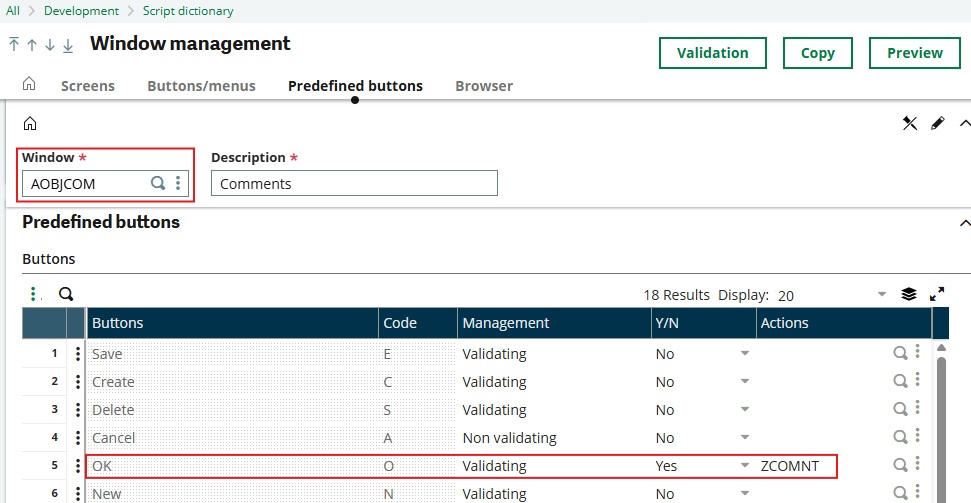
Opened the Comments window (AOBJCOM) and assigned the ZCOMNT action to the predefined ‘OK’ button, as shown in the screenshot below. Then saved the configuration and performed a global validation of the window.
Step 4:
Added 4GL code in the XYZCOMNT specific script to check whether the current screen is a Purchase Order.
If the screen corresponds to a PO and a change is made in the Comments section, the script updates the ‘Comment Modified’ field to ‘Yes’ and sets the Signed flag to 0, which re-enables the ‘Send for approval’ button on the PO screen. Otherwise, it sets the value to ‘No’.
Step 5:
Once the ‘Send for approval’ button is re-enabled, the user can resend the PO for approval, continuing the workflow process as usual.
We handle this scenario in this way because, before the entry is created, the Comment field is not editable. After the entry is created, users can add or modify comments, but these changes cannot be saved using the standard Save button. When the user enters a comment and clicks ‘OK’, the comment is automatically saved to the ACLOB table along with the corresponding reference number.
Conclusion:
By implementing the above configuration and 4GL customization, we successfully enabled the Purchase Order workflow in Sage X3 to automatically re-trigger whenever comments are added or modified.
This enhancement ensures that any updates to the Comments section—often containing critical information or justifications—are reviewed and approved through the established approval process. It not only improves workflow accuracy and compliance, but also strengthens control over PO modifications, ensuring full transparency and accountability in procurement operations.