
Modern import operations rely on accurate costing and timely shipment visibility, and Sage X3 supports this through robust container management.
For trading businesses, containers represent costs, timelines, customer expectations, and commitments. Sage X3 ERP offers a structured shipment management approach, but rising shipment volumes require more visibility into container status and progress.
The Container Tracking Inquiry adds a visibility layer to track containers and vessel movements. It is introduced as an extension to Sage X3’s existing container management capabilities. Developed by Greytrix, this add-on provides the missing shipment visibility directly in Sage X3.
How This Feature Addresses Everyday Shipment Challenges
In many trading operations, costing is done in the ERP, while shipment updates are tracked manually through freight forwarders or external platforms. ETAs change frequently, but are not reflected inside Sage X3 without manual intervention.
The Real Time Container Tracking Inquiry helps reduce this gap. It brings real-time movement updates inside Sage X3, providing a clear picture of container progress, status, and updated ETAs. This allows the team to stay aligned without disrupting existing container management processes.
Key Benefits of the Container Tracking Inquiry
By adding real-time shipment visibility to Sage X3, this container tracking & management solution enables better coordination among teams involved in imports.
With Container Tracking Inquiry, you get:
- Centralized visibility of container movements inside Sage X3
- Reduced dependency on external tracking portals
- Improved planning with updated shipment timelines
- Better coordination between logistics, operations, and procurement
- Clear shipment status across multiple containers and purchase lines
Together, these capabilities strengthen shipment management by making container movement data available where teams already work.
Core Features
The Container Tracking Inquiry brings several functional capabilities that improve visibility without adding complexity.
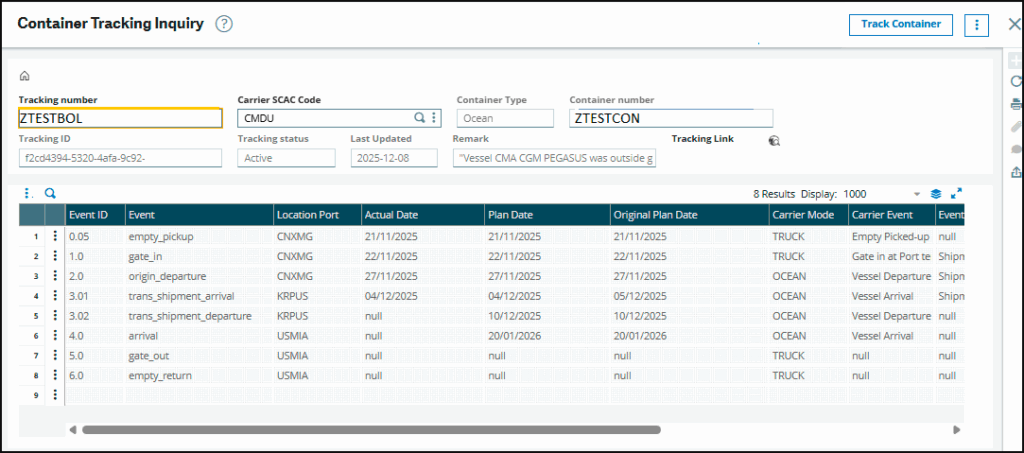
- Dedicated Tracking Inquiry Screen – A dedicated inquiry screen in Sage X3 displays container tracking events and shipment milestones, including departures, arrivals, transshipments, customs clearance, and gate movements.
- Event-Based Tracking – Container status updates are received as events from an external tracking platform and processed automatically, ensuring Sage X3 reflects the latest shipment progress.
- Updated ETAs and Status Remarks – Estimated arrival dates update automatically from tracking data, while short status remarks provide clarity on delays, changes, and overall shipment progress.
- Container and Vessel-Level Visibility – Track container and vessel movements together to gain a complete view of shipment progress across multiple legs of the import journey.
- Visibility Across Purchase Lines – Since containers are linked to purchase lines, teams can easily understand which goods are affected by shipment delays or early arrivals.
- In-Transit Port Tracking – It enables real-time visibility into containers while they are moving between the port of origin and the destination port. Within Sage X3, this ensures shipment status is continuously updated based on live port and carrier data, helping teams proactively manage delays, exceptions, and delivery timelines.
- Greytrix-Built and Supported – Designed and supported by Greytrix, this feature aligns with real Sage X3 import workflows and existing container management setups.
Complementing Existing Container Management in Sage X3
It’s important to understand that this enhancement works alongside Sage X3’s standard container management module.
The existing container management functionality focuses on costing, duties, accounting entries, and ownership transfer. The Container Tracking Inquiry focuses on movement, timelines, and shipment status.
Both operate together within Sage X3, without changing existing costing or accounting processes.
For a detailed explanation of how Sage X3 helps with container management, you can refer to our earlier blog on the Container Management module in Sage X3.
To clarify how these capabilities differ, the table below highlights the distinction between standard container management in Sage X3 and the Container Tracking Inquiry by Greytrix.
| Aspect | Standard Container Management in Sage X3 | Container Tracking Inquiry |
| Primary focus | Costing and accounting | Shipment visibility |
| Container updates | Manual | Automated via tracking events |
| ETA management | Calculated and manually updated | Continuously updated |
| Vessel information | User-maintained | Auto-created or updated |
| Purchase lines visibility | Cost-focused | Shipment status-focused |
| Role in shipments management | Financial control | Operational visibility |
How the Container Tracking Inquiry Works in Sage X3
Behind the scenes, several technical enhancements—leveraging the Master Container Tracking API—ensure that container-tracking data in Sage X3 remains accurate, consistent, and up to date.
- Background event processing:
Tracking updates from the external platform are processed automatically at scheduled intervals, keeping container statuses and ETAs current without manual effort. - Direct tracking access:
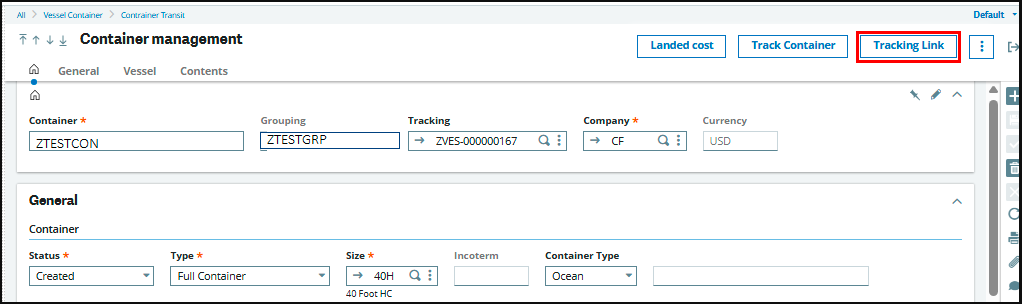
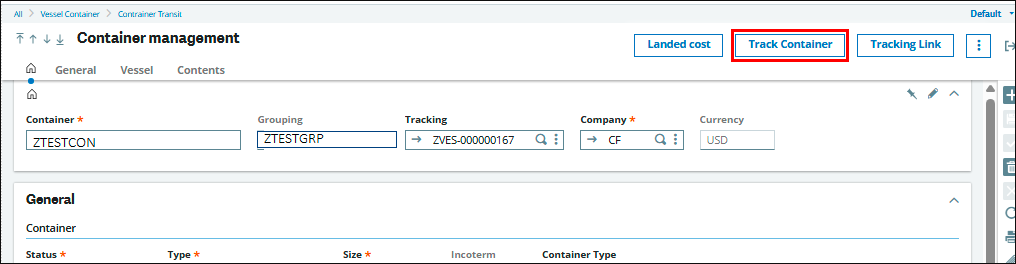
A tracking link on the container screen allows users to open live container tracking details from the external platform when deeper visibility is needed. - Container tracking inquiry screen:
A dedicated inquiry screen displays all container events, shipment status, and remarks in one place for quick review.
Conclusion
Sage X3 provides a strong foundation for container management and cost control. By adding real-time tracking visibility, the Container Tracking Inquiry brings timely, actionable shipment data into that foundation.
Built and supported by Greytrix, a long-standing Sage development partner with deep Sage X3 expertise, this solution reflects proven delivery experience across integrations, customizations, and enterprise-scale ERP implementations.
Together, these capabilities help businesses manage imports with greater clarity, control, and confidence, positioning Sage X3 not just as a system of record but as a system of visibility for modern shipments management.
About Us
Greytrix – a globally recognized and one of the oldest Sage Development Partners is a one-stop solution provider for Sage ERP and Sage CRM organizational needs. Being acknowledged and rewarded for multi-man years of experience and expertise, we bring complete end-to-end assistance for your technical consultations, product customizations, data migration, system integrations, third-party add-on development, and implementation competence.
Greytrix has some unique integration solutions developed for Sage CRM with Sage ERPs namely Sage X3, Sage Intacct, Sage 100, Sage 500, and Sage 300. We also offer best-in-class Sage ERP and Sage CRM customization and development services to Business Partners, End Users, and Sage PSG worldwide. Greytrix helps in the migration of Sage CRM from Salesforce | ACT! | SalesLogix | Goldmine | Sugar CRM | Maximizer. Our Sage CRM Product Suite includes addons like Greytrix Business Manager, Sage CRM Project Manager, Sage CRM Resource Planner, Sage CRM Contract Manager, Sage CRM Event Manager, Sage CRM Budget Planner, Gmail Integration, Sage CRM Mobile Service Signature, Sage CRM CTI Framework.
Greytrix is a recognized Sage Champion Partner for GUMU™ Sage X3 – Sage CRM integration listed on Sage Marketplace and Sage CRM – Sage Intacct integration listed on Sage Intacct Marketplace. The GUMU™ Cloud framework by Greytrix forms the backbone of cloud integrations that are managed in real-time for the processing and execution of application programs at the click of a button.
For more information on our integration solutions, please contact us at sage@greytrix.com. We will be glad to assist you.