
With the upcoming holiday season, higher order demand creates opportunities for manufacturers and distributors. The CNBC/NRF Retail Monitor reported that US holiday sales grew 4.1% year over year from November 1 to December 31, 2025, highlighting the scale of the previous holiday shopping season.
For manufacturers and distributors, meeting seasonal demand means more than having products ready to ship. They must manage extra packages, compare carrier rates, prepare labels, track deliveries, and handle returns—without adding manual work or making shipment information harder to access.
The best time to prepare is before order volumes rise. Review shipping workflows, verify packaging data, compare carrier rates, and test dispatch processes to identify potential bottlenecks. GUMU™ ShipEazy by Greytrix connects key shipping activities to Sage X3 ERP, letting teams use existing delivery information for rate comparison, label generation, and shipment tracking.
What Makes Holiday Shipping Harder to Manage?
Three operational challenges deserve attention before the holiday season.
- Growing order volumes: More shipments can put pressure on packing stations, dispatch teams, carrier pickups, and the people responsible for resolving shipping exceptions. Tasks that are manageable during normal operations can become bottlenecks when many orders must leave within the same pickup window.
- Shipping costs and packaging decisions: Carrier rates are only one part of the shipping cost. Package dimensions, shipment weight, service level, and seasonal charges can also affect the final amount. Incorrect packaging data or inconsistent carton selection can create additional costs.
- Limited shipment visibility: Customer service and operations teams need accessible tracking information to answer delivery questions and investigate delays. If shipment updates are scattered across carrier portals, spreadsheets, and emails, responding can require unnecessary manual effort.
These challenges will vary by business, shipment profile, and carrier mix. The goal is to identify where your current process is most likely to come under pressure and prepare for those specific gaps.
5 Ways to Prepare Your Shipping Operations for Holiday Rush
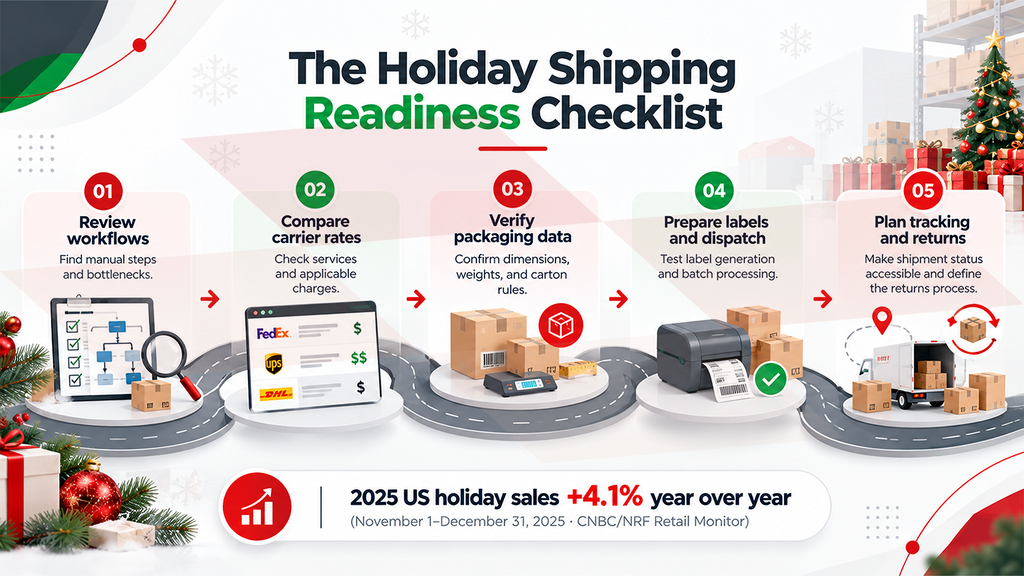
Preparing for the holiday rush means making sure your shipping process can handle increased demand without adding unnecessary manual work or avoidable costs. These five steps can help you identify gaps and prepare your team before order volumes rise.
- Review shipping workflows before order volumes rise
Map the process from order receipt to carrier pickup. Identify where staff manually enter addresses, confirm package details, choose carriers, create labels, or update shipment records.
Review previous peak-season bottlenecks and confirm that carrier accounts, shipping supplies, pickup schedules, and staff responsibilities are ready. Prioritize steps that regularly cause delays or require duplicate data entry.
- Compare carrier rates before confirming shipments
The lowest base rate does not always mean the lowest total shipping cost. Compare available carrier and service options against package characteristics, delivery requirements, applicable charges, and cutoff dates.
Review carrier agreements and peak-season pricing before finalizing your shipping plan. A service that works well for one shipment may not be the best choice for another, particularly when delivery deadlines or package dimensions differ.
- Standardize packaging decisions and verify weights
Review product dimensions, item weights, carton specifications, and special packing requirements. Establish consistent rules for choosing cartons and handling products that need separate packaging or temperature protection.
Accurate packaging information supports more reliable rate calculations and shipping labels. It also helps teams avoid preventable repacking and inconsistencies between estimated and actual shipment details.
- Simplify label generation and dispatch preparation
Check how labels and shipping documents are created today. Manual entry adds work and increases the chance of incorrect shipment details, especially when you must dispatch multiple orders together.
Test label generation, required documentation, and batch-processing workflows before peak demand. Confirm that each process works for the carriers, service levels, and package types your business uses.
- Make shipment tracking easier to access
Ensure teams can find tracking numbers and shipment status from the relevant order or ERP record. Decide who will monitor exceptions, investigate delays, and communicate updates to customers.
Prepare return-label processes as well. Post-holiday returns can create another wave of work, so define how returns will be authorized, received, inspected, and processed instead of treating them as an afterthought.
How GUMU™ ShipEazy Supports Shipping Automation Inside Sage X3
Handling shipping tasks across disconnected systems adds manual work when teams need to focus on getting orders out on time.
GUMU™ ShipEazy by Greytrix connects key shipping activities to Sage X3, supporting carrier rate comparison, Auto Packaging, label generation, and shipment tracking within Sage X3 and the shipping workflow.
The table below shows what these capabilities do and which manual tasks or disconnected processes they can help reduce.
| ShipEazy feature | What it helps with | Reduces the need for |
| Multi-Carrier Integration | Manage supported carriers within Sage X3 | Separate carrier portals |
| Rate Shopping | Compare carrier rates and service options | Manual rate comparisons |
| Auto Packaging | Select suitable cartons and calculate package weights | Manual packing decisions and weight calculations |
| Shipping Labels | Generate both onboarding and return-related labels through the shipping workflow | Repeated data entry and manual label creation |
| Shipment Tracking | Access tracking details linked to Sage X3 records | Searching across portals and spreadsheets |
| Batch Processing | Process multiple eligible deliveries together | Handling each delivery individually |
| Shipping Documents | Prepare relevant shipping documents | Repetitive paperwork |
| LTL Shipping | Support less-than-truckload shipping workflows | Managing freight tasks separately |
| Hazmat & DG Support | Support applicable shipping workflows and documentation | Repeated manual preparation of shipment details |
The value lies in bringing these activities together. Instead of treating rate selection, packaging, dispatch, and tracking as separate tasks, businesses can manage key parts of the shipping process within their Sage X3 environment. The benefits depend on existing workflows, data quality, carrier configurations, and shipment requirements.
Is There Still Time to Prepare Before the Holiday Rush?
Businesses considering a shipping workflow improvement should assess implementation readiness as soon as possible. The project scope, current Sage X3 environment, carrier-account setup, data quality, and testing requirements all affect the timeline.
ShipEazy implementation and testing can take as little as 2–3 weeks, depending on project requirements and readiness. This is not a guaranteed timeline for every business. Discuss your current shipping process, integration requirements, and target go-live date with the Greytrix consultation team to determine what is realistic for your environment.
Choosing a shipping solution means considering both its features and how well it fits your ERP environment and processes. Greytrix brings more than two decades of ERP experience and Sage X3 expertise to ShipEazy, combining product knowledge with implementation and integration experience. As a Sage Gold Development Partner, Greytrix combines product, implementation, and integration knowledge to assess requirements, configure capabilities, and support a smoother transition.
Manufacturers and distributors should assess shipping automation against real operational needs—rate comparison, Auto Packaging, labels, and tracking—rather than treating it as a separate process.
Frequently Asked Questions
1. How can businesses prepare for holiday shipping demand?
Review order-to-dispatch workflows, compare carrier rates, verify product and packaging data, test label and documentation processes, and make tracking information accessible before order volumes increase.
2. How can shipping automation help manage peak-season orders?
Shipping automation can reduce repetitive data entry and connect carrier selection, packaging, labels, and tracking with the ERP workflow. Its value depends on accurate data, suitable carrier configurations, and how the business currently processes shipments.
3. What should Sage X3 users look for in a shipping solution?
Assess whether the solution supports the carriers and shipment types you use, compares rates against delivery requirements, handles your packaging rules, generates the required labels and documents, and makes tracking information accessible in Sage X3. Testing should cover real shipment scenarios and exceptions.
4. How long does ShipEazy implementation and testing take?
Implementation and testing can take as little as 2–3 weeks when project requirements and readiness support that timeline. The actual duration depends on the Sage X3 environment, carrier setup, integration scope, and testing needs.
Make Room for the Holiday Rush
Holiday demand creates an opportunity, but fulfilling more orders also puts pressure on packing, carrier selection, dispatch, and shipment tracking. Preparing early gives your team time to review these workflows, verify product and packaging data, compare available carrier services, and test shipping processes before order volumes rise.
For businesses using Sage X3, GUMU™ ShipEazy by Greytrix connects key shipping activities with the ERP workflow, helping teams manage carrier rate comparison, Auto Packaging, label generation, and tracking without relying entirely on disconnected processes..
Planning for the holiday rush? Book a ShipEazy readiness call with Greytrix to discuss your shipping requirements, Sage X3 environment, and implementation timeline.
About Us
Greytrix – a globally recognized and one of the oldest Sage Development Partners is a one-stop solution provider for Sage ERP and Sage CRM organizational needs. Being acknowledged and rewarded for multi-man years of experience and expertise, we bring complete end-to-end assistance for your technical consultations, product customizations, data migration, system integrations, third-party add-on development, and implementation competence.
Greytrix has some unique integration solutions developed for Sage CRM with Sage ERPs namely Sage X3, Sage Intacct, Sage 100, Sage 500, and Sage 300. We also offer best-in-class Sage ERP and Sage CRM customization and development services to Business Partners, End Users, and Sage PSG worldwide. Greytrix helps in the migration of Sage CRM from Salesforce | ACT! | SalesLogix | Goldmine | Sugar CRM | Maximizer. Our Sage CRM Product Suite includes addons like Greytrix Business Manager, Sage CRM Project Manager, Sage CRM Resource Planner, Sage CRM Contract Manager, Sage CRM Event Manager, Sage CRM Budget Planner, Gmail Integration, Sage CRM Mobile Service Signature, Sage CRM CTI Framework.
Greytrix is a recognized Sage Champion Partner for GUMU™ Sage X3 – Sage CRM integration listed on Sage Marketplace and Sage CRM – Sage Intacct integration listed on Sage Intacct Marketplace. The GUMU™ Cloud framework by Greytrix forms the backbone of cloud integrations that are managed in real-time for the processing and execution of application programs at the click of a button.
For more information on our integration solutions, please contact us at sage@greytrix.com. We will be glad to assist you.